Sketchup doesn't recognize click wheel zoom on new mouse????
-
I just bought a new HP optical 4 button ergo mouse for my win xp desktop (old gateway, for some reason, while SU will let me orbit while holding in the click wheel, it doesn't zoom when scrolling? the mouse works fine in other programs like firefox...any ideas????
[Planner Dude]
-
I have a Logitech that came with an installation pack. I found out that when I use its installed program, it won't do what it would be supposed to in SU but when I quit the driver program, it works fine.
Maybe try to switch it off too and see how it works for you.
-
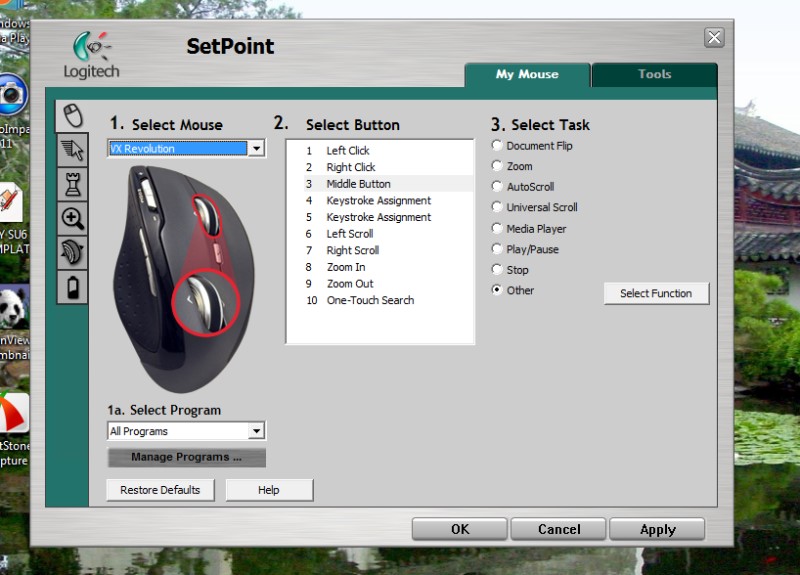
By default both MS and Logitech set the wheel to 'Auto Scroll'/'Universal Scroll'.
You need to change it in the control panel to 'Middle Button' -
did that fix it? planner dooood?
-
@planner dude said:
I just bought a new HP optical 4 button ergo mouse for my win xp desktop (old gateway, for some reason, while SU will let me orbit while holding in the click wheel, it doesn't zoom when scrolling? the mouse works fine in other programs like firefox...any ideas????
Interesting Planner Dude, I have the oposite problem where the click wheel will zoom, but not orbit or pan! Did you fix the problem by installing the mouse software?
I have a Logitech wireless Bluetooth mouse.
Cheers.
[ACZero]
-
For the logitech mouse, you need to set the scroll wheel button to 3 (there is no middle option). At least, that what worked for my bluetooth one.
-
After a lot of screwing around I found that 'middle button' solved the problem with my Logitech mouse.
BTW, I can recommend the Logitech VX Revolution for laptop use. Wireless, with a USB receiver that fits into the back of the mouse for travelling and a couple of extra thumb buttons that I find essential for AutoCad work.
[From memory, highlight the scroll button and then 'select function'.....a window with options appears with 'middle button' one of the options. all a bit counter intuitive, until you work it out]
Stu



Hello! It looks like you're interested in this conversation, but you don't have an account yet.
Getting fed up of having to scroll through the same posts each visit? When you register for an account, you'll always come back to exactly where you were before, and choose to be notified of new replies (either via email, or push notification). You'll also be able to save bookmarks and upvote posts to show your appreciation to other community members.
With your input, this post could be even better 💗
Register Login


Advertisement