Quantimo — quantity takeoff for SketchUp (alpha, looking for testers)
-
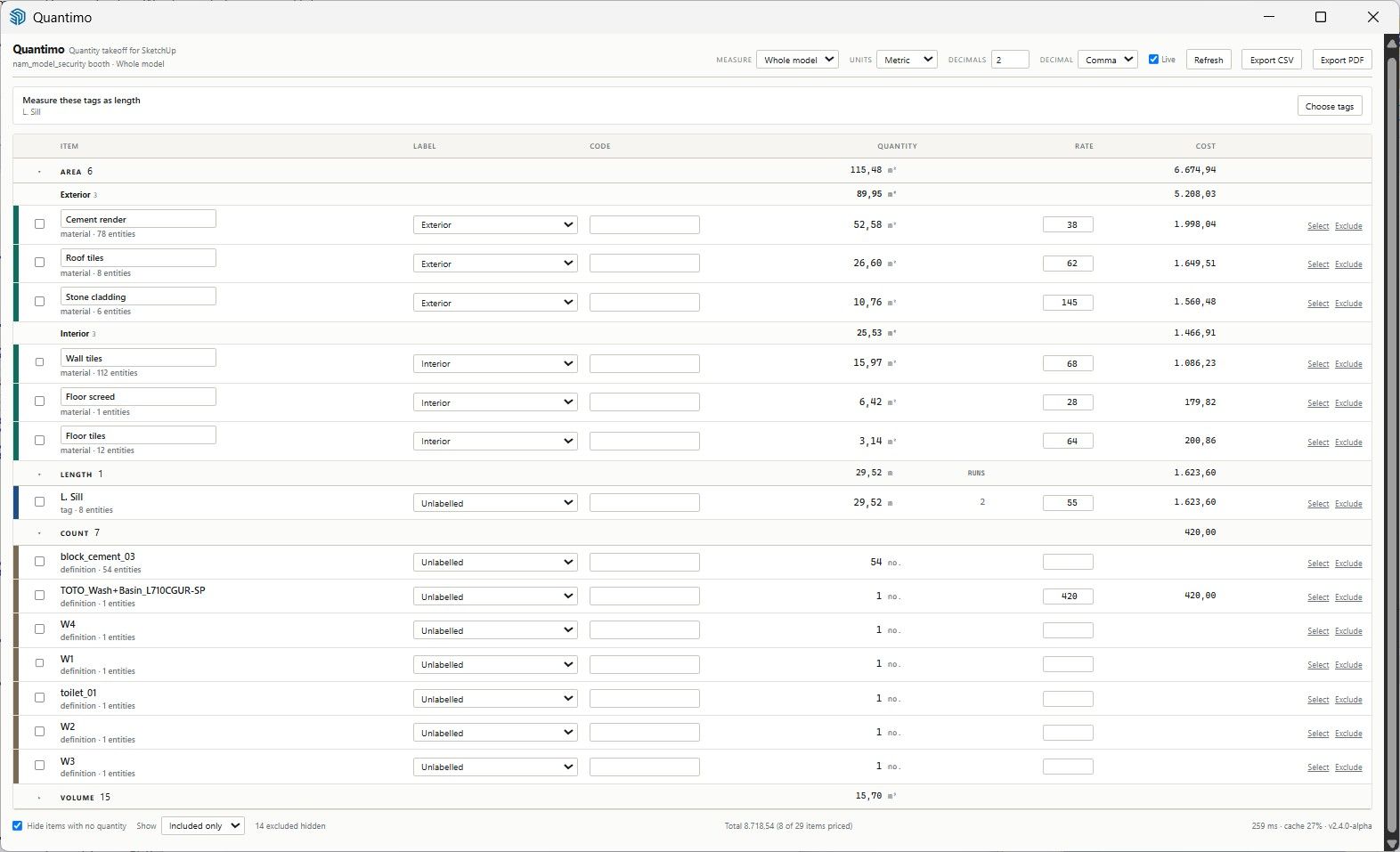
I'm an architect and I've been building a SketchUp extension for my own practice. It's at the point where it's useful to me, and I'd like to know whether it's useful to anyone else. Message me if you'd like to try it.
What it does
Quantimo reads your model and produces a takeoff table you can export. It measures four things:
Area by material — automatic, no setup. Faces with no material get their own row rather than quietly disappearing from the total.
Length from setting-out lines. Draw the run where the flashing or skirting goes, put it on its own tag, tick that tag. It also reports how many separate runs the length breaks into, which matters for laps, mitres and joints.
Volume of solids, classified by the tag on the group. If you tag your solids by material, they collect into one row per material rather than a list of "Group#149".
Counts of components, one row per definition, ignoring the sub-parts inside them.
You can label rows to group them (Exterior, Interior, whatever suits), add your own classification codes, and exclude anything you don't want counted. The table updates as you model, and there's a pause switch for when that gets expensive.
What it deliberately doesn't do
It doesn't try to be an estimating package. There's a single rate field per row for a rough feel while designing, but no currencies, no VAT, no waste factors, no labour splits. The idea is that SketchUp is the only place your geometry exists, so the extension should be excellent at extracting numbers and get out of the way — the actual pricing happens in Excel or in whatever takeoff software you already use.
The CSV is built to be depended on: every row carries a key that survives renaming and remodelling, so a second export updates your spreadsheet rather than forcing you to rebuild it. There's a PDF report too.
Fair warning
It's an alpha. Please test on a copy of your model. It's been used on a handful of models by one person, on Windows — it should work on Mac, but nobody has tried yet. It writes small amounts of its own data into your model file (labels, codes, exclusions), and the name fields in the table rename the actual materials in your model.
I'm mainly after: where the numbers don't match what you expected, what you couldn't work out how to do, and anything it did to your model that you didn't intend. Different modelling conventions from mine are especially useful — it assumes tags go on groups, and it'll show its assumptions the moment someone works differently.
Here is the .rbz and a short manual: https://drive.google.com/drive/folders/1_MrfYIizEqeP1qqLxHIrgP8u8S6FVV0F?usp=sharing -
Nobody willing to give it a quick spin?
Hello! It looks like you're interested in this conversation, but you don't have an account yet.
Getting fed up of having to scroll through the same posts each visit? When you register for an account, you'll always come back to exactly where you were before, and choose to be notified of new replies (either via email, or push notification). You'll also be able to save bookmarks and upvote posts to show your appreciation to other community members.
With your input, this post could be even better 💗
Register Login


Advertisement