sketchucation logo sketchucation
    • Login
    Oops, your profile's looking a bit empty! To help us tailor your experience, please fill in key details like your SketchUp version, skill level, operating system, and more. Update and save your info on your profile page today!
    šŸ”Œ Smart Spline | Fluid way to handle splines for furniture design and complex structures. Download

    [Plugin] GKWare Cabinet Maker

    Scheduled Pinned Locked Moved Plugins
    627 Posts 69 Posters 443.5k Views 70 Watching
    Loading More Posts
    • Oldest to Newest
    • Newest to Oldest
    • Most Votes
    Reply
    • Reply as topic
    Log in to reply
    This topic has been deleted. Only users with topic management privileges can see it.
    • G Offline
      Garry K
      last edited by

      If you convert the outermost group into a component then CabMaker can still edit the Cabinet. There are a number of parts that get resized on there way over to CutMaster - but do not have the finished size in CabMaker. This includes drawer box parts, 5 piece door parts sides where cabinet makers want to let the side into a dado in frames etc.

      1 Reply Last reply Reply Quote 0
      • A Offline
        andrewmo
        last edited by

        @andrewmo said:

        Also, I think I've either found a bug or just don't know how to do it but I can't seem to figure out how to get fronts to display on pullout shelves. The controls are on the form and the documentation seems to indicate that faces are supported, but nothing I do shows these extra panels on the front of a pullout.

        For reference, I figured out that adding finished fronts to pullout shelves is part of the "drawer system" feature defined on the Drawers tab. If you enable "Use Drawer System" on the project tab, then the options on the bottom of the Drawers tab are in effect. The downside of this is that it, seems to, disable the Drawer Boxes and Pullouts options on the Rules 2 tab. It could still be my lack of knowledge of the software, but it seems like you can't get both finished fronts and dado'd drawer bottoms at the same time.

        I'm new to using undermount drawer slides and I was trying to get this to model the setup and dimensions necessary for this configuration. It seems like the Drawer System would be a good fit for this because they come in standard sizes and with all the setbacks and adjustments within CabMaker, it seems like this might be possible, but I haven't yet been able to figure this out

        I'm still playing with this but I also haven't figured out how to show (and get the correct dimensions) for something like half blind dove tails or locking rabbit. This may just be too much detail for the drawer boxes but it was something I was playing with to try to get the drawing to exactly match the build in the shop as a reference.

        1 Reply Last reply Reply Quote 0
        • G Offline
          Garry K
          last edited by

          Skype me and I can show you what can and cannot be done.

          Garry

          1 Reply Last reply Reply Quote 0
          • G Offline
            Garry K
            last edited by

            Since Andrew did not get ahold of me, let's talk a bit about CabMaker and CutMaster.

            When you enable drawer system then Sketchup shows a simple box where the sides, tops and bottoms are equal height and the bottom is simply butted inside of the draw box frame. Please note that the drawer system is colored magenta and the original drawer system has a number of parameters that are magenta. These are the only parameters that are used by drawer system.

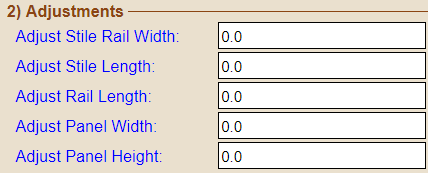
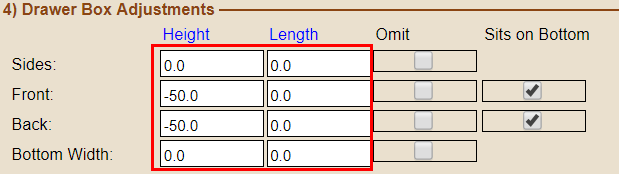
            All the drawer system magic happens in Cutmaster. Mortise and Tenon joints, dadoes drilling, hook holes, pockets etc. CabMaker Design is ONLY for designers and architects. Cabinet makers and manufacturing need CabMaker Build. There are a number of parameters where the label in blue text has a mouse over hint that states clearly. "This setting is only used by reports". This includes drawer part adjustments, 5 piece door adjustments etc. Adjusted part sizes show up in Part_List_2 csv files.

            Here are a couple of areas that have adjustments.
            drawer_adjustments.png
            Drawer Adjustments

            door_adjustments.png
            Door Adjustments

            I originally made use of components exclusively in CabMaker. When you created a medium size kitchen and then look at Components tab in the tray Sketchup would appear locked up and often take minutes as it created hundreds and hundreds of images for use in the Components tab. This was un acceptable so I went through the exercise of changing my code to make Groups instead of Components. The results were infinitely better as it became instant. A much appreciated side effect was the skp file dropped significantly in size since there weren't hundreds and hundreds of images stored in the skp file.

            Anyway - I have no intention of going back to components for cabinet parts - been there - done that.

            1 Reply Last reply Reply Quote 0
            • G Offline
              Garry K
              last edited by

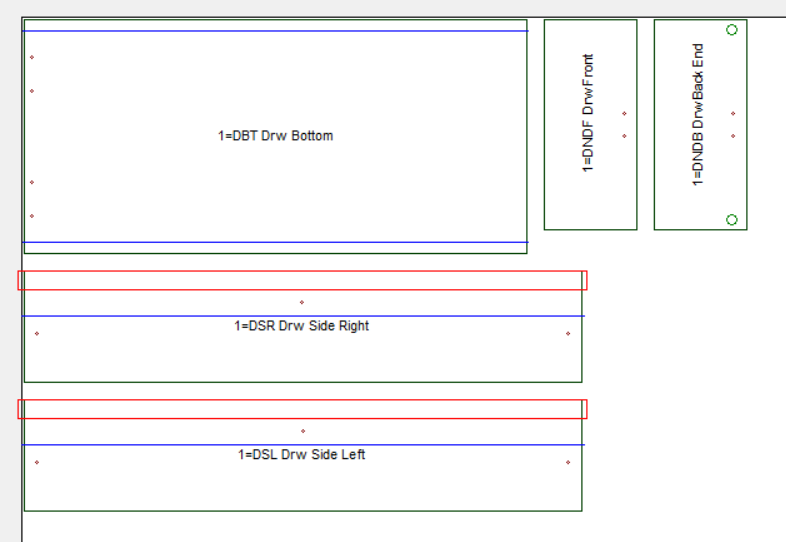
              There are essentially hundreds of different drawer box combinations. Architects and Designers usually aren't interested in the complexity of the permutations and combinations. So this is why cutmaster handles the drawer system construction details.

              Here are just a few of the machining details that are used for this drawer construction.

              Hook Holes on the back for undermount slides
              screw holes on bottom for front clip
              grooving on sides to allow 18 mm material to make use of 16 mm hardware.

              The list goes on.

              drawer_parts.png

              1 Reply Last reply Reply Quote 0
              • G Offline
                Garry K
                last edited by

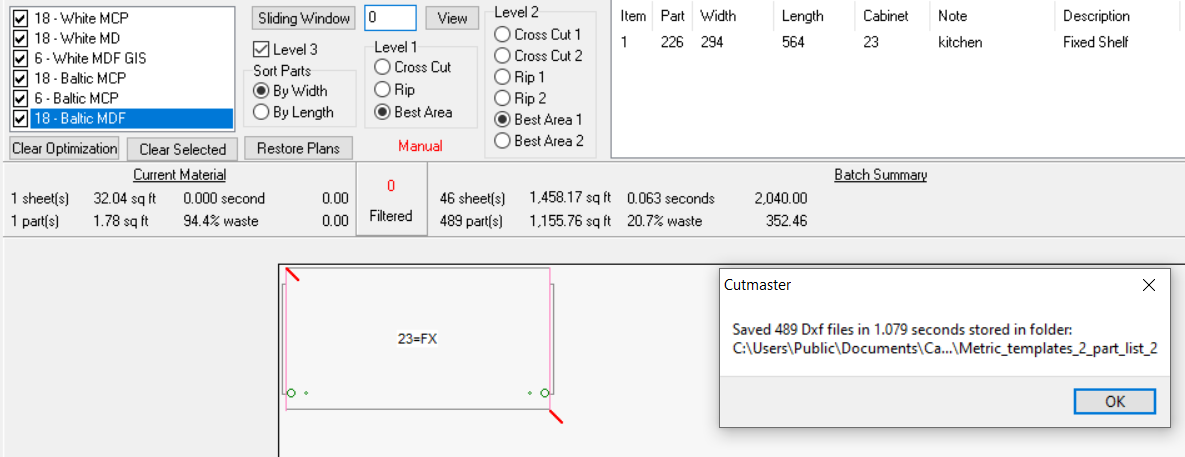
                Here we have a fixed shelf displayed that is using blind mortise and tenon along with rafix connector (the cabinet maker calls it his 2 bit clamp)

                The Dxf routines come from simple DXF which creates cut down versions of DXF files. Here we have 32 cabinets in a kitchen with 489 parts and here I chose individual DXF files 1 per part. The DXF files were created in under 1.1 seconds on a 5 year old computer. All the DXF files combined take up 2.2 megabytes of space.
                Dxf Export.png

                1 Reply Last reply Reply Quote 0
                • M Offline
                  MySchizoBuddy
                  last edited by

                  Does CabMaker work with Opencutlist extension for sketchup?
                  why is garry not posting any youtube videos.
                  Whats new in V8

                  1 Reply Last reply Reply Quote 0
                  • G Offline
                    Garry K
                    last edited by

                    Contact me directly through CabMaker32 website

                    Link Preview Image
                    Contact | CabMaker32Contact – CabMaker32

                    favicon

                    (cabmaker32.com)

                    1 Reply Last reply Reply Quote 0
                    • D Offline
                      dee_andz
                      last edited by

                      Hi Garry, I recently purchased license and I think I need a manual update to my username "andy". I already emailed to you with thereference of purchase and also my username.
                      Thank you

                      1 Reply Last reply Reply Quote 0
                      • J Offline
                        JAKnep Newcomers
                        last edited by

                        Any Update on the license issue? Trial Ended syndrome. Tried several attempts contacting thru CabMaker32.com. Health OK?

                        1 Reply Last reply Reply Quote 0
                        • 1
                        • 2
                        • 28
                        • 29
                        • 30
                        • 31
                        • 32
                        • 32 / 32
                        • First post
                          Last post
                        Buy SketchPlus
                        Buy SUbD
                        Buy WrapR
                        Buy eBook
                        Buy Modelur
                        Buy Vertex Tools
                        Buy SketchCuisine
                        Buy FormFonts

                        Advertisement