Layout hiding rest of drawing when editing a inside a group
-
Hi, I have now switched from Sketchup Pro Classic 2020 to the 23 subscription version. (still not sure whether this was a great idea). I have had a fair few teething problems with my workflow since.
My Biggest issue is:
Layout is hiding the rest of the drawing when I am editing inside a group...
is there a setting or ON/OFF toggle for this feature? I need to see what I am drawing over!I also find it annoying that when I select items they become invisible whilst dragging them... this does not help but actually hinders aligning things accurately. Again can this be de-activated?
Can anybody give me a hint...how to get this back on track?
-
@davidmreinbold said:
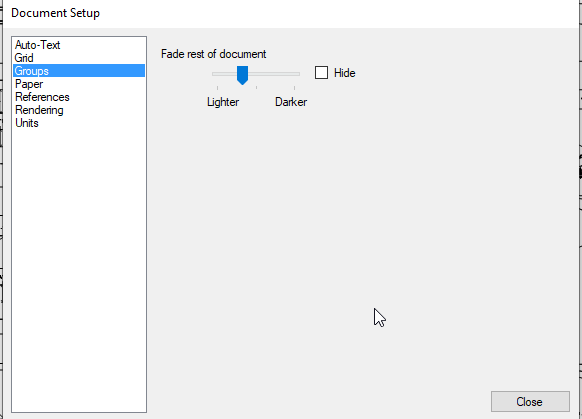
Layout is hiding the rest of the drawing when I am editing inside a group...
is there a setting or ON/OFF toggle for this feature? I need to see what I am drawing over!Yes. There is a setting for that in Document Setup.
@davidmreinbold said:
I also find it annoying that when I select items they become invisible whilst dragging them... this does not help but actually hinders aligning things accurately. Again can this be de-activated?
This cannot be deeactivated. It was done several versions back to make it easier to move selections. It used to be that your graphics card was forced to redraw the selection multiple times while the selection is being moved. This often resulted in very sluggish behavior and difficulty moving entities with precision. You should find that improved now. Use the little blue gizmo to help you move the selection where you want it to go.
-
Thanks a lot Dave R. you saved the day...
Cheers
Dave R.


Hello! It looks like you're interested in this conversation, but you don't have an account yet.
Getting fed up of having to scroll through the same posts each visit? When you register for an account, you'll always come back to exactly where you were before, and choose to be notified of new replies (either via email, or push notification). You'll also be able to save bookmarks and upvote posts to show your appreciation to other community members.
With your input, this post could be even better 💗
Register Login


Advertisement