Screens in windows
-
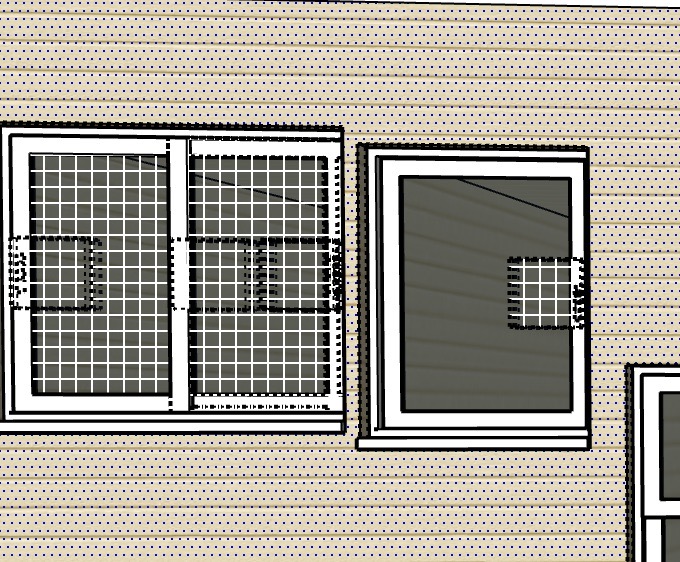
Can you help me figure out why the windows and doors are showing up with these screens in them?
-
Looks like you have hidden object in those locations and have View/Hidden Geometry or Hidden Objects turned on.
-
lol - yes, exactly. Thank you!!
-
You can open the WallCutter options window (Blue C icon on the toolbar) and set the cut depth for the specific component to 1.
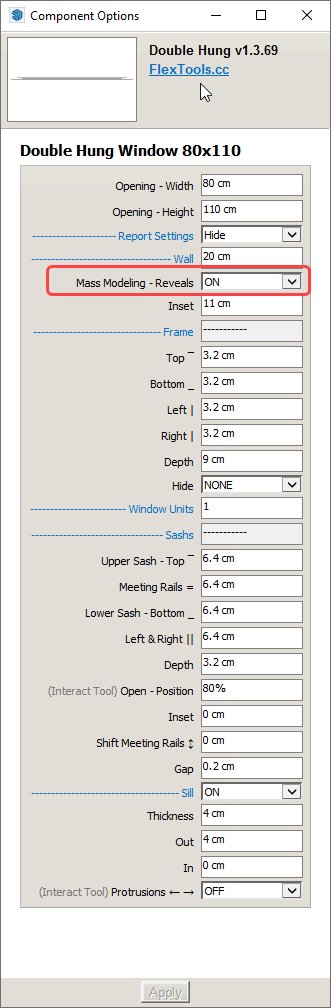
If you are doing Mass Modeling (single face walls) you may also want to turn on the window or door's 'Mass Modeling - Reveals' setting. This will add the "fake" inner reveals of the wall to make it look thicker. You can also play around with the 'Inset' setting to move the window in and out in relation to the face it was placed on.
Generally, I'd recommend to have the walls enclosed in a component or in a group. And place the wall cutting components outside of the wall component/group.


Hello! It looks like you're interested in this conversation, but you don't have an account yet.
Getting fed up of having to scroll through the same posts each visit? When you register for an account, you'll always come back to exactly where you were before, and choose to be notified of new replies (either via email, or push notification). You'll also be able to save bookmarks and upvote posts to show your appreciation to other community members.
With your input, this post could be even better 💗
Register Login


Advertisement