Getting group's dimensions
-
Hello,
I'm new here and I need help for my project. I try to get width, height and depth of my selected entities.
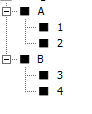
For example, this is my project's hierarchy:model = Sketchup.active_model selection = model.selection selection.each do |entity| UI.messagebox(entity.name) entity.entities.each do |sub_entity| UI.messagebox(sub_entity.name) end endWith this code, if I select A, I get the group A, 1 and 2. Now I'd like to get each group's dimensions. I tried this:
model = Sketchup.active_model
selection = model.selection

selection.each do |entity|
  bb1 = Geom;;BoundingBox.new
  bb1.add(entity.bounds)
  UI.messagebox("Name; #{entity.name}\nWidth; #{bb1.width}\nHeight; #{bb1.height}\nDepth; #{bb1.depth}")
  entity.entities.each do |sub_entity|
    bb2 = Geom;;BoundingBox.new
    bb2.add(sub_entity.bounds)
    UI.messagebox("Name; #{sub_entity.name}\nWidth; #{bb2.width}\nHeight; #{bb2.height}\nDepth; #{bb2.depth}")
    bb2.clear
  end
  bb1.clear
end
If I select the A group I get the right values for A but not for its subgroups 1 and 2.
If I select the subgroup 1, I get the right values for the subgroup 1.If you can explain me why I get this, or tell me how to get what i want. I would appreciate.

-
Your code looks workmanlike.
When I create a set of nested groups as you propose I get the results I'd expect ??What is 'wrong' with your results ?
-
Thanks for your answer. I will try to explain.
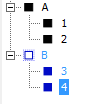
I made this:
-group B size is 15126,
-group 3 size is 15123,
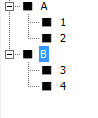
-group 4 size is 15123If my selection is B like this:
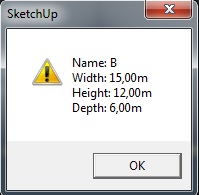
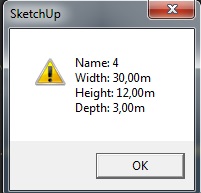
I get this results (which are right only for group B):
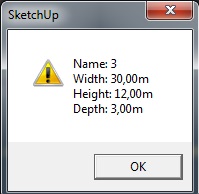
As you can see, for group 3 and 4 the width is not correct.
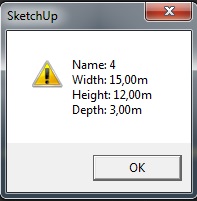
But if my selection is 4 for example:I get right results for group 4:
Usually, how do you get the size of all groups in a model ?
-
Just how did you create 3 and 4 inside of B?
If I create 3 and 4, stack them, then group them to create B, your code works as expected.
-
Hi,
Effectively, I tried as you said and it works.
I will ask my internship supervisor how he created his groups.Do you know if people get group's dimension like I did or if they use another way ?
-
@sweek said:
Do you know if people get group's dimension like I did or if they use another way ?
Be aware that bounds dimensions of the container 'B' can and do change when rotated. The sub_groups, 3 and 4, are unaffected. Creating a new bounding box isn't necessary. It will be the same as the entities bounds. Use .local_bounds for the container, which gives you the initial dimensions, then use the x,y and z scales from the transformation to give you the current size.
model = Sketchup.active_model selection = model.selection selection.each do |entity| bb1=entity.local_bounds; tr1=entity.transformation UI.messagebox("Name; #{entity.name}\nWidth; #{bb1.width*tr1.xscale}\nHeight; #{bb1.height*tr1.yscale}\nDepth; #{bb1.depth*tr1.zscale}") entity.entities.each do |sub_entity| bb2=sub_entity.bounds UI.messagebox("Name; #{sub_entity.name}\nWidth; #{bb2.width}\nHeight; #{bb2.height}\nDepth; #{bb2.depth}") end end -
Thank you, I will work on this.


Hello! It looks like you're interested in this conversation, but you don't have an account yet.
Getting fed up of having to scroll through the same posts each visit? When you register for an account, you'll always come back to exactly where you were before, and choose to be notified of new replies (either via email, or push notification). You'll also be able to save bookmarks and upvote posts to show your appreciation to other community members.
With your input, this post could be even better 💗
Register Login


Advertisement