Arranging Toolbars in Sketchup for Mac
-
Hi,
did anyone yet find a trick to have toolbars in the mac version of sketchup arranged in a more usable way than they work out of the box? These flying toolbars that don't care about your window size are annoying.


I thought there might be a way that i just didn't find so far...
Thanks,
Frank -
Hi,
I have tried most the 'toolbar builders' plugins, and written some of my own, but they all just add complexity.
What I do now is 'nearly always' start SU with plugins 'disabled' and add sets of 'plugins', based on what I'm doing, with a modified version of Fredo's 'additional folders' ruby.
I have my 'Save as Default' Template set with a 60 pixel margin where I can 'Park' toolbars.
Also, I use lots of key shortcuts for my main tools, and Customise(by right-click) the top toolbar with useful SU tools that I don't use with shortcuts.
I would like to be able to add 'tool button sets' to the same windowing system used for 'Entity Info', 'Styles', etc... but that's a Trimble thing.
john
-
I assume that was maybe a design decision (due to multi document interface). I understand it can be very annoying with many 1-button toolbars. Maybe you could group icons together using Custom Toolbars?
http://forums.sketchucation.com/viewtopic.php?t=10041
However the plugin provides only default buttons and users have to add buttons for other plugins by digging in the code (search forUI::Toolbarandadd_item). Unfortunately plugins do not easily expose their functionality to be implemented in alternative UIs, and SketchUp does not provide us programmatic access to all available tools.So there is a lot to whish and I am sure Trimble is willing to improve SketchUp. We only have to encourage the SketchUp team to do changes in the UI and convince them that the changes are good!
-
@driven said:
I have my 'Save as Default' Template set with a 60 pixel margin where I can 'Park' toolbars.
John,
How do you do that? All files, including my template fill the screen on opening. I just saved a Template with a particular window size, but it just fills the screen when I open.
Peter
-
@pbacot,
you choose 'New' to get your 'Template' the move the window across, after resizing the width, then
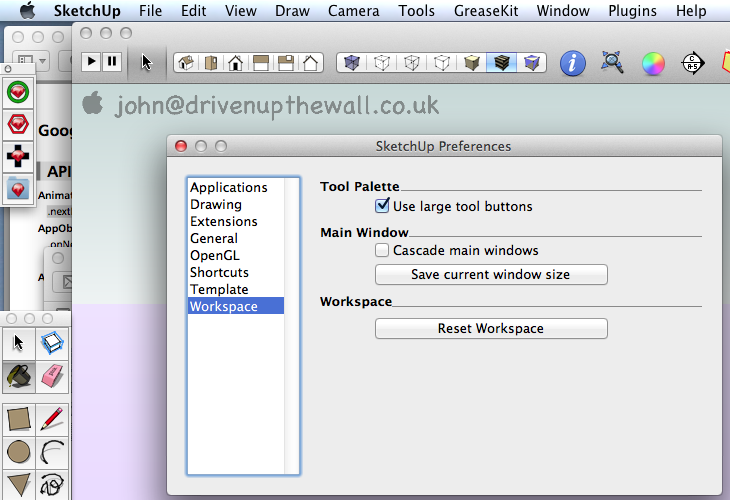
john -
Doh! I never look down that far! or haven't for ages...

Thanks! Peter
-
Has there been any headway made with the mac toolbar situation?
Has someone come up with a plugin that helps or is there now a way to group together the separate toolbars (the top custom toolbar line just isn't enough)


Hello! It looks like you're interested in this conversation, but you don't have an account yet.
Getting fed up of having to scroll through the same posts each visit? When you register for an account, you'll always come back to exactly where you were before, and choose to be notified of new replies (either via email, or push notification). You'll also be able to save bookmarks and upvote posts to show your appreciation to other community members.
With your input, this post could be even better 💗
Register Login


Advertisement