Layer Panel has diappeared
-
My layers panel has disappeared in layout 2017 and i cant get it back by clicking on window-layers nothing happens. Is there a reset? Anyone else having massive problems with this program, every upgrade seems to get glitchier and glitchier
[mod=Rich:1wox3uuz]Unshoutified post[/mod:1wox3uuz]
-
Is it hiding under your caps lock button....
couldn't resist.
Have you created a second tray and not just the Default tray. It could be opening on that. There should be a tab on the tray for more trays. -
I should say that I am using Layout 2017 on a mac, so the layers panel is normally floating on my second monitor. I don't think i have moved it into the edge of the monitor as that has happened before, but I can't see it anywhere. Is it possible to reset panels
-
Same here. Pages panel and some others missing. SU 2017 on a Mac.
I miss the "reset workspace" button of SketchUp... -
I have this happen from time to time...
I am using the app 'Moom' on my Mac to move / reset windows when I switch from 1-3 monitors.
You can also for LO to arrange the panels...
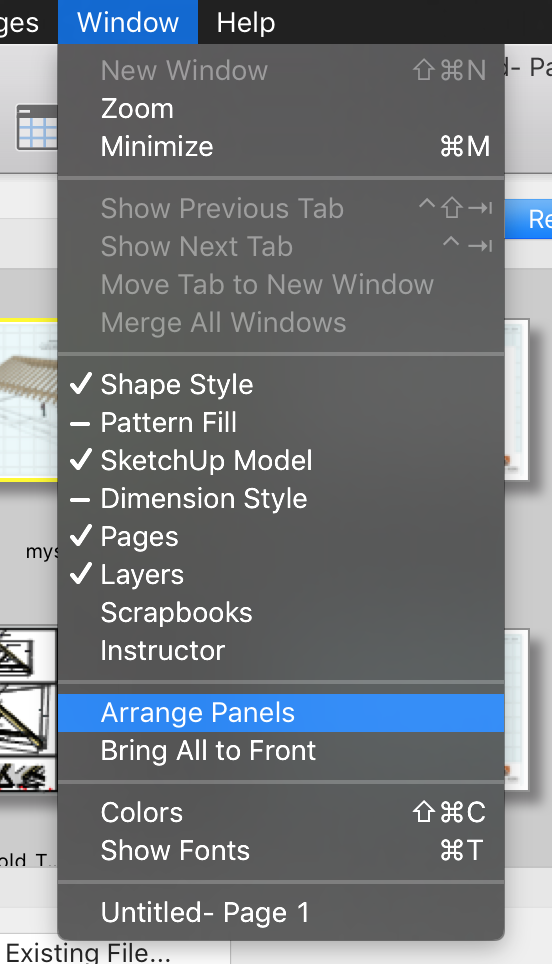
-
@wolfram said:
Same here. Pages panel and some others missing. SU 2017 on a Mac.
I miss the "reset workspace" button of SketchUp...It's still there...
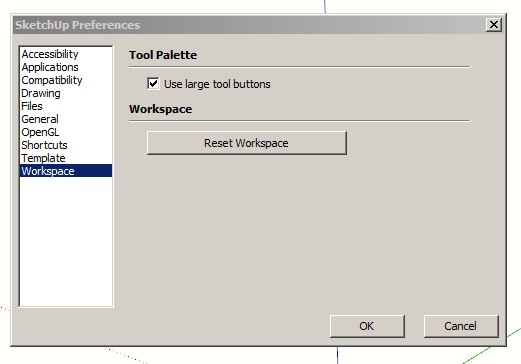
-
I've been having the same issue. My work around has been to collapse all other open trays and then toggle the green resize button - top left.



Hello! It looks like you're interested in this conversation, but you don't have an account yet.
Getting fed up of having to scroll through the same posts each visit? When you register for an account, you'll always come back to exactly where you were before, and choose to be notified of new replies (either via email, or push notification). You'll also be able to save bookmarks and upvote posts to show your appreciation to other community members.
With your input, this post could be even better 💗
Register Login


Advertisement