Help a novice fix mesh holes
-
Hey geniuses of the world, I could use a little help
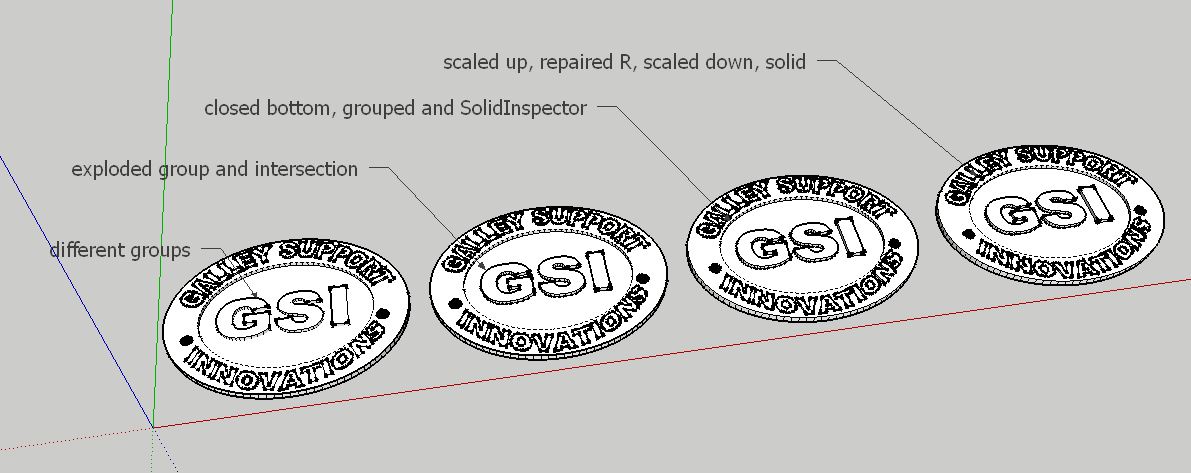
I'm VERY new to sketchup and 3d printing. I tried my hand at modeling my company logo off a 2d drawing, and impressed myself with the results UNTIL I rand solid inspector and found a bunch of errors that I don't know how to fix.
I did search the forums and found what seem to be similar issues, but I'm just not understanding what needs to be done here. Like I said, I'm very new and don't understand all the lingo and technical jargon just yet.
Could anyone take a look at this and give me very simple, easy to understand steps on how to make this printable?
I really want to learn. Thanks in advance. GSI.skp
-
-
Bottom of the piece must be different than the bottom of letters' bottom "gsi" !
For have a thickness!
So increase or decrease one of them and close your volume!
Volume must be "waterproof"
You have now a volume "solid" ready for the Print 3D!

-
Thank you so much for your help guys! Really appreciate it


Hello! It looks like you're interested in this conversation, but you don't have an account yet.
Getting fed up of having to scroll through the same posts each visit? When you register for an account, you'll always come back to exactly where you were before, and choose to be notified of new replies (either via email, or push notification). You'll also be able to save bookmarks and upvote posts to show your appreciation to other community members.
With your input, this post could be even better 💗
Register Login


Advertisement