Zooming In Close Up
-
Hi everybody :
              I'm currently using Sketchup 8.  And a weird effect popped up when I zoom in close to my project.  When I zoomed in,  I could see a cross section of walls and windows. But, when I zoomed back to a wide view, everything looked "normal".
                                                             garystan
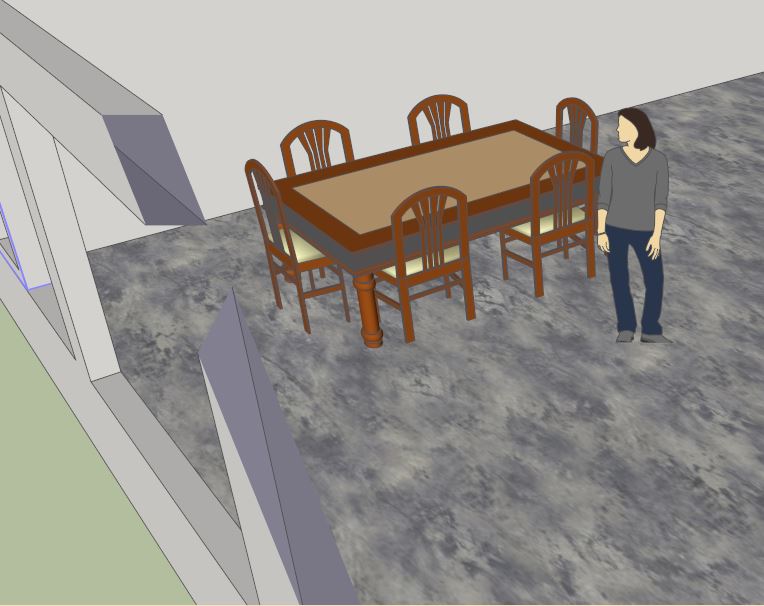
-
This is the well-known "clipping" effect. Most often occurs when your model is located far from the SU origin. Also occurs more frequently if you are not in perspective mode.
-
@bob james said:
This is the well-known "clipping" effect. Most often occurs when your model is located far from the SU origin. Also occurs more frequently if you are not in perspective mode.
Bob James :
Thanks for your reply. I sort of understand what your saying. But in a way I don't. Two things I'm not clear on.........1)Being too far the the SU origin. And 2) Perspective Mode ?
Thanks
garystan -
1) Being too far the SU origin.
The SU origin is where the red/green/blue axes meet. If your model is very far from this location you will often get clipping. These axes can be turned on/off under the menu View/Axes2) Perspective Mode
There are three camera viewing modes (See menu Camera):- Parallel Projection
- Perspective
- Two-Point Perspective
You can often escape clipping (temporarily) by switching to a different viewing mode
-
to neutralize clippping bug:
- switch to parallel view
- do zoom extends
- scroll mouse wheel 'till desired.
The cause of this clipping- you've got some objects (or whole model itself) placed too distantly from origin.

Hello! It looks like you're interested in this conversation, but you don't have an account yet.
Getting fed up of having to scroll through the same posts each visit? When you register for an account, you'll always come back to exactly where you were before, and choose to be notified of new replies (either via email, or push notification). You'll also be able to save bookmarks and upvote posts to show your appreciation to other community members.
With your input, this post could be even better 💗
Register Login


Advertisement