[REQ] Detect Overlaps mode
-
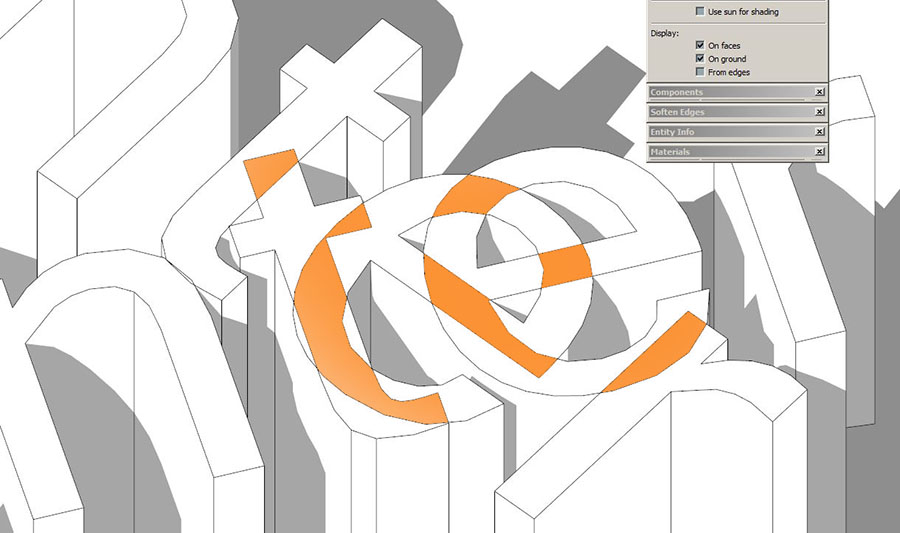
I'm really missing a visual mode that would clearly show all areas with overlapping faces. It'd solve many problems in export\rendering.
Thanks in advance.
-
If the geometry isent grouped the result would be randomized unless you find a way to put mindreading into code..
Another way to put it is finding out if a face has a hole, but it wont be foolproof..
But it would only be for visual purposes ?Sketchup.active_model.selection.grep(Sketchup;;Face).each{|face| face.material = "orange" if face.loops.length > 1 } -
For visual purposes only! Kinda quality control before exporting.
-
ok..
Looking at your Picture again I see that the faces are all "simple polygons" without holes. So this oneliner wont work. I overlooked this fact.
I have a feeling this is not so simple to solve since we don't have any reference to compare with (?)
It's easy to visually see the letters and how they should be formed, but in code it's just another polygon with the same properties as it's neighbours.I don't have time to dig deeper into this right now, maybe later..
-
@rv1974 said:
I'm really missing a visual mode that would clearly show all areas with overlapping faces. It'd solve many problems in export\rendering.
Thanks in advance.
it might be easier to achieve this considering a volume, instead of a surface
and since your letters are 3d, you might consider transform them into solids
-
@unknownuser said:
it might be easier to achieve this considering a volume, instead of a surface
and since your letters are 3d, you might consider transform them into solids
I agree.
However I think Rv1974 is after a general purpose face overlapping detection.
Thought about it during lunch, and can perhaps be solved if looking at face vertices winding order and comparing those with adjecent faces in the plane. Or maybe not

I don't have time to work on this though.. But an interesting problem.
-
@unknownuser said:
However I think Rv1974 is after a general purpose face overlapping detection.
Exactly! Those letters were used for illustrating purposes only. And it supposed to be a heavy duty thing- displaying relatively large geometry.
-
if each item has material, Visualizer quickly shows any overlaps...

to fix them in code it is probably quickest to filter bounding box max/min of each item...
once filtered you could jitter them a tiny amount to avoid z fighting that shows up in renderers...
to check if a model [containing only solids] has any overlaps...
original_count = 0
ents = Sketchup.active_model.active_entities
ent_n = ents.length
ents.each do|e|
  original_count += e.definition.entities.grep(Sketchup;;Face).length
end
sel = Sketchup.active_model.selection
Sketchup.active_model.active_entities.each do|e|
  sel.add(e) if sel.length == 0
  sel[0].outer_shell(e) if sel.length == 1
end
shell_count = sel[0].definition.entities.grep(Sketchup;;Face).length
if shell_count != original_count
  p original_count - shell_count
  ent_n.times{Sketchup.undo}
  # run a jitter code
end
john
-
So you suggest to render in application A in order to eliminate defects in application B.
I'm not sure it's heading in right direction. -
@Rv1974 when you say "overlapping" faces where you refering to Z-fighting where non-intersected faces lie on top of each other ,as Driven has shown ?
Cause the first Picture show intersected faces which would mean a whole different thing, and dare I say quite more complicated algorithm...
Otherwise Driven's boundingbox tests idea might work.
-
All possible directions of course. And NOT 'solids'- SU is not about solids at all.
-
@rv1974 said:
...SU is not about solids at all.
SU has some very fast methods for handling solids that take forever on non-solid geometry...
The only reason for the overlapped geometry is sloppy modelling that can be more easily fixed if all are grouped solids...
are you importing the bad topography?
which renderer is failing to accept the errors?
are you really still using SU v8 Pro?

Hello! It looks like you're interested in this conversation, but you don't have an account yet.
Getting fed up of having to scroll through the same posts each visit? When you register for an account, you'll always come back to exactly where you were before, and choose to be notified of new replies (either via email, or push notification). You'll also be able to save bookmarks and upvote posts to show your appreciation to other community members.
With your input, this post could be even better 💗
Register Login


Advertisement