Move and offset in one step
-
Does anyone know of a plugin or way to move a component to an existing point and then offset it by a specific VCB value?
Right now if I want component A to be 100mm from component B it is a two step process: draw a guide line 100mm from component B and then align component A to that guideline. I'm just trying to figure out if there's a way I can do this one one step instead of two.
Thanks in advance.
-
You don't need a guideline for this...
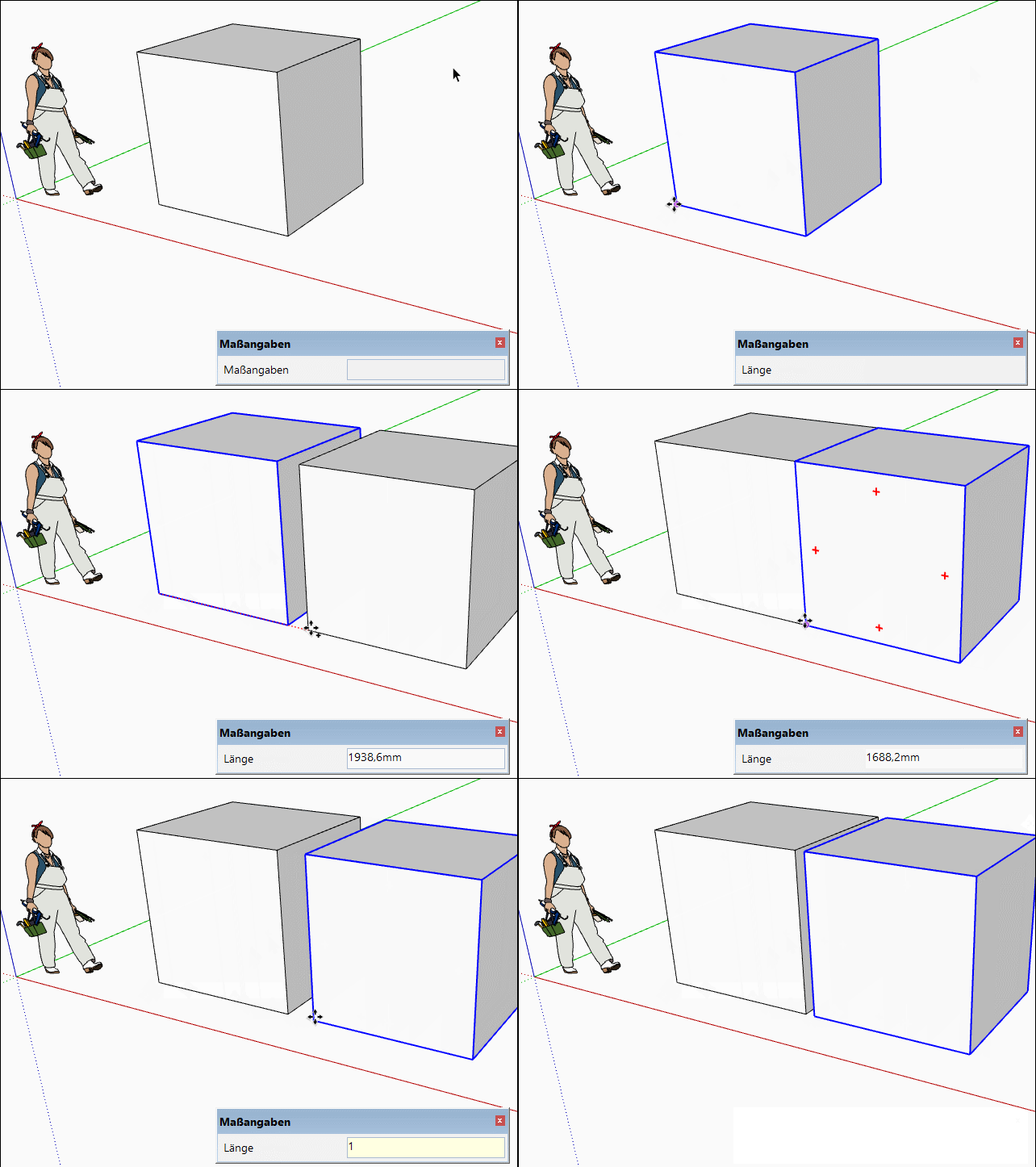
-
Right, thanks, but still a two step process, step 1 move and align points A and B and step 2 move component away/offset by VCB. There's no way to move point A to point B and then offset by a specific amount, all in one step? I know it seems trivial, but if you're doing this a lot it's a time saver (some other 3d modelling programs allow you to do this). Thanks again.
-
How do you define the direction for the second movement, it's always the same as the first one?
-
Yes exactly.
-
Move along (part of FredoTools) has this function.
-
Does it? I tried using Move Along already... I'll check again but I'm pretty sure it will only offset from the original point, not the second. In other words, if component A is 100mm from component B, and you move it component A so it is touching component B, and then type 10 into the VCB, it is going to offset it 10mm from where it was originally, not 10mm relative to component B...
-
Never mind, you're right, move along will do it, thanks very much!
-
I wouldn't have suggested it without trying it before, the VCB changes to distance and you can enter the distance to B...

Hello! It looks like you're interested in this conversation, but you don't have an account yet.
Getting fed up of having to scroll through the same posts each visit? When you register for an account, you'll always come back to exactly where you were before, and choose to be notified of new replies (either via email, or push notification). You'll also be able to save bookmarks and upvote posts to show your appreciation to other community members.
With your input, this post could be even better 💗
Register Login


Advertisement