Get layers in layer window to display alphabetically?
-
I'm working on a large model and need to use a lot of layers. For some reason they do not display alphabetically. Any way to do this. My Autocad automatically rearranges the layers.
-
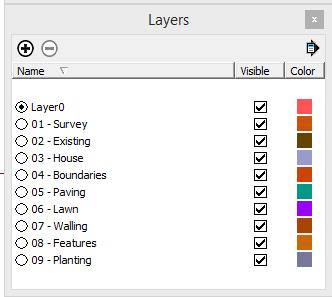
I can't help you specifically on this one, but a tip that may help you or others is I have my template set up with a numbered layer menu that suits my garden design work, (see attachment).
The beauty of using a numbered system, 01, 02, etc. is that you very quickly become familiar with how all your usual layers are ordered. Secondly you can add linked layers, so 03 -House might have 03a - Outbuildings, 03b - Garage block, etc. added on some models - keeping all the "building" layers grouped together. Finally, if you download models from 3D Warehouse and elsewhere, (like Formfonts), the layers they sometimes annoyingly add to your model are listed after all your numbered layers and so don't clutter the list up.
I hope that helps someone !
-
@calypsoart said:
I'm working on a large model and need to use a lot of layers. For some reason they do not display alphabetically. Any way to do this. My Autocad automatically rearranges the layers.
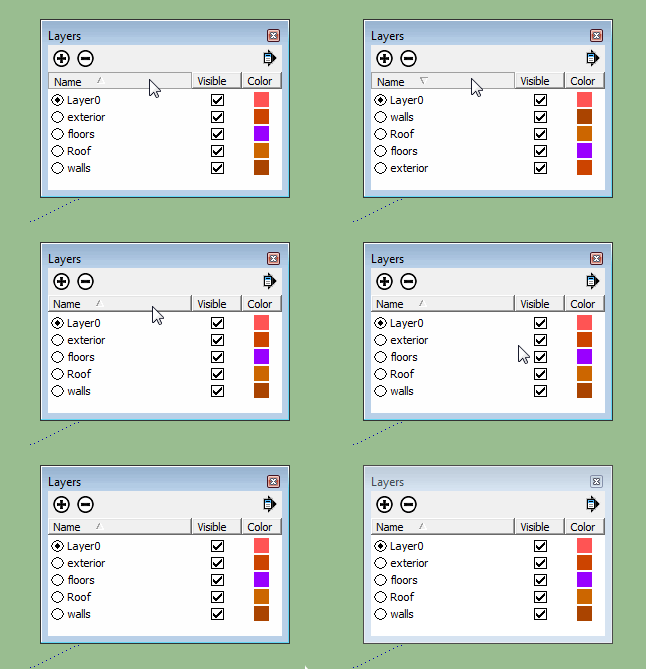
In Windows>Layers, the names should be sorted. If not, click on Name at the top of the names column. This will toggle between a-z and z-a sorting.
-
@sdmitch said:
@calypsoart said:
I'm working on a large model and need to use a lot of layers. For some reason they do not display alphabetically. Any way to do this. My Autocad automatically rearranges the layers.
In Windows>Layers, the names should be sorted. If not, click on Name at the top of the names column. This will toggle between a-z and z-a sorting.
Duh! I feel like an idiot. That's how files get ordered and so many things. I think I've been looking at this screen for too long. A walk is in order.
Thanks!
-
@calypsoart said:
Duh! I feel like an idiot. That's how files get ordered and so many things. I think I've been looking at this screen for too long. A walk is in order.
When you recover from your massive "duh" (welcome to the club), Calstock's advice is still very good.


Hello! It looks like you're interested in this conversation, but you don't have an account yet.
Getting fed up of having to scroll through the same posts each visit? When you register for an account, you'll always come back to exactly where you were before, and choose to be notified of new replies (either via email, or push notification). You'll also be able to save bookmarks and upvote posts to show your appreciation to other community members.
With your input, this post could be even better 💗
Register Login


Advertisement