Some textures missing on export
-
Hi
This is a test piece for a university project. I have managed to make a weird blobby abstract rock thing cracked into four pieces. I textured every side in Sketchup but when I export it as a 3DS or an obj it removes the textures from some of the faces

I'm hoping to be able to put this through Pepakura and print it out.
I have attached both the skp file and the 3ds file so people can see what has happened... Or I would have added the 3ds file but apparently it wont let me so I can't show you that part.
I would be very grateful for any help.
Cheers
-
Okay. I think I might know why but I'm not 100% sure. If I don't get an answer back by tomorrow I will test this out. I'm busy doing essays and other stuff today but:
When projecting textures, can it make a difference which way (forwards or backwards) the image you are projecting is facing? I had a big square with the coloured stripes texture on which I was using to project onto the model, and in some of the cases it was definitely facing outwards rather than in towards the model but I tried using it anyway... Although it did still appear to show on the outside of the model so I can't imagine that this is the reason... I'm really not sure! Other people must have had this problem too.
-
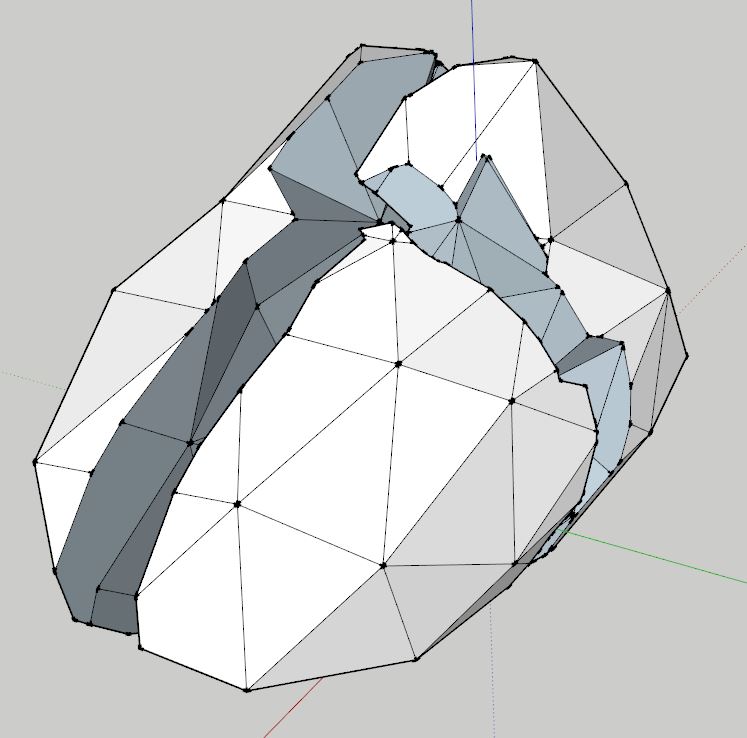
If you look at your model in monochrome you can see that you have reversed faces.
The blue/grey colour should be the inside.
I'm guessing those are the faces you are having a problem with.
If so, open each part for editing, right click on a white face and select Orient Faces.
This will flip the wrong ones around the right way. You will probably need to repaint them with your material and then export.
-
Awesome! Thank you very much.
-
So that worked, but then when I retextured and exported the faces were reversed again.
When I draw a square plane to texture and then use the eye dropper tool to copy the texture to project onto the form, could the side that I am using the eye dropper tool on end up reversing the faces?
-
Sorry, I have no experience with the exporter and how it reacts to textures.

Hello! It looks like you're interested in this conversation, but you don't have an account yet.
Getting fed up of having to scroll through the same posts each visit? When you register for an account, you'll always come back to exactly where you were before, and choose to be notified of new replies (either via email, or push notification). You'll also be able to save bookmarks and upvote posts to show your appreciation to other community members.
With your input, this post could be even better 💗
Register Login


Advertisement