Shadow Artifact Problems
-
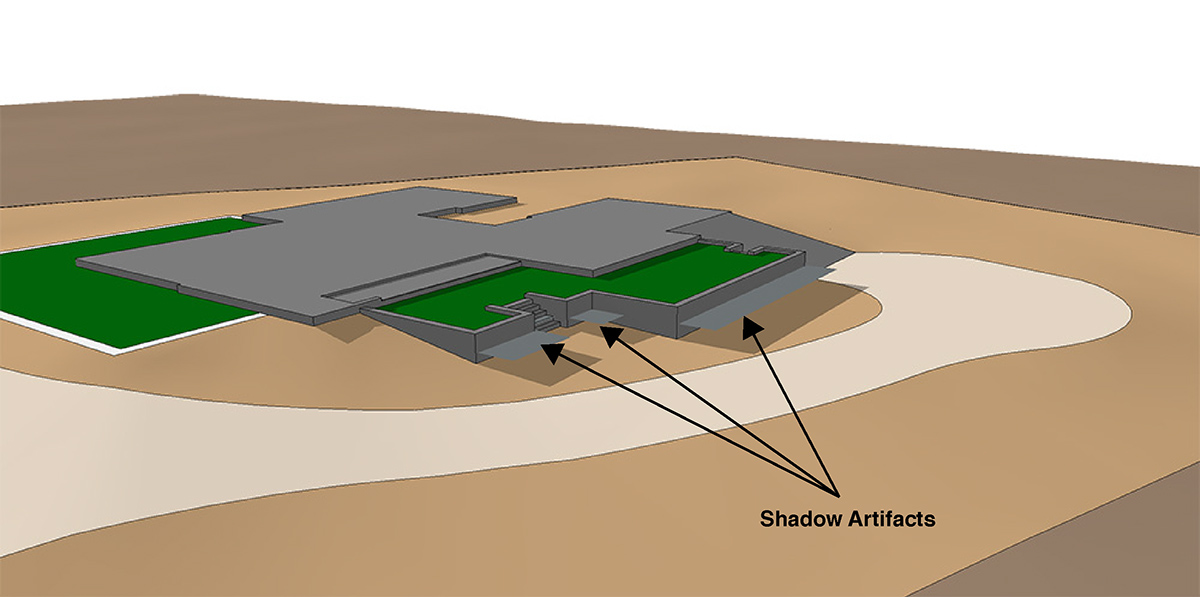
Am having a problem with a geo-located model in the latest version of Sketchup Pro for Mac (14.1.1283) with an artifact that only appears when I have shadows displayed. It appears to be along the same plane as that of the original Google Earth Snapshot layer. I have since deleted that layer. The artifact follows the shadows and cannot be selected. Any suggestions would be greatly appreciated.
Enclosed is an image displaying my issue.
-
Just as a guess looking at the image on my phone, is the model set above and below the ground plane? It looks like you have the shadows set to display "on ground" so they are showing on the original plane. Try going to the shadow settings dialog and untick 'on ground'
-
That did the trick! Thank you so much. I just don't work with shadows enough I guess.

Hello! It looks like you're interested in this conversation, but you don't have an account yet.
Getting fed up of having to scroll through the same posts each visit? When you register for an account, you'll always come back to exactly where you were before, and choose to be notified of new replies (either via email, or push notification). You'll also be able to save bookmarks and upvote posts to show your appreciation to other community members.
With your input, this post could be even better 💗
Register Login


Advertisement