sketchucation logo sketchucation
    • Login
    Oops, your profile's looking a bit empty! To help us tailor your experience, please fill in key details like your SketchUp version, skill level, operating system, and more. Update and save your info on your profile page today!
    ⚠️ Update | Sketchucation Tools 5.0.8 released with licensing improvements and bugfixes Download

    Use ATI graphic card instead of Intel HD 4000

    Scheduled Pinned Locked Moved SketchUp Discussions
    sketchup
    10 Posts 3 Posters 2.7k Views 3 Watching
    Loading More Posts
    • Oldest to Newest
    • Newest to Oldest
    • Most Votes
    Reply
    • Reply as topic
    Log in to reply
    This topic has been deleted. Only users with topic management privileges can see it.
    • john2J
      john2
      last edited by

      I recently bought a laptop that came ATI Sunpro 8570 graphics 2gb card. It also has intel integrated HD graphics 4000. How can I ensure that SketchUp always uses my ATI graphics card and not the intel one?

      Sketchup Make 2017 (64-bit), Vray 4.0 , Windows 10 – 64 bit, corei7-8750H, 16GB RAM, Nvidia GeForce GTX 1050Ti 4GB

      1 Reply Last reply
      Reply Quote 0
      • sketch3d.deS
        sketch3d.de
        last edited by

        normally the AMD Catalyst driver detects if the dedicated video subsystem is required by the application and then switches automatically from the integrated HD 4000 to the AMD 8570m.

        you can manipulate this setting in the AMD Catalyst Control Center under "Power > Switchable Graphics":
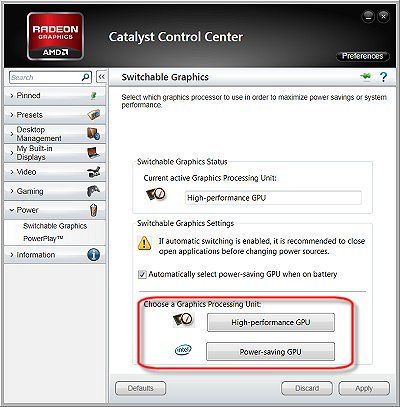
        amd_catalyst_switchable-graphics.jpg

        you may try to check which one is recently active by checking with the MS diagnosis tool by running "dxdiag" under "Windows Start > Run command line".

        further information can be found in the concerning FAQ of the AMD support.

        hth,
        Norbert

        1 Reply Last reply
        Reply Quote 0
        • john2J
          john2
          last edited by

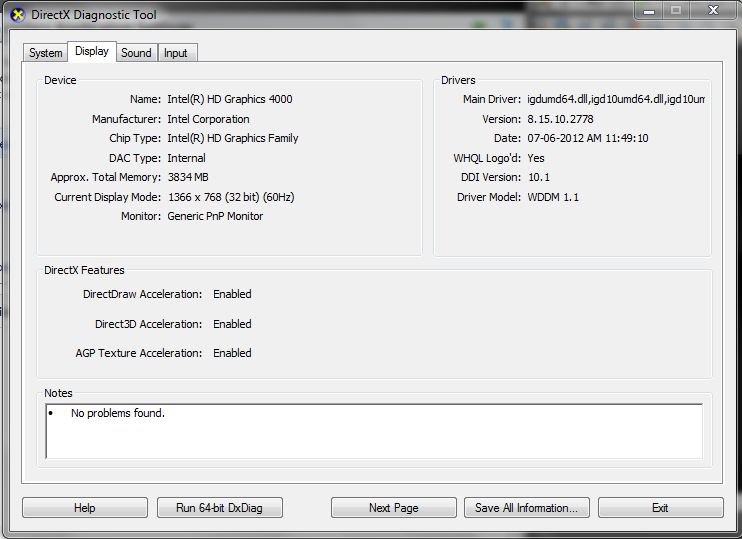
          I went to catalyst control option, did the maximize performance button. I checked dxdiag. its showing intel one 😞

          ddd.JPG

          Sketchup Make 2017 (64-bit), Vray 4.0 , Windows 10 – 64 bit, corei7-8750H, 16GB RAM, Nvidia GeForce GTX 1050Ti 4GB

          1 Reply Last reply
          Reply Quote 0
          • sketch3d.deS
            sketch3d.de
            last edited by

            plugin the power supply unit and assign the AMD 8750m manually to SU via the CCC.

            hth,
            Norbert

            1 Reply Last reply
            Reply Quote 0
            • john2J
              john2
              last edited by

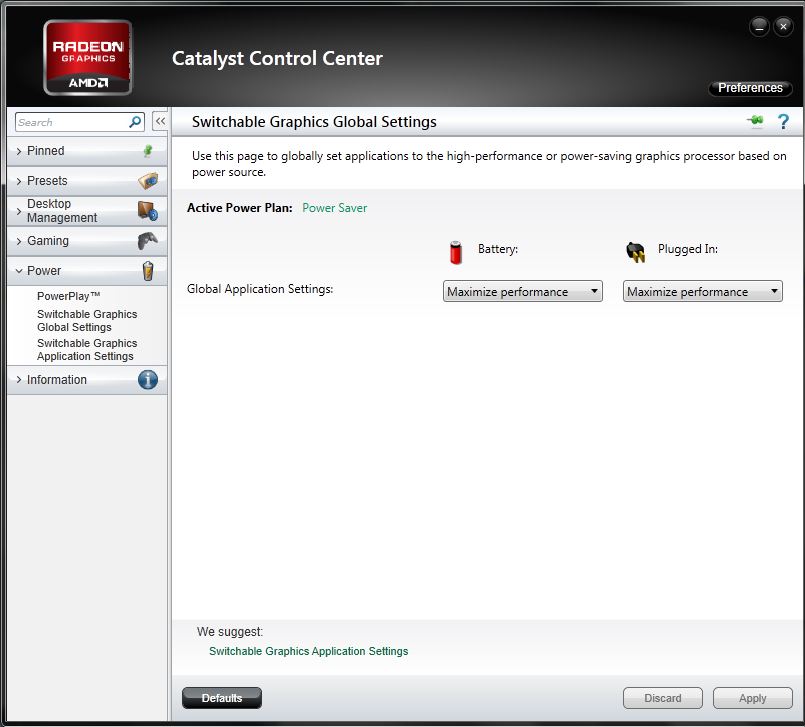
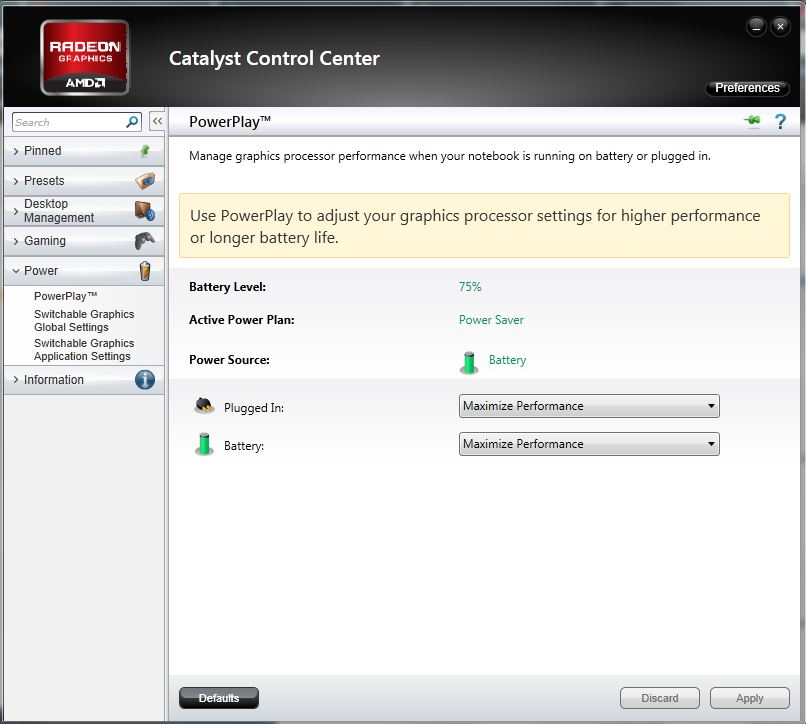
              Here are my settings

              see the images


              graphi1.JPG


              graphi2.JPG

              Sketchup Make 2017 (64-bit), Vray 4.0 , Windows 10 – 64 bit, corei7-8750H, 16GB RAM, Nvidia GeForce GTX 1050Ti 4GB

              1 Reply Last reply
              Reply Quote 0
              • sketch3d.deS
                sketch3d.de
                last edited by

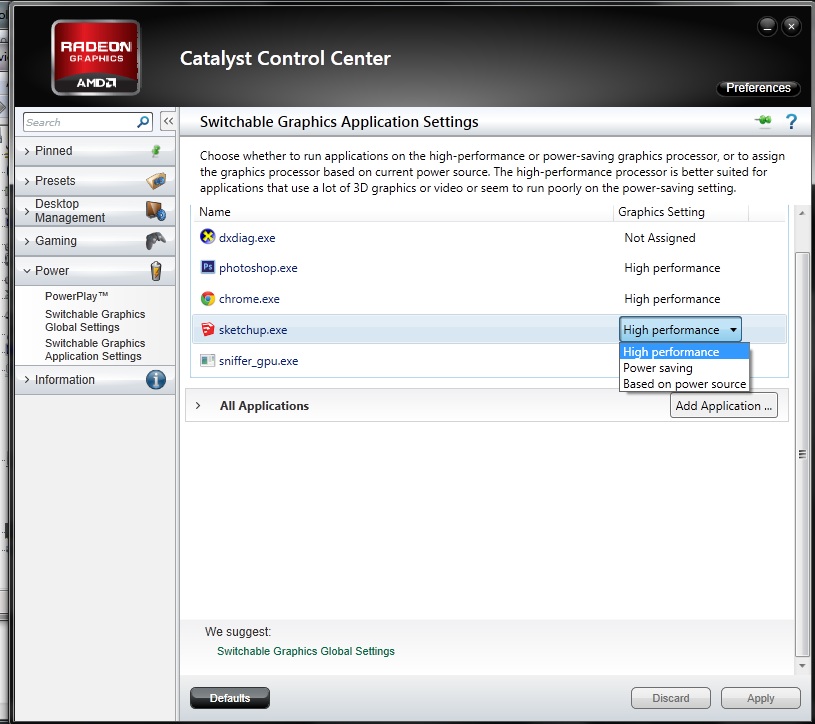
                "Switchable Graphics Application Settings > SketchUp > AMD 8750m"

                N.

                1 Reply Last reply
                Reply Quote 0
                • john2J
                  john2
                  last edited by

                  I'm getting High performance, powersaving, based on power source. I've selected high performance option. That will do the thing right?

                  graphc3.JPG

                  Sketchup Make 2017 (64-bit), Vray 4.0 , Windows 10 – 64 bit, corei7-8750H, 16GB RAM, Nvidia GeForce GTX 1050Ti 4GB

                  1 Reply Last reply
                  Reply Quote 0
                  • sketch3d.deS
                    sketch3d.de
                    last edited by

                    normally yes, launch SU and goto dxdiag (or GPU-Z) for checking this.

                    N.

                    1 Reply Last reply
                    Reply Quote 0
                    • john2J
                      john2
                      last edited by

                      @sketch3d.de said:

                      normally yes, launch SU and goto dxdiag (or GPU-Z) for checking this.

                      N.

                      Thanks for suggesting this GPU tool. I'll surely check this out.

                      Sketchup Make 2017 (64-bit), Vray 4.0 , Windows 10 – 64 bit, corei7-8750H, 16GB RAM, Nvidia GeForce GTX 1050Ti 4GB

                      1 Reply Last reply
                      Reply Quote 0
                      • N
                        ngothofm
                        last edited by

                        Hello,

                        I am encountering a similar problem however mine is a bit different. In my Catalyst Control Centre there is no option to switch Sketch Up to use the AMD GPU.

                        Is there another way to force SU to use the AMD GPU because currently it is using my intergrated Intel HD GPU

                        1 Reply Last reply
                        Reply Quote 0

                        Hello! It looks like you're interested in this conversation, but you don't have an account yet.

                        Getting fed up of having to scroll through the same posts each visit? When you register for an account, you'll always come back to exactly where you were before, and choose to be notified of new replies (either via email, or push notification). You'll also be able to save bookmarks and upvote posts to show your appreciation to other community members.

                        With your input, this post could be even better πŸ’—

                        Register Login
                        • 1 / 1
                        • First post
                          Last post
                        Buy SketchPlus
                        Buy SUbD
                        Buy WrapR
                        Buy eBook
                        Buy Modelur
                        Buy Vertex Tools
                        Buy SketchCuisine
                        Buy FormFonts

                        Advertisement