[Plugin] Remove Inner Faces
-
@unknownuser said:
the subdive and smooth plugin set has a tool that does what ur asking for however u cant control how much it extrudes (which is a bit silly really) it just extrudes a bit to give you those extra faces then u have to manually drag it to the legth u want
Yeah, that tool would be great to have as a standalone script as an alternative to the normal pushpull tool.
-
module Wikii def Wikii.remove_inner_faces fs=[] Sketchup.active_model.selection.each{|x| if x.typename=="Face" to_be_delete=true x.outer_loop.edges.each{|y| if y.faces.length<=2 to_be_delete=nil break end } fs << x if to_be_delete end } Sketchup.active_model.start_operation "remove_inner_faces" fs.each{|x| x.erase!} puts fs.length.to_s+" faces removed !" Sketchup.active_model.commit_operation end end #Wikii.remove_inner_faces -
@WiKii
How use that? With the ruby console?
I am not ruby expert
-
Hi Pilou !
1- Copy the code in a a new notepad file.
2- Copy this code below, in the fileif not file_loaded?("remove_inner_faces.rb") UI.menu("Plugins").add_item("Remove inner faces"){Wikii.remove_inner_faces} end file_loaded("remove_inner_faces.rb")2- Save it as "remove_inner_faces.rb".
3- Move the file in plugins folder.
4- Restart SU.

-
@unknownuser said:
... only forgotten to scroll the first code of Wikii so some lines are missing
...There is a "Select all" link on the top of the code snipplet - if you use that, you can make sure not to leave anything out in the future (or click in the code field and hit Ctrl+A then Ctrl+C)
-
Yes for the next time it will be more easy!

-
Ok I have made the steps above 1 2, 2(?) 3 4
but "syntax error line 16" (last line)
@unknownuser said:
Error Loading File remove_inner_faces.rb
C:/Program Files/Google/Google SketchUp 6/Plugins/remove_inner_faces.rb:16: syntax errorEdit
:
I only forgotten to scroll the first code of Wikii so some lines are missing
All works fine!
You are genious!!!
Ruby linked by Wiiki
-
@unknownuser said:
Does exist a ruby script for kill the internal surfaces but not the edges of these surfaces (after a Pushpull + Ctrl for example)?
[/attachment]How about one for killing external surfaces, after an intersection of multiple groups, when forming internal models only (eg for export for light or acoustic modelling)? I'd like to place a marker (or the camera) inside my room and have a plugin automatically trim and delete any surfaces not reachable from that point. Sort of like doing a blow-mould!
Would be very handy!
-
merci monsieur Pilou
and wikii of course -
wikii, thank u very much. Great tool for retop.
-
@unknownuser said:
How about one for killing external surfaces, after an intersection of multiple groups, when forming internal models only (eg for export for light or acoustic modelling)? I'd like to place a marker (or the camera) inside my room and have a plugin automatically trim and delete any surfaces not reachable from that point. Sort of like doing a blow-mould!
Seems you have this result with a blender of normal selections (right to left, left to right), Inverse Selection by Tig, Selection Toys by Thomthom...
-
Hi Guys,
Just a quick one.
Does this still work for Skecthup 2016? I have re-named the zip folder extension to ".rbz" hoping this would install it correctly. I says it did install but i cant seem to see it anywhere in the menus? Any help would be very much appreciated.
-
@j_forrester said:
Hi Guys,
Just a quick one.
Does this still work for Skecthup 2016? I have re-named the zip folder extension to ".rbz" hoping this would install it correctly. I says it did install but i cant seem to see it anywhere in the menus? Any help would be very much appreciated.
just put this file in your plugins folder
-
@glro said:
@j_forrester said:
Hi Guys,
Just a quick one.
Does this still work for Skecthup 2016? I have re-named the zip folder extension to ".rbz" hoping this would install it correctly. I says it did install but i cant seem to see it anywhere in the menus? Any help would be very much appreciated.
just put this file in your plugins folder
Thank you very much, worked perfectly!
-
Just a side note.
Sdmitch made a script for me that works like ctrl+pushpull without creating inner faces.
It seems he hasn't released it publicly but you could perhaps ask him to release it if interested. -
I get this:
Error Loading File remove_inner_faces.rb
Error: #<NoMethodError: undefined methodfile_loaded?' for main:Object> D:/Program Files/SketchUp/SketchUp 2015/Tools/remove_inner_faces.rb:23:in<top (required)>'Thanks in advance
-
This plugin hasn't worked for sometime, its a shame as it really helped me out a lot, is there any plans in updating this or is there any alternative plugin that does the same?
-
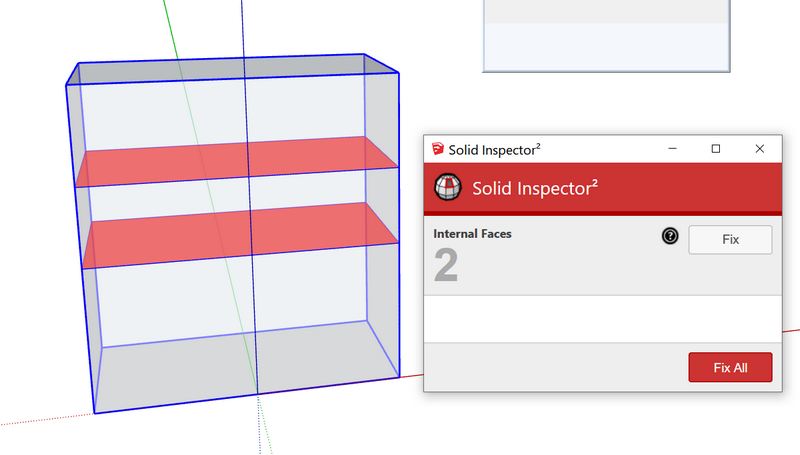
Solid Inspectorby thomthom will do the job.
-
Perfect!





Hello! It looks like you're interested in this conversation, but you don't have an account yet.
Getting fed up of having to scroll through the same posts each visit? When you register for an account, you'll always come back to exactly where you were before, and choose to be notified of new replies (either via email, or push notification). You'll also be able to save bookmarks and upvote posts to show your appreciation to other community members.
With your input, this post could be even better 💗
Register Login


Advertisement