Shadow strings in a model are going to give me a 2ND tumor!
-
PLEASE HELP!- I've been working on this model in sketchup for an animation, and I'm a student who is still quite a bit of a novice.
For some reason I keep getting these "shadow strings" or shadow projection lines when I try to animate or view the scene with shadows. Is there anything I can do to eliminate these lines (short of remodeling from scratch)?
I have already tried using some plugins on it such as ThomThom's "Cleanup" plugin (thanks for the work on that by the way Thom) hoping that would help. I also tried the fix FixSolid plugin, but nothing seems to help remedy the problem.
I was going to try using Todd Burch's "Close Opens" plugin from Smustard, but I don't know if that will work, and I don't want to burn $20 on "trying" something that might not be the fix for my problem.
I can send pictures or the actual model file to anyone who might be able to help me.
I am looking for some expert advice or help.
I have already had one golf-ball sized tumor in my skull (pituitary), PLEASE help me from letting this model/animation form a 2nd one.
Thanks in advance to whoever reads this (and perhaps decides to help).
Eric
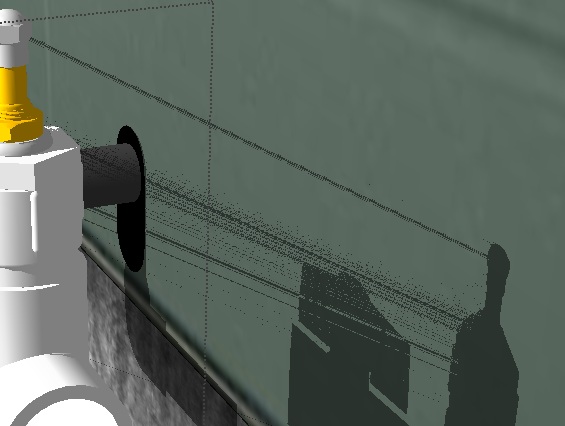
-
I've never had the problem and I'm sure greater minds will chip in but, have you tried the built in Shadow String Fix.

-
Dudenheim!!!
You just saved a man's life today! I can't believe the answer was right underneath my nose the whole time- not to mention that it was a one-button-fix!
Thanks BOX, you made everything perfect man!
Hopefully I can help someone the way you helped me today- Keep up the GREAT Work-
Vielen Dank noch einmal mein Freund

Eric
-
Glad to help.

Hello! It looks like you're interested in this conversation, but you don't have an account yet.
Getting fed up of having to scroll through the same posts each visit? When you register for an account, you'll always come back to exactly where you were before, and choose to be notified of new replies (either via email, or push notification). You'll also be able to save bookmarks and upvote posts to show your appreciation to other community members.
With your input, this post could be even better 💗
Register Login


Advertisement