Sketchup 2 vue export: triangles issue
-
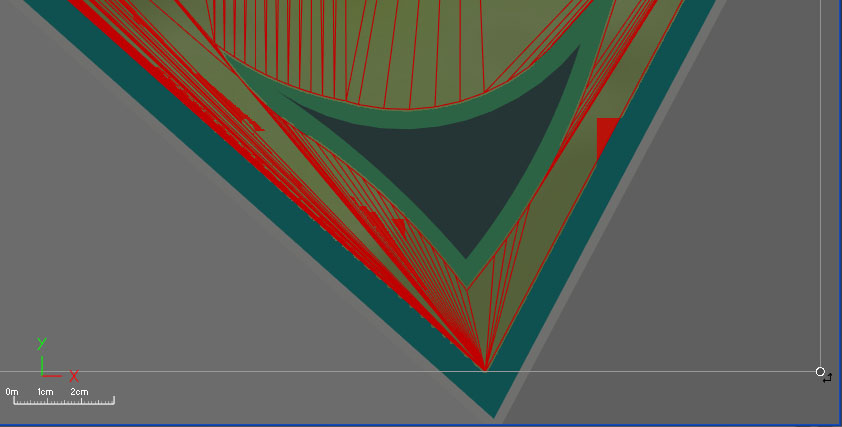
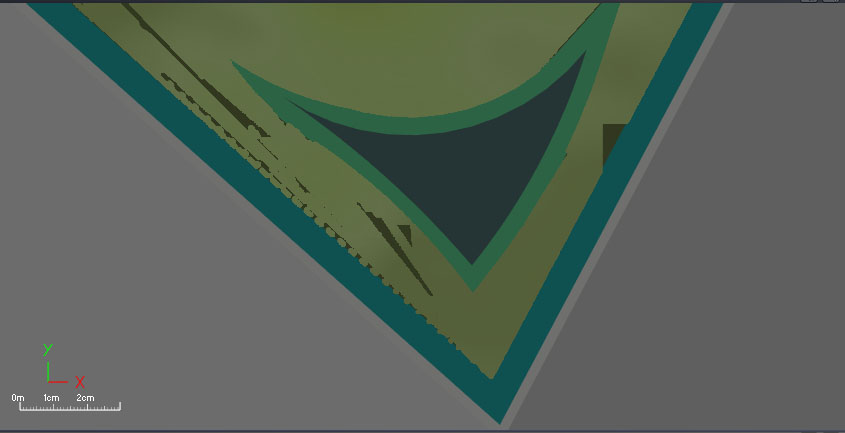
Hi! When I'm importing SU model into VUE10 I get incorrect triangulating. This causes incorrect ecosystem applying on the face...
(Tried to export in diff formats, like obj, dae, etc., chose or not "trianguate faces" in SU export options. Smoothing option in VUE works incorrectly, it change geometry of the face)On the picture you can see holes in applied ecosytem, where triangulation lines are too often (too close to each other)
Are there any chances to fix it? E.g., make triangulation in another way, or something else...
-
The only way I have found to work the conversion of Sketchup to Vue is not using the plugin of e-on software, or exporting to obj. Artlantis is the only way i found that work..
Open the sketchup file in Artlantis, export it to obj and import from that file into Vue, work perfectly without it being the classic heavy file or misplaced textures.Who would have thought that Artlantis is the best way to use Vue for sketchup.
regards
nacho
Hello! It looks like you're interested in this conversation, but you don't have an account yet.
Getting fed up of having to scroll through the same posts each visit? When you register for an account, you'll always come back to exactly where you were before, and choose to be notified of new replies (either via email, or push notification). You'll also be able to save bookmarks and upvote posts to show your appreciation to other community members.
With your input, this post could be even better 💗
Register Login


Advertisement