Please help me with SP error
-
Hi everyone
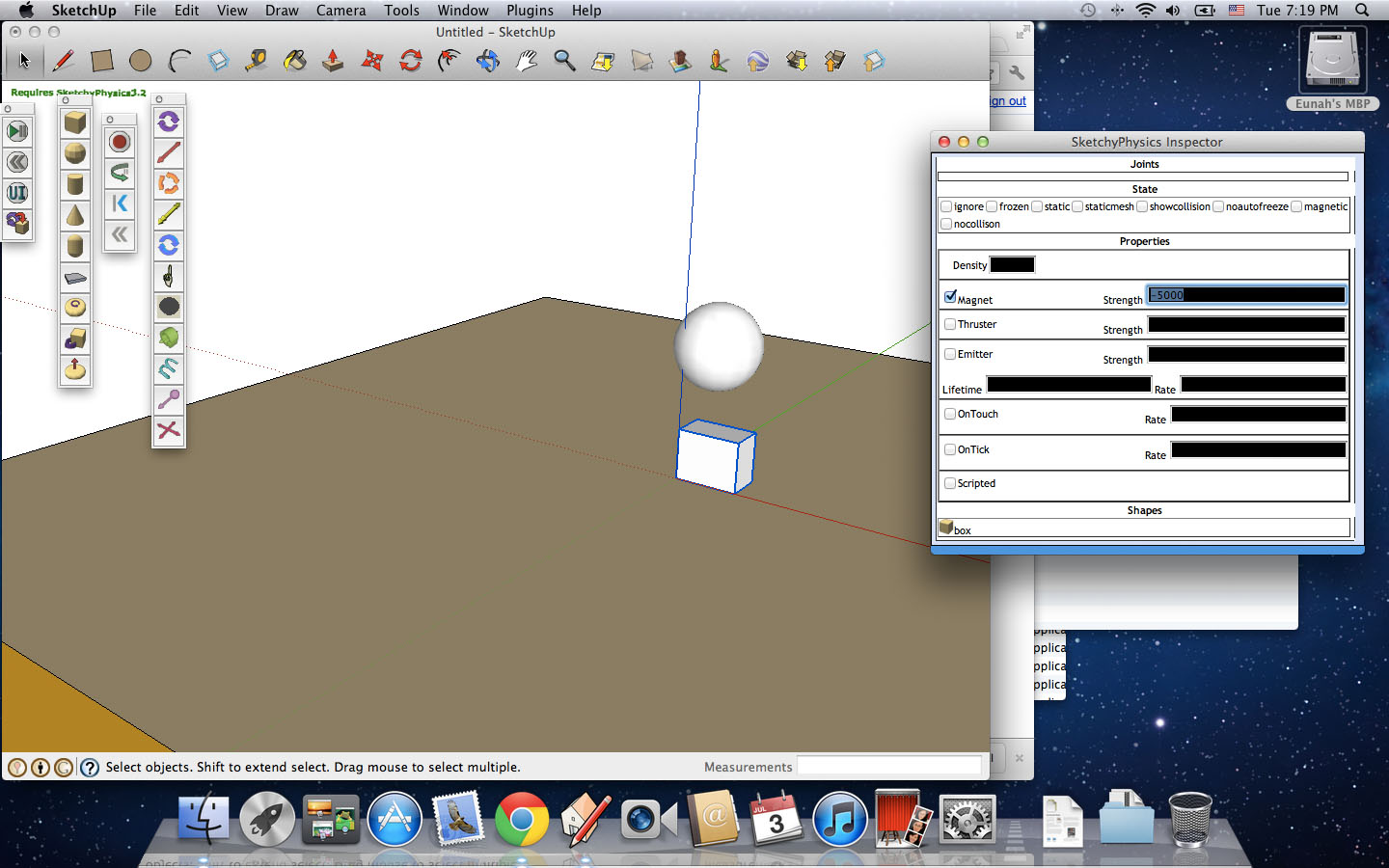
As you can see, all the slots in the Inspector are always black.
I reinstalled Sketchup and SP as well several times but it's the same.
I can see figures when they're highlighted so it's no big deal.
The real problem is that the number I type in won't be saved and it keeps going back to the default '0.0' every time I click on something else.
It's so frustrating!Could anyone let me know what causes this and how to fix it?
I use macbook pro, Os X Lion, Sketchup 8(free version), and the latest SP 3.2.
Thanks in advance!!!
-
This is a known issue with the latest version of Safari, rather than SUp.
Try to get an earlier version of Safari and revert to that until Apple decide to fix their mess...
-
Thanks for your quick reply, TIG!
I downgraded Lion on my macbook to Snow Leopard and everything seems fine.

Hello! It looks like you're interested in this conversation, but you don't have an account yet.
Getting fed up of having to scroll through the same posts each visit? When you register for an account, you'll always come back to exactly where you were before, and choose to be notified of new replies (either via email, or push notification). You'll also be able to save bookmarks and upvote posts to show your appreciation to other community members.
With your input, this post could be even better 💗
Register Login


Advertisement