Photo matching existing model
-
I've got an existing model and I'm trying to position it to match an image.
I've been trying to follow some tutorials on this but
- They are mostly focused on building a new model.
and MORE IMPORTANTLY - The photo is mostly hidden. I can get tiny glimpses of it. For some reason, some surfaces of the model will show the photo through them, but it's not nearly enough to work with. And if I turn the "model" check box off, it just shows the grid and perspective lines, the photo is NOWHERE TO BE SEEN.
Is there a way to put the photo up front where I can see it or something?
- They are mostly focused on building a new model.
-
Can you post the model and thephoto (or the photo already in the model)?
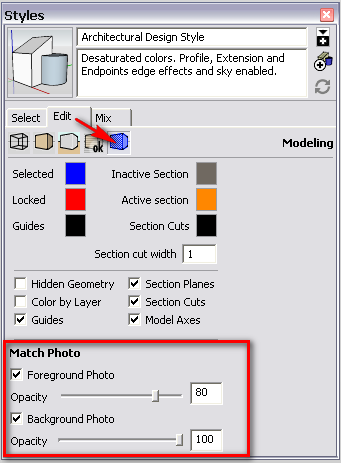
as for the image visibility settings, go to your styles panel (Window menu) > in model folder (small house) > edit tab and the last, blue icon (Modelling settings). There, at the bottom, you have two opacity sliders for the background/foreground image.

Hello! It looks like you're interested in this conversation, but you don't have an account yet.
Getting fed up of having to scroll through the same posts each visit? When you register for an account, you'll always come back to exactly where you were before, and choose to be notified of new replies (either via email, or push notification). You'll also be able to save bookmarks and upvote posts to show your appreciation to other community members.
With your input, this post could be even better 💗
Register Login


Advertisement