sketchucation logo sketchucation
    • Login
    Oops, your profile's looking a bit empty! To help us tailor your experience, please fill in key details like your SketchUp version, skill level, operating system, and more. Update and save your info on your profile page today!
    Mac User? | Join the Rayscaper Beta for Mac Learn More

    Repeat Last command??

    Scheduled Pinned Locked Moved Plugins
    25 Posts 7 Posters 8.4k Views 7 Watching
    Loading More Posts
    • Oldest to Newest
    • Newest to Oldest
    • Most Votes
    Reply
    • Reply as topic
    Log in to reply
    This topic has been deleted. Only users with topic management privileges can see it.
    • J
      jpalm32
      last edited by

      @dan rathbun said:

      @jpalm32 said:

      Or how about a Plugin that "make all faces the same"? Then I can select All and reverse all if needed.

      You DO NOT need a plugin, it's built-in.

      As I said above.

      1) Select all the faces.

      2) Right-click INSIDE the selection.

      3) Press the R key after the context menu pops up.

      Thganks, will see how that works for me.

      Your done. Donta Worry. Umpa-Umpo. Be happy. Umpa-Umpa.

      1 Reply Last reply
      Reply Quote 0
      • Dan RathbunD
        Dan Rathbun
        last edited by

        ALSO.. if you open the Entity Info toolwindow (inspector) and select multiple items, you'll see that you can apply visibility, layer and front & back materials, to all the selected entities in the set.

        I'm not here much anymore.

        1 Reply Last reply
        Reply Quote 0
        • J
          jpalm32
          last edited by

          @dan rathbun said:

          ALSO.. if you open the Entity Info toolwindow (inspector) and select multiple items, you'll see that you can apply visibility, layer and front & back materials, to all the selected entities in the set.

          Thanks for your help.But here's my problem.
          I import a CAD and it has 100s of front & back faces. All scattered (not allowing a window select) . Even with your helpful suggestions, it requires selecting each one then a command.
          What I want is to select all, part by window, group... and make ALL faces the same.
          I would think anyone importing a sloppy DWG or DXF is having the same issue.

          1 Reply Last reply
          Reply Quote 0
          • Dave RD
            Dave R
            last edited by

            How about Orient Faces? Select a face with the correct orientation and run that from the context menu.

            Etaoin Shrdlu

            %

            (THERE'S NO PLACE LIKE)

            G28 X0.0 Y0.0 Z0.0

            M30

            %

            1 Reply Last reply
            Reply Quote 0
            • J
              jpalm32
              last edited by

              @dave r said:

              How about Orient Faces? Select a face with the correct orientation and run that from the context menu.

              😳 Theres it is, sitting in my download dir, for who knows how long.
              Sorry to waste peoples time.
              Maybe if it was named something more descriptive I would have noticed it! 🤣 🤣

              1 Reply Last reply
              Reply Quote 0
              • Dave RD
                Dave R
                last edited by

                Orient Faces is native to SketchUp. No plugin required. 😉

                Etaoin Shrdlu

                %

                (THERE'S NO PLACE LIKE)

                G28 X0.0 Y0.0 Z0.0

                M30

                %

                1 Reply Last reply
                Reply Quote 0
                • J
                  jpalm32
                  last edited by

                  @dave r said:

                  Orient Faces is native to SketchUp. No plugin required. 😉

                  Pro Only??
                  Have Oriant Faces RB in my dirctory. Must be some use for FREE version?
                  Which I downloade from this site!

                  1 Reply Last reply
                  Reply Quote 0
                  • Dave RD
                    Dave R
                    last edited by

                    No. Not pro only. You have to select a face before it'll show in the context menu.
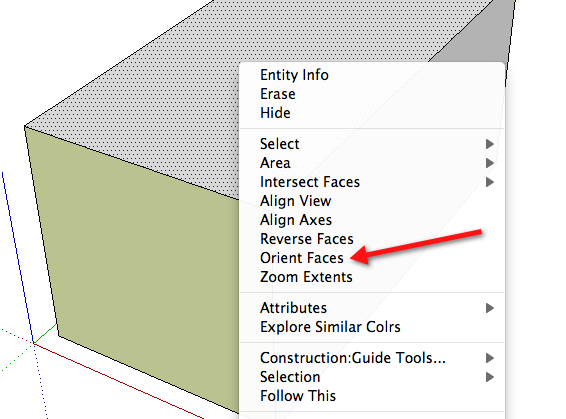

                    Orient.png

                    Etaoin Shrdlu

                    %

                    (THERE'S NO PLACE LIKE)

                    G28 X0.0 Y0.0 Z0.0

                    M30

                    %

                    1 Reply Last reply
                    Reply Quote 0
                    • J
                      jpalm32
                      last edited by

                      @dave r said:

                      No. Not pro only. You have to select a face before it'll show in the context menu.

                      Stupid me! If you select more then one face you don't see it!
                      I kept selecting more then one face.
                      I am trully humbled!
                      Than you for persistence!

                      1 Reply Last reply
                      Reply Quote 0
                      • Dave RD
                        Dave R
                        last edited by

                        No worries. I suppose it doesn't work if you select more than one face because they might have different orientations and then which face would SketchUp use as the reference face? It might make the magic smoke come out of the processor. 😲

                        Etaoin Shrdlu

                        %

                        (THERE'S NO PLACE LIKE)

                        G28 X0.0 Y0.0 Z0.0

                        M30

                        %

                        1 Reply Last reply
                        Reply Quote 0
                        • mitcorbM
                          mitcorb
                          last edited by

                          I guess he didn't see my suggestion above.

                          I take the slow, deliberate approach in my aimless wandering.

                          1 Reply Last reply
                          Reply Quote 0
                          • J
                            jpalm32
                            last edited by

                            @mitcorb said:

                            I guess he didn't see my suggestion above.

                            Yes I did Tim, thank you.
                            Going back & forth while working.

                            1 Reply Last reply
                            Reply Quote 0
                            • Dan RathbunD
                              Dan Rathbun
                              last edited by

                              ThomThom also authored the Selection Toys plugin.

                              You NEED to get that. It allows you to get selection sets, based on search criteria, and apply filters.

                              Now, ALSO built into Sketchup... select ONE face, right-click it, click "Select >" on the popup, and choose "ALL on the same Layer" (or Material which is likely to be nil as a default.)

                              Now you have a selection set whose members can be out of the viewport.

                              (You could always Zoom Extents, also before selecting.)

                              Here's another plugin by Didier Bur: Automatic Face Reverser

                              Otherwise.. go to Plugins Index and use your browser's find function to look for buzzwords (Reverse, Face, etc.)

                              I'm not here much anymore.

                              1 Reply Last reply
                              Reply Quote 0
                              • Didier BurD
                                Didier Bur
                                last edited by

                                Not to mention FrontFace by Tomasz Marek, which is my favorite !
                                Here: http://rhin.crai.archi.fr/rld/plugin_details.php?id=154

                                DB

                                1 Reply Last reply
                                Reply Quote 0

                                Hello! It looks like you're interested in this conversation, but you don't have an account yet.

                                Getting fed up of having to scroll through the same posts each visit? When you register for an account, you'll always come back to exactly where you were before, and choose to be notified of new replies (either via email, or push notification). You'll also be able to save bookmarks and upvote posts to show your appreciation to other community members.

                                With your input, this post could be even better 💗

                                Register Login
                                • 1
                                • 2
                                • 2 / 2
                                • First post
                                  Last post
                                Buy SketchPlus
                                Buy SUbD
                                Buy WrapR
                                Buy eBook
                                Buy Modelur
                                Buy Vertex Tools
                                Buy SketchCuisine
                                Buy FormFonts

                                Advertisement

