[Plugin] Ruby Console Pro #2
-
Edit: New file (Sun. AM, 5/23/10) includes experimental animated Move code.
Edit: I've moved
ou(), out()andouts()outside the protection of the module so, for example,outs()can be used anywhere you would haveputs(), before.Before I begin with the plugin, let me ask that those who like this thank Jim Foltz. I learned how to do this by studying Jim's WebConsole.
This is strictly for developers, hence the announcement here. The console (RCP) looks like this:

If you click "Init" you get this:
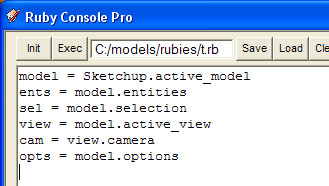
You can provide, via Setup, your own init code. Code in the console is executed when you click "Exec" or when you press Enter in the RCP. The output window, for the above code, reports:
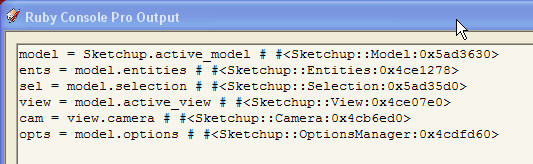
The "Save", "Load", "Clear" and "Exit" buttons do what their names promise. "Output" toggles visibility of the Output window. "Setup" launches this dialog:
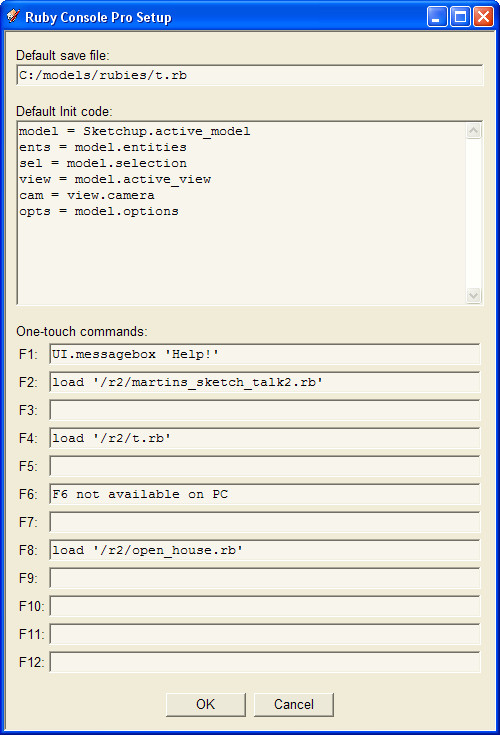
This lets you provide your own default save file, your own init code and "One-touch" commands for F1 through F12 (skipping, on PC, F6). These commands execute immediately when you press the key. Since you can load a program with these keys, there's no theoretical reason why you can't create a model of the Taj Mahal with a single keystroke.
As always, the window with focus receives keystrokes. One-touch commands work when RCP has focus.
We are not heading toward an IDE, here, however. Reason: HTML's textarea widget is not suitable for serious text editing. Sorry.
Extract to your Plugins directory. Ruby Console Pro is added below the Ruby Console in the Windows menu. Use
outsto output a string (plus a newline). Useoutto output a string plus a single space. Useouto output a string and nothing else.Edit: Version 0.? in continuous use developing move code.
-
Hey, I like the looks of thei Martin. I have used Jim's plugin devoutly for a long time (since my first days programming for SU). I can't do without a multi-line editor. I've used Alex's a bit, but I dnot like some of the things it does (specifically wraps everything into a single undo - I want to control that on my own!).
Anyhow, this looks great. I like the F-keys macros. I would use that a lot I'm sure.
I'll be looking forward to this release, thanks!
Chris
-
Bug: NameError:
If you Save or Load, then Cancel, you get a NameError and the Save/Load terminates. That's exactly what you wanted when you clicked Cancel, so this one's harmless. Will be fixed next time I UL the file. For now, ignore it.
-
Updated 5/21. New file in original post.
-
ok, I'm finally getting this installed and I'm using it. Or well, I've used it for about 15 minutes. first impressions are that I like it in general. I keep hitting the init button instead of the exec button. So it might be nice to have a larger exec button, and maybe not placed right next to the init button.
I am also not sure that I like that 'enter' executes the code. I generally never want my code to execute until I'm redy to hit the execute button. Perhaps <ctrl>+<enter> could be execute. That might be nice.
I am still undecided on that output screen. I thinik I like it though. I have not used it enough to really know what I think. But I do like how it shows the returned info from each line of code. That is kind of handy.
So far so good Martin,
Chris
-
hmm, also it seems to kick out errors for any "end" statement:
end # #<SyntaxError: (eval):1:inprocess': compile error\n(eval):1: syntax error>` -
Is this 'plugin' still valid ?
.. or is it superceded by the one in the Plugins forum?
[Plugin] Ruby Console Pro with SketchTalk in Motion++.. or does one use THIS edition if they do not care for the 'SketchTalk in Motion++' features ??
-
Hey Dan, didn't you say you were working on a webdialog console, too? How's that coming?
-
Many of my ideas were implemented by Alex. I was working instead on a Win32 native version. I may switch to writing it in C or C++ as I want to do some things using MFC objects, such as docking the toolbar inside the console window (currently it follows the window and "snaps" itself to the upper left corner.)
I have the font handling working OK (need to fix the height sizing a bit to account for different dot pitches.) I can switch between the Google OEM font (Courier New), "Normal" user font, and a "Custom" user font (for say a large bold font used only for classroom lecture, as an example.)
I have the "memory" location working (and solved the issue when then user closes the console with the "X" button,) as well as 3 custom locations the user can set by double-clicking on a numbered button.
Looks like this, except I added a timed reload button (a gem with a clock,) after the reload button (the one with the double load arrows.)

-
That looks good, Martin and Dan. Thumbs up for all developpers of these kind of tools.
If I would could wish for 1 feature that is missing(or I have overlooked) in all these editors, is the capability
to fold methods or conditionals etc. When getting longer scripts that helps a lot.But having longer scripts is maybe not what these "inside Sketchup" code editors was created for, so just a thought of mine.
-
A console and an editor are two different things.
I'm on Windows, and I suggest using NotePad++, it has block folding.
-
@unknownuser said:
A console and an editor are two different things.
Ok, I see.. I do use notepad ++ as well. To be more precise then, my wish was for folding methods in console.
But I get your point.



Hello! It looks like you're interested in this conversation, but you don't have an account yet.
Getting fed up of having to scroll through the same posts each visit? When you register for an account, you'll always come back to exactly where you were before, and choose to be notified of new replies (either via email, or push notification). You'll also be able to save bookmarks and upvote posts to show your appreciation to other community members.
With your input, this post could be even better 💗
Register Login


Advertisement