Organic curves are killing me :(
-
Hi All,
I could really use some advice on the workflow to create a shape. Basically I am trying to model a bed for my pet. I have the shape of it but am struggling to get the curves right. The work flow I have tried includes:
Approach #1. draw front profile, draw side profile, intersect - this gives me the curves sort of but they don't go around the shape = FAIL
Approach #2. draw shape, follow me around shape to get curves - only problem is a can't get the curves to taper down at the front = FAIL
Approach #3. draw half the shape with curves and make a skin using the soap bubbles plug-in - only problem is it looks like a boat not a pet bed = FAIL
Approach #4. draw shape and put it on the correct angle( for the bottom), copy and scale (for the top), then manually draw in curves between the two shapes - unbelievably slow to do and I still can't figure out how to get it to curve down in front.I also followed Elisei's tutorial on how to make a skin (which I had to replay about 50 times!!) which kind of worked except I still couldn't get the right shape - it ended up looking like a chair

I have included a file which shows my discarded attempts and also a picture of what I am trying to achieve. It is very sad to say that I have sat at my computer all week and I only have this embarrassment to show for it!!
-
-
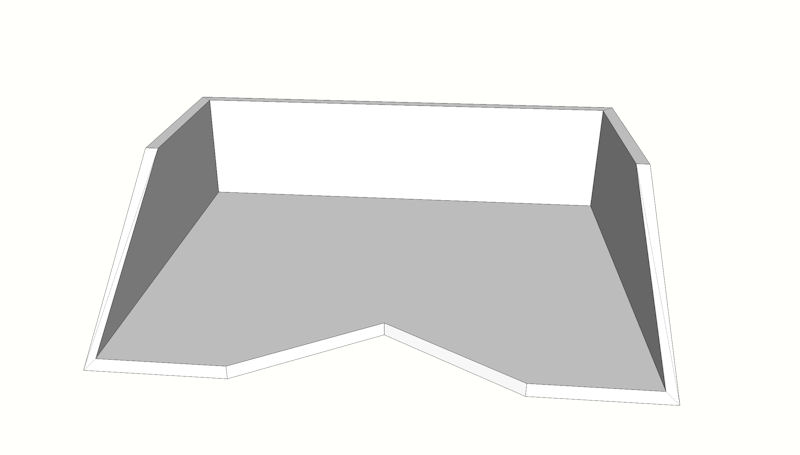
I used Artisan, made a simple proxy (see image) and ran 2 iriterations.

Hello! It looks like you're interested in this conversation, but you don't have an account yet.
Getting fed up of having to scroll through the same posts each visit? When you register for an account, you'll always come back to exactly where you were before, and choose to be notified of new replies (either via email, or push notification). You'll also be able to save bookmarks and upvote posts to show your appreciation to other community members.
With your input, this post could be even better 💗
Register Login


Advertisement