Creating a Cardboard Slice Model Using SketchUp 8
-
I am a substitute teacher. I recently saw a model, created by a student, of the top of a Roman / Greek (Ionic?) column. The model was made from 'slices' of cardboard built up, layer upon layer. I asked him how he did it and he said he used SketchUp. I downloaded SketchUp and downloaded the column top from Google 3D.
How do I turn this computer model into a real model, made of cardboard slices (using a normal printer)? I would like to use this technology in my grade 7 class, so any software would have to be free (or quite cheap).
Any thoughts?
Thanks in advance.
-
Try this Slicer plugin: http://forums.sketchucation.com/viewtopic.php?p=16689#p16689
-
Yes Slicer by TIG is a cool plug

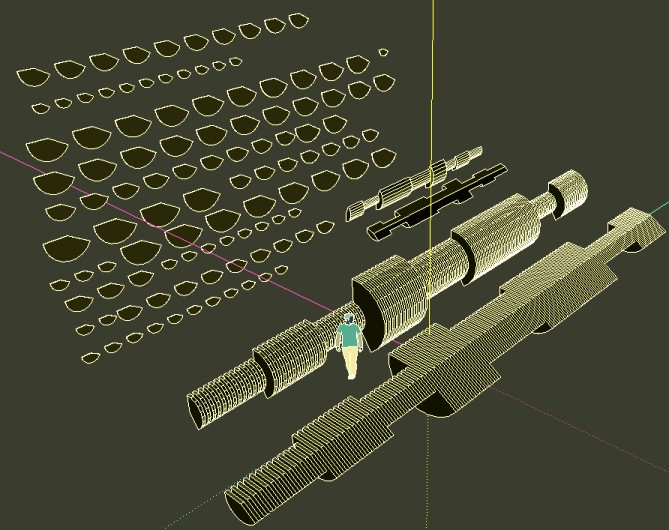
-
If you are building it up out of slices, then print your slices from the model and use the shapes for your cutting templates. (if this isn't too obvious...since you asked)
-
Thanks. i haven't had a chance to do this yet, but will be trying it out in the next couple of days.
I figured I would have to use sheets of paper as a template (those bits of cardboard would definitely jam up my printer), but thanks for confirming what I thought I had figured out.
Cheers


Hello! It looks like you're interested in this conversation, but you don't have an account yet.
Getting fed up of having to scroll through the same posts each visit? When you register for an account, you'll always come back to exactly where you were before, and choose to be notified of new replies (either via email, or push notification). You'll also be able to save bookmarks and upvote posts to show your appreciation to other community members.
With your input, this post could be even better 💗
Register Login


Advertisement