BoolTools and "Intruded" Text?
-
I've got some 3D text and a cube, and I'm trying to use BoolTools to get the 3D text to be "intruded" into a face of the cube. But no matter what BoolTools tool I try, one or both objects disappear. A sample file is attached. What is the correct way to get BoolTools to handle this?
-
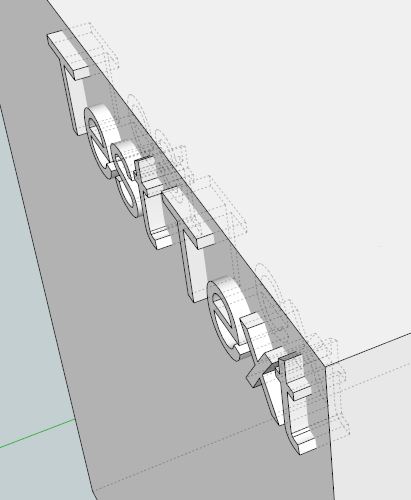
Vik, try it like this with the text intersecting the face instead of flush with the surface and report back please.
-
I tried it with the text intersecting the face (file attached). Here are my results so far using BoolTools on the test file:
- Intersection Tool: deletes cube and the portion of the text that was outside the cube; leaves the text that was inside the cube unchanged.
- Difference Tool: deletes the cube and the portion of the text that was inside the cube; leaves the text that was outside the cube unchanged.
- Union Tool: groups the cube and the text together and otherwise leaves both unchanged.
So far none of the operations seems to produce "intruded" text.
-
I installed BoolTools just to try it (I bought it for SU7)...
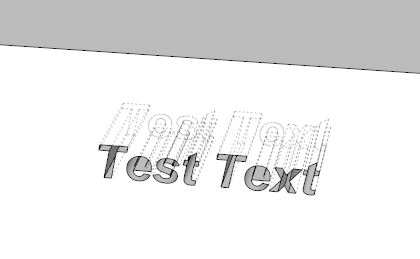
Use the Difference tool....first the box, then the text...viola!

-
With the difference tool, first click on the cube and second on the text.
(It seems it works just the other way round than the solid tools in SU
Hi Marcus

-
It worked. Cool!
-


Hello! It looks like you're interested in this conversation, but you don't have an account yet.
Getting fed up of having to scroll through the same posts each visit? When you register for an account, you'll always come back to exactly where you were before, and choose to be notified of new replies (either via email, or push notification). You'll also be able to save bookmarks and upvote posts to show your appreciation to other community members.
With your input, this post could be even better 💗
Register Login


Advertisement