Question on Match Photo
-
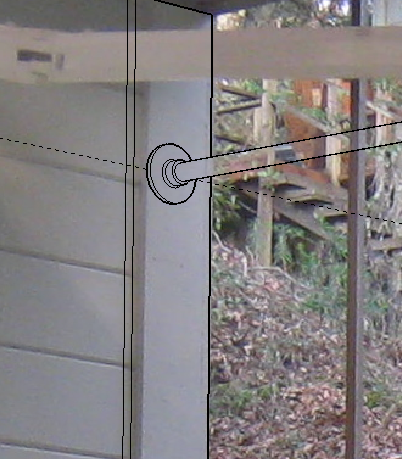
Last time I did match photo, the things I drew ended up in front of and overlaying the photo image. This time the lines are visible but no texture or color of the objects (which are definitely solid when the Match Photo scene is off. The various style settings do nothing except X-ray actually shows a ghost of the faces.
I just recently upgraded to 8 pro. Could this be it?
Attached is image. The black SU lines are supposed to have solid faces (and do when the photo is off).
I just want to do a quick mock up of the idea and leave the photo in background.
Thanks for any suggestions.
-
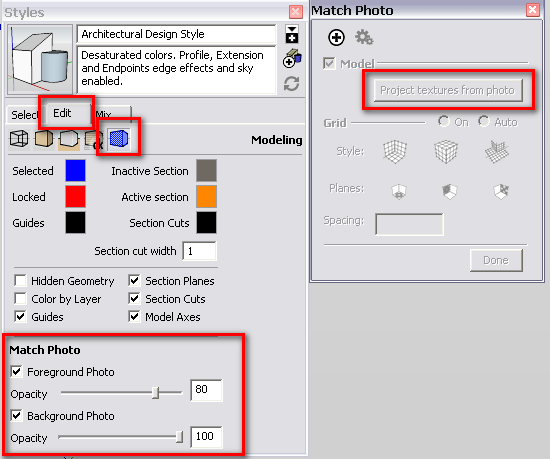
Some PM features have been moved to the styles panel now. Also, when done with modelling, simply project the photos onto the model in the PM dialog.
-
Thank you, Gaieus! That must be what I am missing. I looked at online help for this but I didn't see that. After using SU8 for a while I would have stumbled over it eventually, I guess.


Hello! It looks like you're interested in this conversation, but you don't have an account yet.
Getting fed up of having to scroll through the same posts each visit? When you register for an account, you'll always come back to exactly where you were before, and choose to be notified of new replies (either via email, or push notification). You'll also be able to save bookmarks and upvote posts to show your appreciation to other community members.
With your input, this post could be even better 💗
Register Login


Advertisement