How on earth would i do this
-
hi!
i'm not really sure how to go about doing this, aside from doing it manually..
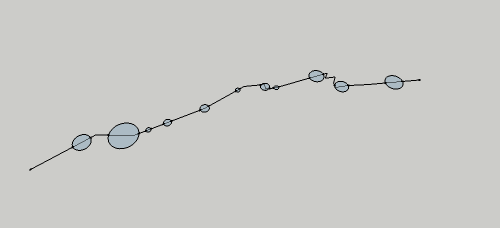
i've attached a picture of a little squiggly line with some circles on it
is there a way to make like 60 of these squiggly lines going off in all directions, and with random squiggles, and (this would be nice but is not needed) with the sizes and locations of the circles all random as well??
basically i want to attach a bunch of these to a circle so it looks like a bunch of messed-up spokes in a wheel.
doing this manually won't take super long, but i'm wondering if there's a more efficient way of doing this. or like a script or something?
thanks!
dave
-
- create a center hub (circle) with 60 segments
- Use the "point at center" script to put a construction point at the center of the circle
- Turn you squiggle line thingy into a component
- Attach it to one of the end points in the circle
- Use the rotate tool to rotate a copy of the squiggle line thingy to the next end point in the circle, using your center point as a pivot
- Create a rotated array by typing x59 then enter
- Choose multiple random copies in the array and right click to choose "make unique"
- Edit the different "unique" bunches of components to add your variation.
Conversely, you could start with 4 unique and varied components and attach them to the circle, rotating them to every 4th (alternating) segment of your circle. You would get variation but lose the randomness.
-
thank you!
can't wait to give this a shot tonight!

Hello! It looks like you're interested in this conversation, but you don't have an account yet.
Getting fed up of having to scroll through the same posts each visit? When you register for an account, you'll always come back to exactly where you were before, and choose to be notified of new replies (either via email, or push notification). You'll also be able to save bookmarks and upvote posts to show your appreciation to other community members.
With your input, this post could be even better 💗
Register Login


Advertisement