Why my model looks like this?
-
Hi..
I'm new to Sketchup, so, please bear my (maybe) stupid question...

I was working with creating my home on Sketchup. Suddently it got jeopardized and looked horrible.
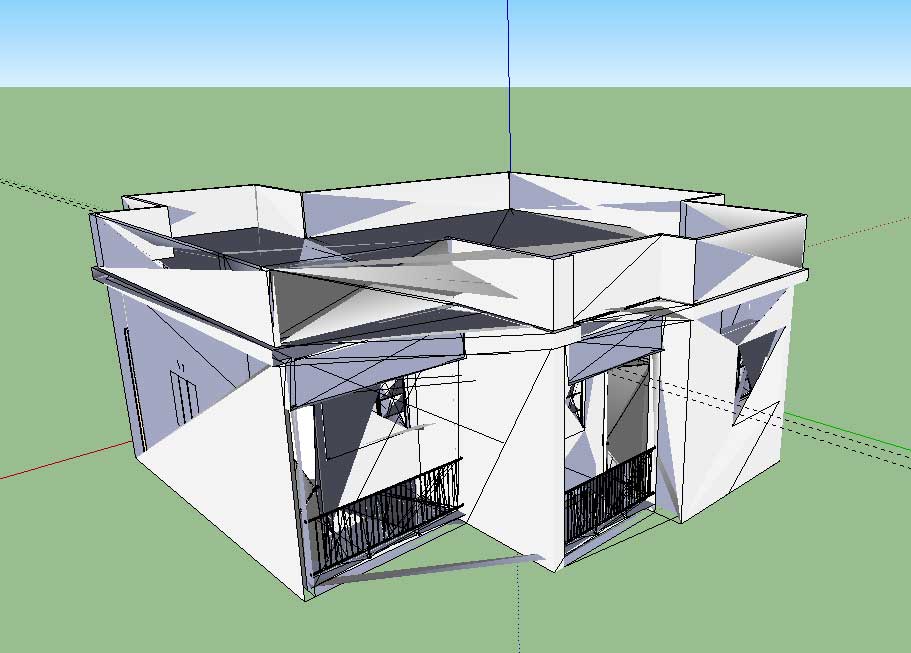
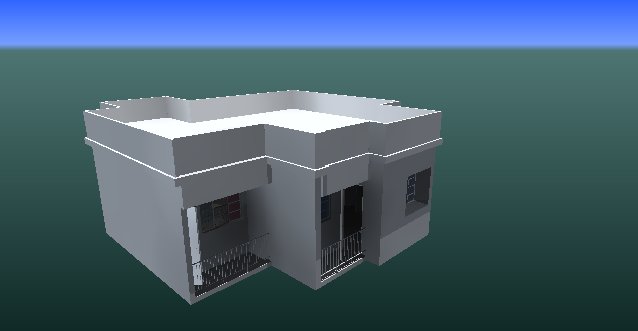
But when I render the same (jeopardized) model with IDX, it shows correct.
Could you pls help me?
TIA
-
Well, I got the answer (from SketchUcation only!)
It's primarily with the Intel display card issue.
Goto Windows > Preferences > OpenGL > Switch between the options. Click OK.
If it shows ok with the either option, check back the previous option. If it's ok, it's fine. Else, select the option works best for you.
Hope this helps!
-
Sorry to post again...
If it happens after adding shadow or a texture, then, it's definitely display card issue, because, it cannot take so much of loads. Switch off shadowing and do the same as mentioned above, it should be ok.
Thanks.
Hello! It looks like you're interested in this conversation, but you don't have an account yet.
Getting fed up of having to scroll through the same posts each visit? When you register for an account, you'll always come back to exactly where you were before, and choose to be notified of new replies (either via email, or push notification). You'll also be able to save bookmarks and upvote posts to show your appreciation to other community members.
With your input, this post could be even better 💗
Register Login


Advertisement