Bringing picture into sketchup
-
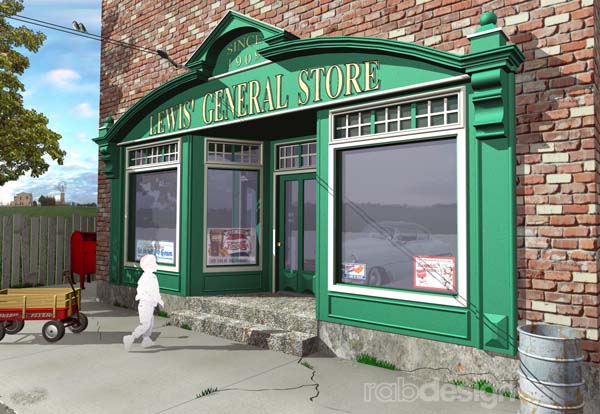
How do I get this picture rotated so I can place it on a building?
-
Nobody reads the help files anymore?!
http://sketchup.google.com/support/bin/answer.py?hl=en&answer=57655 -
this forum has become the help file.
you're a Victim of your own friendliness.

-
Well it's a nice image.
-
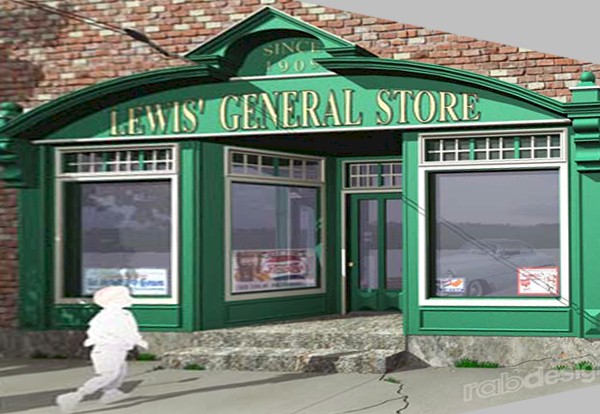
The previous post was to place a model on a image. Are you asking how to place a image on a model? Not sure what you mean by rotation, but SU will stretch textures on a face, or by PhotoShop edit it as necessary. If you are trying to make a 2d elevation of the wood work and storefront, the result in either case will be a distorted as some of the surfaces are not in the photo. I roughly did the attached, is that what you were asking?
-
Thank you honoluludesktop
That was what I was trying to do!!


Hello! It looks like you're interested in this conversation, but you don't have an account yet.
Getting fed up of having to scroll through the same posts each visit? When you register for an account, you'll always come back to exactly where you were before, and choose to be notified of new replies (either via email, or push notification). You'll also be able to save bookmarks and upvote posts to show your appreciation to other community members.
With your input, this post could be even better 💗
Register Login


Advertisement