sketchucation logo sketchucation
    • Login
    Oops, your profile's looking a bit empty! To help us tailor your experience, please fill in key details like your SketchUp version, skill level, operating system, and more. Update and save your info on your profile page today!
    πŸ”Œ Smart Spline | Fluid way to handle splines for furniture design and complex structures. Download

    Avatar works

    Scheduled Pinned Locked Moved Corner Bar
    11 Posts 6 Posters 434 Views 6 Watching
    Loading More Posts
    • Oldest to Newest
    • Newest to Oldest
    • Most Votes
    Reply
    • Reply as topic
    Log in to reply
    This topic has been deleted. Only users with topic management privileges can see it.
    • soloS Offline
      solo
      last edited by

      Brilliant Nomer...

      Can you give me an idea as to how you did this?

      http://www.solos-art.com

      If you see a toilet in your dreams do not use it.

      1 Reply Last reply Reply Quote 0
      • GaieusG Offline
        Gaieus
        last edited by

        Definitely cool! πŸ‘ πŸ‘ πŸ‘

        (I have already seen your kids once in some picture somewhere I forget now - they are so beautiful!!! Happy father!)

        Gai...

        1 Reply Last reply Reply Quote 0
        • N Offline
          nomeradona
          last edited by

          thanks gai thanks solo..

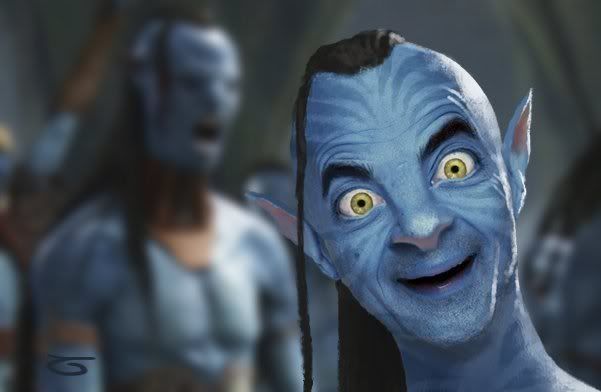
          my steps as follows:

          using wacom is easier but with mouse its also ok.

          • using liquify bloat tool to make the eyes a bit bigger.
          • skin.. jsut use hue, saturation and move them to have the desire blue skin.
          • skin variation.. paint on new layer and use overlay blending mode and adjust opacity.
          • pattern on the skin. choose new layer and use lasso tool and just inscribe the desired shapes. then fill it with a much darker color, use overlay and adjust opacity.
          • white acnes. just use soft brush small diameter and start painting (white) on the new layer again and again adjust opacity.
          • eyes. select the black part with minimal feathering,then adjust hue saturation/lightness brightness. paint black and paint the specular highlight.
          • ears i just copied the orignal ones and pasted and use masking.
          • hair.. same as the ears but some hair i used other peoples braid hair too. byu googling of course.
          • background.. use avatar stuff also and applied some bluring.

          once done.. i combined the images and then i use liquify again. forward warp tool to push nose, eyes to desired effect. also use the burn and dodge tool..

          visit my blog: http://www.nomeradona.blogspot.com

          1 Reply Last reply Reply Quote 0
          • pilouP Offline
            pilou
            last edited by

            πŸ˜‰ Don't know the creator 😳

            http://i828.photobucket.com/albums/zz208/cgpinoy/3916065_ee9d96f2e1dedce641d765c70eb.jpg

            Frenchy Pilou
            Is beautiful that please without concept!
            My Little site :)

            1 Reply Last reply Reply Quote 0
            • olisheaO Offline
              olishea
              last edited by

              lol great stuff nomer....but now you need to get the face paints out!! πŸ˜†

              photoshop wizard! πŸ‘

              oli

              1 Reply Last reply Reply Quote 0
              • N Offline
                nomeradona
                last edited by

                ok a small tutorial

                Link Preview Image
                4shared - free file sharing and storage

                Online file sharing and storage - 15 GB free web space. Folder sharing. File upload progressor. Multiple file transfer. Fast download.

                favicon

                4shared (www.4shared.com)

                visit my blog: http://www.nomeradona.blogspot.com

                1 Reply Last reply Reply Quote 0
                • GaieusG Offline
                  Gaieus
                  last edited by

                  😳
                  Sorry, I have just noticed that instead of three thumbs-up I inserted one and two thumbs-down above (now corrected)

                  Gai...

                  1 Reply Last reply Reply Quote 0
                  • N Offline
                    nomeradona
                    last edited by

                    ha no worries gai.

                    visit my blog: http://www.nomeradona.blogspot.com

                    1 Reply Last reply Reply Quote 0
                    • B Offline
                      bytor
                      last edited by

                      Nomer,

                      That is some amazing work! I am sure your daughters are glad to have a dad that can do such cool things! 😎

                      Find the Cost of Freedom.....

                      1 Reply Last reply Reply Quote 0
                      • N Offline
                        nomeradona
                        last edited by

                        @bytor said:

                        Nomer,

                        That is some amazing work! I am sure your daughters are glad to have a dad that can do such cool things! 😎

                        thanks bytor.

                        visit my blog: http://www.nomeradona.blogspot.com

                        1 Reply Last reply Reply Quote 0
                        • 1 / 1
                        • First post
                          Last post
                        Buy SketchPlus
                        Buy SUbD
                        Buy WrapR
                        Buy eBook
                        Buy Modelur
                        Buy Vertex Tools
                        Buy SketchCuisine
                        Buy FormFonts

                        Advertisement