Trouble with push/pull
-
I'm using SketchUp Pro 6.4 on WinXP. In the attached drawing, I can push or pull the outer ring (the one with the holes in it), but when I rotate around to the other side, there's no bottom. When this has happened before (with other drawings), I've usually been able to draw a line across the open space to create a surface closing the "chasm," but here all I get is a thick line and no surface. Something similar, but worse, happens when I try to push/pull the inner gear element. In this case, I only get the exterior volume; none of the gear detail gets extruded, which is what want (along with the aforementioned bottom). What's causing this behavior, and how can I fix it? Thanks.
-
you have a group hidden in there, explode it. then before you pp hit ctrl so you have a plus sign by your cursor. this will create a new face.
-
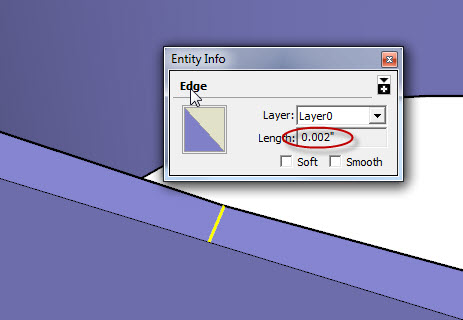
i didn't realize how small this gap is till i took another look. SU definately doesn't like this. scalle everything up at least 10 maybe 100 times then perform all your operations before you scale back down.
-
Thanks! I found that group and exploded it, and used the ctl trick. That seems to have fixed the problems. Where did you find that gap you mentioned, though?
-
i guess gap is the wrong term, i meant distance from the edge of holes to outer edge.
Hello! It looks like you're interested in this conversation, but you don't have an account yet.
Getting fed up of having to scroll through the same posts each visit? When you register for an account, you'll always come back to exactly where you were before, and choose to be notified of new replies (either via email, or push notification). You'll also be able to save bookmarks and upvote posts to show your appreciation to other community members.
With your input, this post could be even better 💗
Register Login


Advertisement