3D rendered walk throughs
-
I'm trying to create a graphically 'pretty' building walk through for a client and would like to do a 3D walk through for them of realistic quality. I know that many render exporters simply create a series of still images which then need to be strung together to create the walk through. Is there any options other than this? An exporter specifically for rendered animations? I have looked around but nothing seems to stand out.
I know right hemisphere provide this sort of thing (http://www.righthemisphere.com) but its expensive and has a lot of extras that I don't want.
I just want to make visually impressive animations from sketchup, fast.
Any and all help much appreciated
-
you might try walkabout3d http://www.walkabout3d.com/Video/index.php?vidid=1 you can use the trial version i believe its fully functional for 120 minutes. it can also work directly with Lightup for better lighting and a more photo realistic feel.

-
Well, if you use QWalkabout, why not provide a real walkthrough where your client can do it interactively?
Also, its "bigger sister", Simmetry3D can even provide more controils and features:
http://www.simmetry3d.com/index.php -
@gaieus said:
Well, if you use QWalkabout, why not provide a real walkthrough where your client can do it interactively?
exactly, you can make an executable and send to him, even with the trial.
Gaieus, Walkabout $99, Simmetry3D $300 annual subscription?
-
Yeah those look cool, only issue is, in this instance, all details haven't been completely finalized so if we allow him to walkabout wherever he wants he might notice.
I wondered what Blender is like for producing these sorts of presentations and how well (if at all) it interacts with Sketchup.
Thanks for the comments folks I will certainly use walkabout and perhaps symmetry 3d on other jobs
-
That's not 300 US Dollars but British Pounds.

(But for a trial version?
 )
)Anyway, you know when I'd purchase such a subscription. I have tried it, it has the potential but seeing that the last entry on their forums is from two years ago, I really doubt they are using that money wisely.
-
@gaieus said:
That's not 300 US Dollars but British Pounds.
(But for a trial version?
)Anyway, you know when I'd purchase such a subscription. I have tried it, it has the potential but seeing that the last entry on their forums is from two years ago, I really doubt they are using that money wisely.
What are your thoughts on a sketchup/blender working partnership Gaieus?
-
Ok, so you don't need interactivity but just to create walk through videos, and do it fast. I recommend you try LightUp:
http://www.light-up.co.uk/Search YouTube for: sketchup lightup
to see some examples of the output. -
I haven't used Blender almost at all, not to speak about its capabilities. I know it can do animation (walking people and such) but knowing that it exists doesn't mean I also know how to use it.
For a walkthrough animation, indeed, LightUp would be ideal to render with and use a straight SU output.
-
Thanks very much for your help everyone, I have plenty to work with now
-
you could also try FRAPS (http://www.fraps.com/) $37 or free if you don't mind watermark, to capture a direct walkthrough from SU. see my try, (inspired by your question) here: http://www.youtube.com/watch?v=iEHjiBBT3pM
BTW, how do i embed my video??
[flash=560,304:mwhz8xdy]http://www.youtube.com/v/iEHjiBBT3pM&hl=en&fs=1&[/flash:mwhz8xdy]
-
There are quite a few free screen capturing apps, too.
@xrok1 said:
BTW, how do i embed my video??
Edit your post and see the bbcode. You need to use the snipplet from the embed code on youtube, not the web url.
-
hey! did you do that? its magic

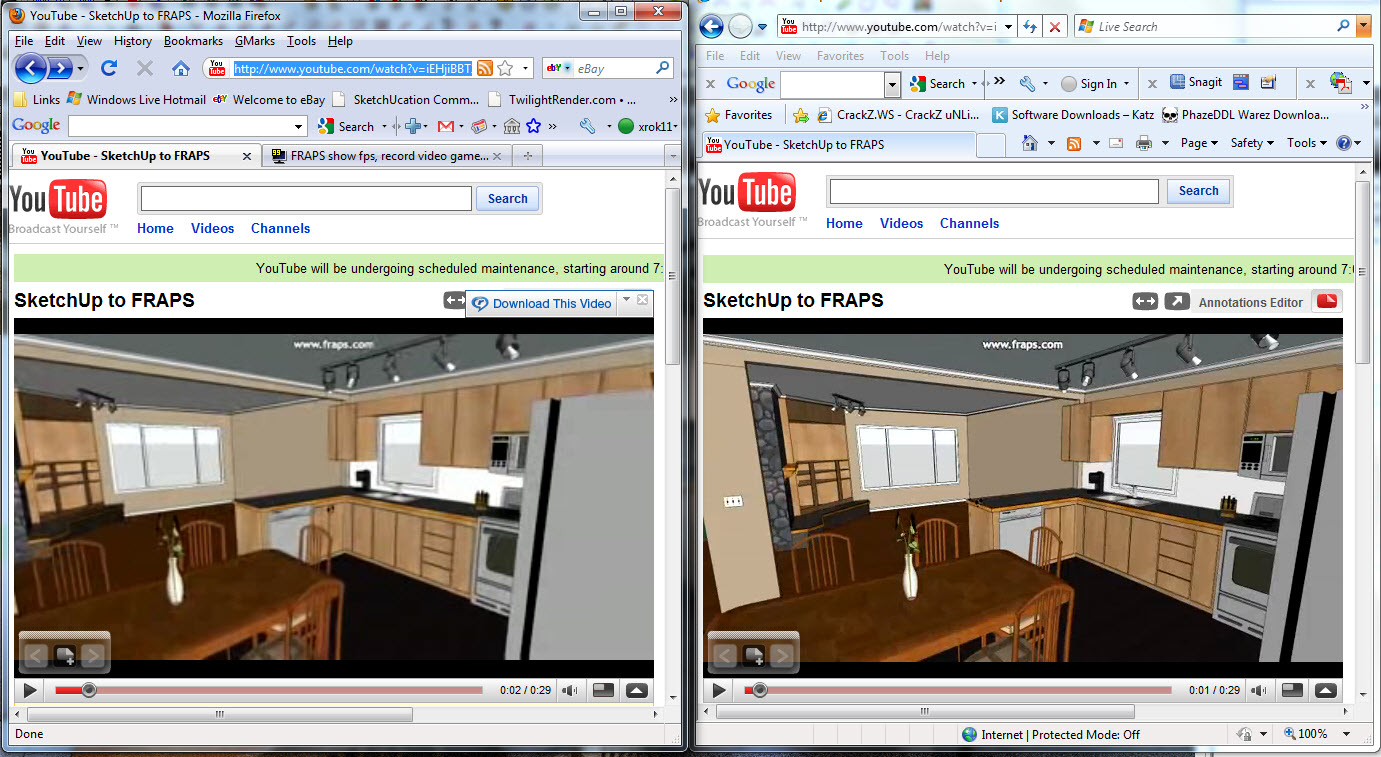
BTW, did anyone notice the difference between the FF and IE youtube video quality???? what's up with that, i hate IE as much as the next guy but it sure do a lot better just on youtube???
-
Try again. Most probably YouTube was still processing your video when you tried with Firefox.
-
No, still looks like crap. have you tried them side by side? IE is waaaay clearer!
-
besides, in my screen shot they're running simultaneously.
-
Camstudio is pretty hard to beat for screen capture....primarily because its free

-
did you just answer your own question?
-
I believe in the near future we will be using game engines for real time walkthroughs.
Unfortunately no one really developed a fast workflow from Sketchup to game engine.
With the new Cry Engine 3 just being released, I really hope it will finally happen. -
i just tried Camstudio and there's no way to get the frame rate even near acceptably smooth at a descend resolution. at least on my machine. fraps on the other hand is smooth like butter
 even at full screen resolution. But hey, its your presentation.


Hello! It looks like you're interested in this conversation, but you don't have an account yet.
Getting fed up of having to scroll through the same posts each visit? When you register for an account, you'll always come back to exactly where you were before, and choose to be notified of new replies (either via email, or push notification). You'll also be able to save bookmarks and upvote posts to show your appreciation to other community members.
With your input, this post could be even better 💗
Register Login


Advertisement