Color by Layer trick
-
I don't know if you are aware of this, but in case you aren't...
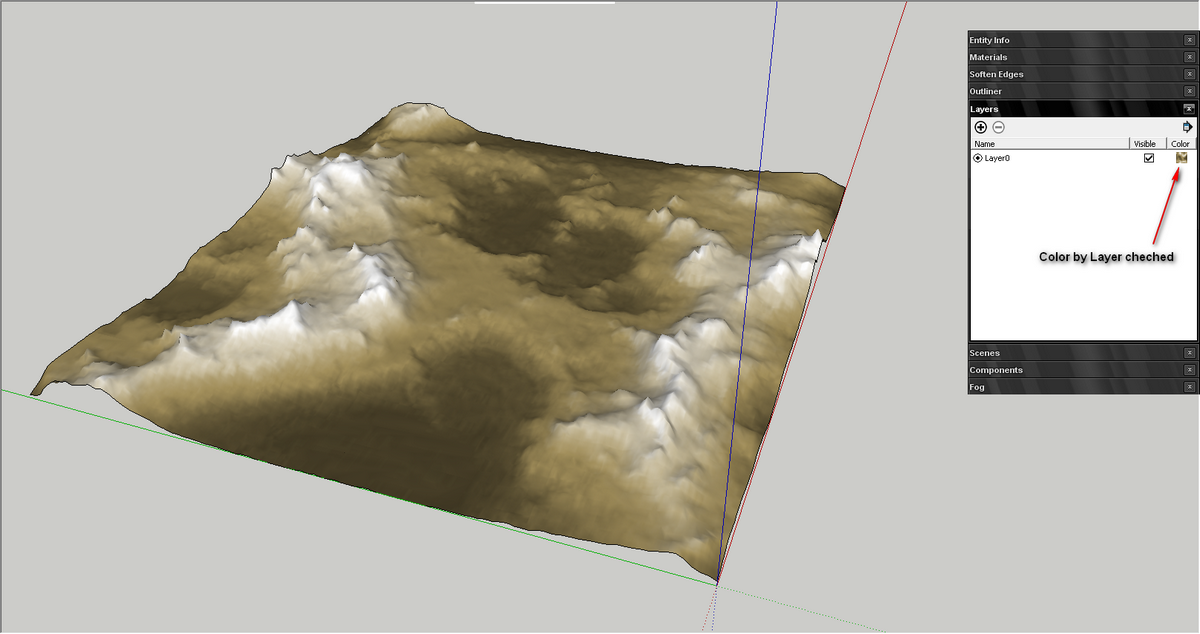
The layer color can be texture! Just figured this out a minute ago, when playing around in SU.
-
Wow, it's new for me, too, thank you for the tip!
This is good for SketchUp-only output, but if you plan to ever render your model, it's best practice to apply colors and textures directly to front faces, as thomthom says.
-
That is a nice way to "Diagnose" layering issues...
I do a lot with layers, using them to show different options in my designs... Sometimes when you can't figure out what layer an object is on, making it yellow, or red can help you find it...
-
Your color is not a color at all though, its a material. Right? That's new to me if it is. I'll need to investigate.
Chris
-
@chris fullmer said:
Your color is not a color at all though, its a material. Right? That's new to me if it is. I'll need to investigate.
Chris
Yes Chris... this is actually the trick! The color can be a material! And just in this second i have some ideas about how this feature can be exploited.

Hello! It looks like you're interested in this conversation, but you don't have an account yet.
Getting fed up of having to scroll through the same posts each visit? When you register for an account, you'll always come back to exactly where you were before, and choose to be notified of new replies (either via email, or push notification). You'll also be able to save bookmarks and upvote posts to show your appreciation to other community members.
With your input, this post could be even better 💗
Register Login


Advertisement