Mirrioring in SU
-
I am drawing a valley beam on one side of my gabled roof and I would like to mirror it to the other side and save the time in redrawing it.
Is there a way to mirror objects in SU?
Ive attached a drawing of what I'm doing to as an aid.
6X6 design 1.skp -
Select everything you want to mirror, right click->make component. Move a copy of the component, scale it by -1 then move it in to position.
-
Hi Ben (again),
As I suggested, use the Scale tool for mirroring.
- select the object
- make a copy of it (see step 4 below)
- select the scale tool and from the left side grip,start scaling it "through" itself into a negative value (-1 see the measurement box at the bottom right).
This will be your mirrored copy of the original component (see attached image in this state of the operation) - go to Edit > Paste in place to paste in the original copy you made in step 2.
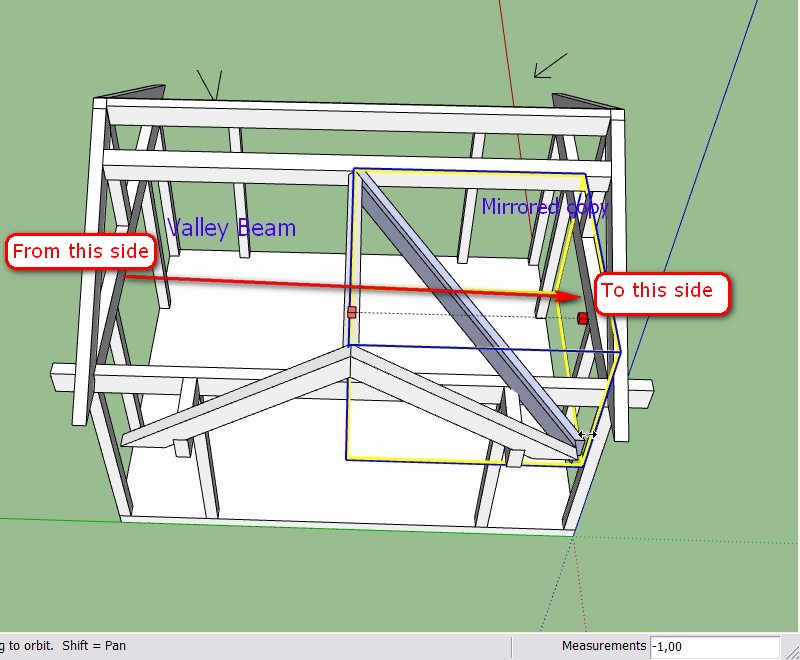
And here is your skp file with the mirrored part:
-
Another option is to install the mirror ruby script by TIG.
You can find it here about halfway down the page.
http://www.crai.archi.fr/RubyLibraryDepot/Ruby/en_edi_page.htmJust save before you run it as it can crash sometimes.
Hope this helps.
Once again this begs the question as to why SU does not have a native mirror function. It is just about as basic a command as anyone would need.

-
Hi Ben, hi folks.
Alternatively, you can:
1 - Move a copy of the beam. In your case that would be along the red axis.
2 - Right click on the copy and choose Flip Along --> Component's green.
3 - Position it correctly with the Move Tool.
I tried, using the upper endpoint and it works nicely.
A trick: If you are not sure which axis you need to choose with the Flip command and want to avoid trial and error with a few Undos, you can double click on the component to see its axes. Click outside the component to close it before doing the flip.
Just ideas.
-
See, Ben, I toldyou that someone will come up with the plugin idea!

-
Thank you all. Now that I have seen how it is done I wonder why I did not think of it.
I will def be coming back



Hello! It looks like you're interested in this conversation, but you don't have an account yet.
Getting fed up of having to scroll through the same posts each visit? When you register for an account, you'll always come back to exactly where you were before, and choose to be notified of new replies (either via email, or push notification). You'll also be able to save bookmarks and upvote posts to show your appreciation to other community members.
With your input, this post could be even better 💗
Register Login


Advertisement