Working on a UV mapping solution
-
All right, I updated to add a right click context menu. You could also assign the script a shortcut key if you prefer that. I replaced the version that is up about 4 posts. So just re-download and overwrite the exitisng file if you had downloaded the old version.
As for aligning components....I think Didier might have made an align tool. I've never used it, but its probably available at the ruby depot. I don't know if does quite what would be required though.
Rewriting the unfold tool to work with components might be a bit trickier than with just plain faces. But it might be possible. Another option could be to write a script that would take all the single face components and rotate them around so they were all flat and on the 0,0 flat groundplane. Then the user could move them around, but at least the flattening would be done. Might not be helpful though, who knows.
Chris
-
hi xrok1
Yep it sure is a lengthy process, that's why I thought I'd share it with the group to see if someone can automate it a bit.Jim's unfold tool is a really good starting point. The trick is to be able to create a macro recording of unfolding the model, then refold the model by reversing the unfold process after the model is mapped. The macro would record all moving, rotation steps, in say a text file, in much the same way as the undo feature in SU.
-
Hi Chris
Thanks for the update. This is super.@unknownuser said:
As for aligning components....I think Didier might have made an align tool. I've never used it, but its probably available at the ruby depot. I don't know if does quite what would be required though.
I'll have a look at that.
@unknownuser said:
Rewriting the unfold tool to work with components might be a bit trickier than with just plain faces. But it might be possible.
This tool could work if it were possible to record the unfold steps then reverse them to reassemble the model.
@unknownuser said:
Another option could be to write a script that would take all the single face components and rotate them around so they were all flat and on the 0,0 flat groundplane. Then the user could move them around, but at least the flattening would be done. Might not be helpful though, who knows.
This would work if the flattening was done in small chunks, perhaps.
-
@unknownuser said:
This tool could work if it were possible to record the unfold steps then reverse them to reassemble the model.
why not just copy the original then unfold that? i thought thats what you where doing?
@unknownuser said:
Rewriting the unfold tool to work with components might be a bit trickier than with just plain faces. But it might be possible.
the freescale ruby seems to be able to detect faces clicked inside components because it aligns the cage to a clicked face. the code is not scrambled either, hint hint.
 all you would need is to then rotate the face to match the next click, along a common edge.
-
@xrok1 said:
nice technique, but rather lengthy process. if only we could get jim to rework the unfold to work with components made of single faces then the process would flow!
Explain what do you want again?
I know (in my head already) how to keep history of the unfold precess and then have the plugin step backwards through the process (and not use the built-in undo.) It is just a matter of making time to implement and test it.
-
well instead of unfolding faces of (lets use a cube as our example) each face of the cube is being made into a seperate component but still in place to form the cube then copied. if this copy could still be treated by your unfold script as the original cube (non-component) would be, then it could be unfolded and used to texture thus updating the textures on the originally copied component cube.
-
But if it has a built in "refold" process, it would not need to be turned into separate components. The idea then would be to take a component. Edit the component. Save that state of folding (no unfolding). Then unfold how you would like. Save that state as "unfolded". Then be able to switch back and forth quickly from folded (original form) to unfolded mode (flat form).
So you could unfold your components and lay them flat. Edit their textres easier, then flip a switch and they rebuild themselves, with materials in place.
That is how I think it should work.
Chris
-
that might be even better!
 the only problem i can see is if you want to use projected textures, won't they change when refolded?
 -
No, components (and all geometry, i think) hold their UV mapping after youve projected your texture.
-
@xrok1 said:
@unknownuser said:
This tool could work if it were possible to record the unfold steps then reverse them to reassemble the model.
why not just copy the original then unfold that? i thought thats what you where doing?
With Jim's tool you wouldn't need to create a copy of the original model
@unknownuser said:
that might be even better! the only problem i can see is if you want to use projected textures, won't they change when refolded?
Remus is correct. If you project a texture to a face of a component or group the projection remains on the face.
My orignial UV mapping consisted of a cube with projected mapped faces. I used this as my source to UV map models before this latest technique. It worked ok but I had to rearrange the uv map pieces in Max or Ultimate Unwrap3D or my employer's 3D program. Now With Chris' Make Component tool the process has sped up my modeling in SU. By laying out the pieces as in my tutorial the UV mapping is completed within SU meaning I have cut out a vital step in the other applications.
Bob -
@chris fullmer said:
But if it has a built in "refold" process, it would not need to be turned into separate components. The idea then would be to take a component. Edit the component. Save that state of folding (no unfolding). Then unfold how you would like. Save that state as "unfolded". Then be able to switch back and forth quickly from folded (original form) to unfolded mode (flat form).
So you could unfold your components and lay them flat. Edit their textres easier, then flip a switch and they rebuild themselves, with materials in place.
That is how I think it should work.
Chris
Exactly what I have had in mind. Also, perhaps it would be nice to have a 'solid state' copy of the model while you unfold the other copy for texturing, that way you could quickly see if textures are lining up correctly as you apply them. But if that was too complex the quick unfold/refold options would be great.
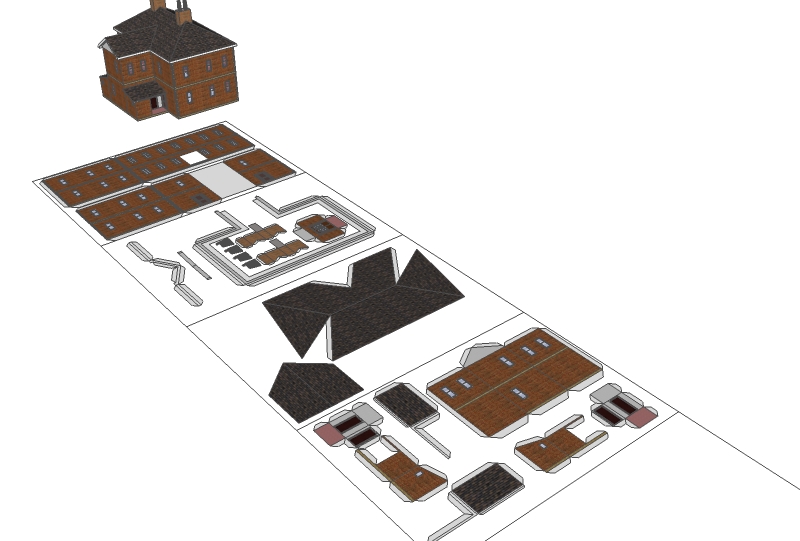
Attached is a model of a building I made today. I textured it from the materials within SU, then unfolded a clone of it using the technique in my tutorial, ably assisted by Chris' Make Component tool. The layout is for printing to make a paper model. While I can accurately scale it to 1/87 (HO) when I export it as an eps file it loses the textures when loaded into Illustrator. Why I havent figured out, but by loading into Photoshop at A4 300DPI I can apply textures to the model, and either print it or export as pdf.
The large rectangles are the A4 page layouts. To save each layout I hide the others. it keeps the saved files tidier that way.Bob

Hello! It looks like you're interested in this conversation, but you don't have an account yet.
Getting fed up of having to scroll through the same posts each visit? When you register for an account, you'll always come back to exactly where you were before, and choose to be notified of new replies (either via email, or push notification). You'll also be able to save bookmarks and upvote posts to show your appreciation to other community members.
With your input, this post could be even better 💗
Register Login


Advertisement