Replace material
-
Can anyone please tell me how to replace a material in the model entirely with a different material? The material is applied to objects inside group and components. Is there any plugin?
Pritam
-
-
Thanks a lot... but I just bought 'repaint' script from smustard.
-
If you want to change one particular texture (and TIG's plugin automates this procedure in fact), select the material in the "In model" section in the Material browser, go to the Edit tab and there you can reload the texture with any other you like.
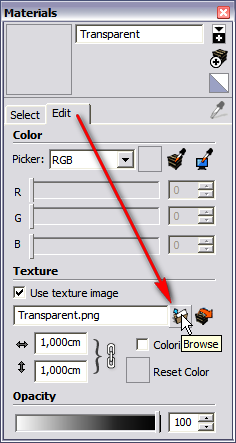
-
Thanks Gaeius... but the only problem here might be that this feature does not support skm files, so the skm files wont show up in the browser to choose.
Another question off the topic Gaeius... do you have any idea how to 'batch convert' jpegs into skm. I have this large podium texture library(jpegs) but it simply wont show up in sketchup material browser as they are not skm files
Pritam
-
@3dmodellers said:
Another question off the topic Gaeius... do you have any idea how to 'batch convert' jpegs into skm. I have this large podium texture library(jpegs) but it simply wont show up in sketchup material browser as they are not skm files
Pritam
Try massmaterialimporter.rb from here:
http://www.crai.archi.fr/RubyLibraryDepot/Ruby/em_ren_page.htm -
hey... that was great... I just converted 200 jpegs.
Pritam

Hello! It looks like you're interested in this conversation, but you don't have an account yet.
Getting fed up of having to scroll through the same posts each visit? When you register for an account, you'll always come back to exactly where you were before, and choose to be notified of new replies (either via email, or push notification). You'll also be able to save bookmarks and upvote posts to show your appreciation to other community members.
With your input, this post could be even better 💗
Register Login


Advertisement