sketchucation logo sketchucation
    • Login
    Oops, your profile's looking a bit empty! To help us tailor your experience, please fill in key details like your SketchUp version, skill level, operating system, and more. Update and save your info on your profile page today!
    Mac User? | Join the Rayscaper Beta for Mac Learn More

    [Plugin] Cloud (update)

    Scheduled Pinned Locked Moved Plugins
    9 Posts 8 Posters 13.4k Views 8 Watching
    Loading More Posts
    • Oldest to Newest
    • Newest to Oldest
    • Most Votes
    Reply
    • Reply as topic
    Log in to reply
    This topic has been deleted. Only users with topic management privileges can see it.
    • Didier BurD
      Didier Bur
      last edited by

      Hi,
      Below is an update of my script to import 3D "points cloud".
      It now skips blank lines, wrong lines (not returning 3 valid coordinates) and invalid data (non-digit data).
      Enjoy,
      😉


      Put cloud.rb in your Plugins folder, read the PDF's, follow the quick tutorials, and report bugs !

      DB

      1 Reply Last reply
      Reply Quote 0
      • GaieusG
        Gaieus
        last edited by

        Cool update, thanks! Spares a lot of manual editing of messy data files. 👍

        Gai...

        1 Reply Last reply
        Reply Quote 0
        • S
          sepo
          last edited by

          Thanks very much.

          1 Reply Last reply
          Reply Quote 0
          • MALAISEM
            MALAISE
            last edited by

            👍 👍

            MALAISE

            La Connaissance n'a de valeur que partagée

            1 Reply Last reply
            Reply Quote 0
            • I
              ilay7k
              last edited by

              Didier, thank you!

              1 Reply Last reply
              Reply Quote 0
              • M
                Matt
                last edited by

                Dear Didier,
                Just wanted to say thank you so much for your revised script - I had the same problem described - but your enhanced '09 version solves it and is much improved - the auto line drawing is particularly good. I'm using your script to allow me to work with complex geometry within Sketch-up which I've calculated within Excel.
                Sterling work old chap!
                Matt 👍

                1 Reply Last reply
                Reply Quote 0
                • S
                  SAnderka
                  last edited by

                  Thanks for the update!

                  Also, this observation might help people with unexplainable "nothing happens"-errors:

                  404 Not Found

                  favicon

                  (forums.sketchucation.com)

                  1 Reply Last reply
                  Reply Quote 0
                  • C
                    cj4195
                    last edited by

                    Hi I am currently trying to open point cloud data using this plug-in, however, the data I am using is in .ptsb format which will not work, any ideas how I can convert it to .csv?

                    1 Reply Last reply
                    Reply Quote 0
                    • Didier BurD
                      Didier Bur
                      last edited by

                      Hi,
                      No need to convert it to CSV.
                      Here is what Autode$k says about ptsb format:

                      @unknownuser said:

                      Pointcount
                      X Y Z Intensity R G B
                      (Intensity is a float value 0-1)

                      Example:
                      2
                      0 0 0 .5 128 128 128
                      1 1 0 .5 128 128 128

                      Quite simple isn't it 😄
                      So open your file in a text editor, erase first line (number of points), save it to 'somefilename.txt' and it should work. Just set the points cloud reader first dialog to use a space delimiter, and second dialog to set X,Y,and Z coordinates as the first, second and third datum of each line (see below).
                      I've tried this example and it works.
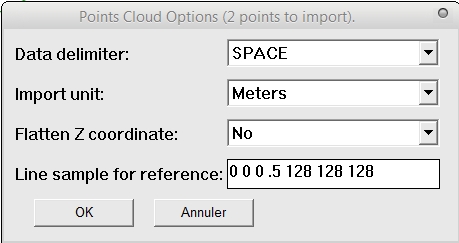
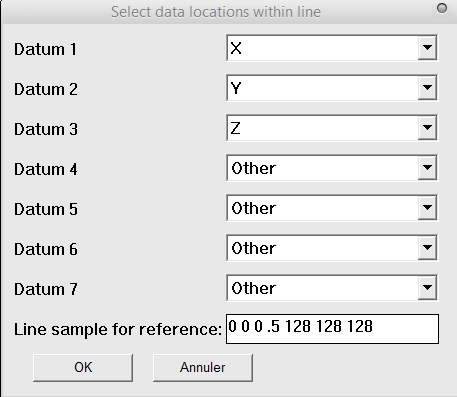
                      Dialog 1
                      Dialog 2

                      Regards,

                      DB

                      1 Reply Last reply
                      Reply Quote 0

                      Hello! It looks like you're interested in this conversation, but you don't have an account yet.

                      Getting fed up of having to scroll through the same posts each visit? When you register for an account, you'll always come back to exactly where you were before, and choose to be notified of new replies (either via email, or push notification). You'll also be able to save bookmarks and upvote posts to show your appreciation to other community members.

                      With your input, this post could be even better 💗

                      Register Login
                      • 1 / 1
                      • First post
                        Last post
                      Buy SketchPlus
                      Buy SUbD
                      Buy WrapR
                      Buy eBook
                      Buy Modelur
                      Buy Vertex Tools
                      Buy SketchCuisine
                      Buy FormFonts

                      Advertisement
