sketchucation logo sketchucation
    • Login
    Oops, your profile's looking a bit empty! To help us tailor your experience, please fill in key details like your SketchUp version, skill level, operating system, and more. Update and save your info on your profile page today!
    Mac User? | Join the Rayscaper Beta for Mac Learn More

    [Plugin] DoorTool - 7 tools, incl. icons

    Scheduled Pinned Locked Moved Plugins
    17 Posts 10 Posters 20.8k Views 10 Watching
    Loading More Posts
    • Oldest to Newest
    • Newest to Oldest
    • Most Votes
    Reply
    • Reply as topic
    Log in to reply
    This topic has been deleted. Only users with topic management privileges can see it.
    • T
      tomot
      last edited by

      forgot to add the file πŸ˜„


      DoorTools.rar

      my plugins
      tomot

      1 Reply Last reply
      Reply Quote 0
      • G
        gksl4
        last edited by

        Thank you very much

        1 Reply Last reply
        Reply Quote 0
        • A
          agrazdi
          last edited by

          Thanks in advance

          Is it possible that the arc of the openning proyection on the floor would be at least the double of sides ?? and grouped ??

          agrazdi

          1 Reply Last reply
          Reply Quote 0
          • T
            tomot
            last edited by

            @agrazdi said:

            Thanks in advance

            Is it possible that the arc of the openning proyection on the floor would be at least the double of sides ?? and grouped ??

            agrazdi

            I don't know what you mean by "the double of sides ??" if you don't want to see the arc, just turn off the doorswing layer.

            my plugins
            tomot

            1 Reply Last reply
            Reply Quote 0
            • A
              agrazdi
              last edited by

              I should have said " 12 sides instead 6 sides that the swing arc has, so it would look nicer and grouped if possible "
              But turning off the swing layer is a good option.

              Thanks

              agrazdi

              1 Reply Last reply
              Reply Quote 0
              • S
                seasdes
                last edited by

                Thank you Tomot for a very usefull plug-in. It will get a lot of use at my place. 😍 😍 😍

                Using Sketchup Pro 2019

                1 Reply Last reply
                Reply Quote 0
                • PixeroP
                  Pixero
                  last edited by

                  Thanks. Works great.

                  1 Reply Last reply
                  Reply Quote 0
                  • B
                    bellwells
                    last edited by

                    Thank you, Tomot. I make a decent amount of French doors with windowizer, so I'm sure this will save me some time.

                    Ron

                    1 Reply Last reply
                    Reply Quote 0
                    • C
                      cyan.archnet
                      last edited by

                      BRILLIANT plugin!, thank you.

                      1 Reply Last reply
                      Reply Quote 0
                      • T
                        tomot
                        last edited by

                        I discovered a small error in the DoorToolLouver.rb file which resides in the DoorTools folder.

                        The current version will NOT draw glass louvers when the "glass" option is picked under "Louver type". Although this option had been working all along, unfortunately a replacement variable I decided to change at the last moment, got transposed properly to all locations in this script, ......except one. 😞

                        Open DoorToolLouver.rbin notepad

                        def initialize
                            
                            super # calls the initialize method in the ThreePointTool class
                            # sets the default Window settings
                            $adNI14 = 1.inch if not $adNI14       # Louver Spacing
                            $klGY59 = 45 if not  $klGY59          # Louver angle
                            $fgHJ12 = 1.5.inch if not $fgHJ12     # Louver width
                            $klGY24 = 0.25.inch if not $klGY24    # Louver thickness
                            $plBH85 = 0.inch if not $plBH85       # Louver offset from opening
                            $buTB05 = 0.inch if not $buTB05       # Louver setback from face
                            $etKU36= "Solid" if not $etKU36       # Solid or Glass 
                            
                            $fgHJ12 = 0.25.inch if $fgHJ12 <= 0.inch
                            
                            # Set the layer names
                            $drDR00= "Doors" if not $drDR00        #layer for door
                            @swinglayer= "DoorSwing" if not @swinglayer  #layer for doorswing
                            
                            # Dialog box
                            ltype = ["Solid", "Glass"]
                            enums = ["",ltype.join("|")]
                            prompts = ["Default Layer", "Louver Type", "Louver Spacing", "Louver Angle", "Louver Width", "Louver Thickness", "Louver Offset ; from sides ","Louver Setback ; from face "]
                            values = [ $drDR00, $etKU36, $adNI14, $klGY59, $fgHJ12, $klGY24, $plBH85, $buTB05]
                            results = inputbox prompts, values, enums, "Door Accessory - Louver parameters"
                        
                            return if not results
                            $drDR00, $ltype, $adNI14, $klGY59, $fgHJ12, $klGY24, $plBH85, $buTB05 = results


                        and replace $ltype, The 2nd word in the last line of this code snippet with, $etKU36,
                        Then resave, DoorToolLouver.rb, Make sure this file gets resaved with the .rb extension

                        my plugins
                        tomot

                        1 Reply Last reply
                        Reply Quote 0
                        • irwanwrI
                          irwanwr
                          last edited by

                          Hi there tomot,

                          Would you mind if I ask you a question? I've been using Door Tool and Window Tool for few days now.
                          Trying to learn and to use them well. It really helps a lot. Speeding up things to do with door and window making.

                          I wonder if there is a way to customise these plugins. Like creating separate parts on the frames?
                          It might be very helpful when it deals with wood frames, I think. With wood grains flow along either the vertical or horizontal groups/components.
                          Also about the glass. Can I customise the colour of it? Like changing it to use Gray Translucent as default for example?

                          Admiring your works. Great plugins.

                          Thank you,

                          1 Reply Last reply
                          Reply Quote 0
                          • R
                            rachmatrf
                            last edited by

                            Hi Tomot,

                            Thank you very much...
                            You Rock Man!!!

                            Best regards,
                            Rach.

                            1 Reply Last reply
                            Reply Quote 0
                            • T
                              tomot
                              last edited by

                              @irwanwr said:

                              Hi there tomot,
                              I wonder if there is a way to customise these plugins. Like creating separate parts on the frames?
                              It might be very helpful when it deals with wood frames, I think. With wood grains flow along either the vertical or horizontal groups/components.
                              Also about the glass. Can I customise the colour of it? Like changing it to use Gray Translucent as default for example?

                              I left out adding materials since there is such a large variety available. hence you need to do that manually to your individual choice.
                              Yes you can change the glass color! After you have installed a door with glass, that glass color will occur in the SU materials browser click the House Icon in the browser, there you will find all the colors your scene is using. now click edit and change the color to your liking.

                              my plugins
                              tomot

                              1 Reply Last reply
                              Reply Quote 0
                              • EdsonE
                                Edson
                                last edited by

                                tom,
                                I found out what appears to be an odd behavior in your plugin: the louver tool and the mullion tool generate doors without frames! is that on purpose or my copy is not working properly? I am on mac.

                                I find it very strange in comparison with your own Bifold Tools which generates complete doors with frames.

                                edson mahfuz, architect| porto alegre β€’ brasil
                                http://www.mahfuz.arq.br

                                1 Reply Last reply
                                Reply Quote 0
                                • T
                                  tomot
                                  last edited by

                                  @edson said:

                                  tom,
                                  I found out what appears to be an odd behavior in your plugin: the louver tool and the mullion tool generate doors without frames! is that on purpose or my copy is not working properly? I am on mac.

                                  I find it very strange in comparison with your own Bifold Tools which generates complete doors with frames.

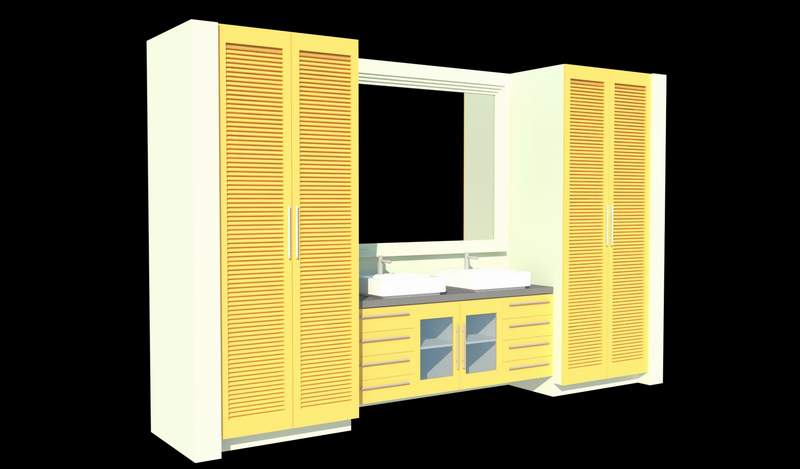
                                  Sorry for the very late reply,...its by design, for example if you don't like the bifold door panels you can delete them and replace them with actual louvers, from window tools, or use a pic that represents louvers. the same is true with my cabinet tool, if you don't like the panel effect you can replace the panels with louvers from window tools, as illustrated in the attached pic.

                                  bath.JPG

                                  my plugins
                                  tomot

                                  1 Reply Last reply
                                  Reply Quote 0
                                  • EdsonE
                                    Edson
                                    last edited by

                                    @tomot said:

                                    @edson said:

                                    tom,
                                    I found out what appears to be an odd behavior in your plugin: the louver tool and the mullion tool generate doors without frames! is that on purpose or my copy is not working properly? I am on mac.

                                    I find it very strange in comparison with your own Bifold Tools which generates complete doors with frames.

                                    Sorry for the very late reply,...its by design, for example if you don't like the bifold door panels you can delete them and replace them with actual louvers, from window tools, or use a pic that represents louvers. the same is true with my cabinet tool, if you don't like the panel effect you can replace the panels with louvers from window tools, as illustrated in the attached pic.

                                    thanks for the explanation.

                                    edson mahfuz, architect| porto alegre β€’ brasil
                                    http://www.mahfuz.arq.br

                                    1 Reply Last reply
                                    Reply Quote 0

                                    Hello! It looks like you're interested in this conversation, but you don't have an account yet.

                                    Getting fed up of having to scroll through the same posts each visit? When you register for an account, you'll always come back to exactly where you were before, and choose to be notified of new replies (either via email, or push notification). You'll also be able to save bookmarks and upvote posts to show your appreciation to other community members.

                                    With your input, this post could be even better πŸ’—

                                    Register Login
                                    • 1 / 1
                                    • First post
                                      Last post
                                    Buy SketchPlus
                                    Buy SUbD
                                    Buy WrapR
                                    Buy eBook
                                    Buy Modelur
                                    Buy Vertex Tools
                                    Buy SketchCuisine
                                    Buy FormFonts

                                    Advertisement