sketchucation logo sketchucation
    • Login
    Oops, your profile's looking a bit empty! To help us tailor your experience, please fill in key details like your SketchUp version, skill level, operating system, and more. Update and save your info on your profile page today!
    Mac User? | Join the Rayscaper Beta for Mac Learn More

    Plugin

    Scheduled Pinned Locked Moved Developers' Forum
    20 Posts 11 Posters 2.4k Views 11 Watching
    Loading More Posts
    • Oldest to Newest
    • Newest to Oldest
    • Most Votes
    Reply
    • Reply as topic
    Log in to reply
    This topic has been deleted. Only users with topic management privileges can see it.
    • GaieusG
      Gaieus
      last edited by

      Hi Rogero,

      spiraltair.rb can be found here (scroll down).

      Gai...

      1 Reply Last reply
      Reply Quote 0
      • R
        rogerra
        last edited by

        Thanks.

        I see them but when I click on either link to download it does not work.

        I guess they are not available anymore.

        1 Reply Last reply
        Reply Quote 0
        • Didier BurD
          Didier Bur
          last edited by

          Right-click on the file name and select "Save link target as".

          DB

          1 Reply Last reply
          Reply Quote 0
          • R
            remus
            last edited by

            Both the links go to an error page...

            http://remusrendering.wordpress.com/

            1 Reply Last reply
            Reply Quote 0
            • P
              pmiller
              last edited by

              @remus said:

              Both the links go to an error page...

              Not for me

              1 Reply Last reply
              Reply Quote 0
              • R
                remus
                last edited by

                Hmmm, very strange, theyre still broken for me. I wonder if it is location dependant?

                http://remusrendering.wordpress.com/

                1 Reply Last reply
                Reply Quote 0
                • StinkieS
                  Stinkie
                  last edited by

                  It's personal, Remus. The links frown upon you and your ways.

                  1 Reply Last reply
                  Reply Quote 0
                  • Chris FullmerC
                    Chris Fullmer
                    last edited by

                    They don't work for me either.

                    Lately you've been tan, suspicious for the winter.
                    All my Plugins I've written

                    1 Reply Last reply
                    Reply Quote 0
                    • J
                      Jim
                      last edited by

                      The links are incorrect. They link to the ruby files, and should end in .rb. If you add the .rb in the address bar of the browser after you click the link, you can download the files.

                      Hi

                      1 Reply Last reply
                      Reply Quote 0
                      • R
                        rogerra
                        last edited by

                        I click on the link and when it goes to the error page, I then add the .rb in the address window. It then opens the code.

                        All I can do is "select all" and copy to the clipboard.

                        Then I can past into wordpad but can only save as a .txt file.

                        How do I make it an .rb file?

                        1 Reply Last reply
                        Reply Quote 0
                        • R
                          remus
                          last edited by

                          Just change save the file as .txt, then right click the file->rename and then change it to .rb.

                          http://remusrendering.wordpress.com/

                          1 Reply Last reply
                          Reply Quote 0
                          • Alan FraserA
                            Alan Fraser
                            last edited by

                            ...or just click off the file type "text" and select "any". That way, it won't add a .txt extension after the .rb

                            3D Figures
                            Were you required to walk 500 miles? Were you advised to walk 500 more?
                            You could be entitled to compensation. Call the Pro Claimers now!

                            1 Reply Last reply
                            Reply Quote 0
                            • plot-parisP
                              plot-paris
                              last edited by

                              an alternative could be to use a newly created script by AdamB. it looks at the difference in position/rotation/scale of two components and creates multiple copies with the same transformations applied to each copy in relation ship to the previous one.

                              you can find it in this thread.create a component of the first step of your spiral stair case. create a copy, move it up and rotate it around the stairs' centre.
                              then right-click the first step-component and choose "Play it again", type in the number of desired steps, followed by "x" (15x for example), then left-click the second component...

                              thats it, you have a spiral stair case 😄

                              1 Reply Last reply
                              Reply Quote 0
                              • R
                                rogerra
                                last edited by

                                I don't get it. I have the .txt file but renaming it to spiralstair.rb does not change the type.

                                Under "rename" and "properties" it still shows as a text file, not an rb file as my other plugins do.

                                I can't find any "all" option by right clicking.

                                I tried taking an existing .rb file and saving it as a new name. Then deleting the text and pasteing the spiral stair text into it. It did't work.

                                What am I doing wrong?

                                1 Reply Last reply
                                Reply Quote 0
                                • J
                                  Jim
                                  last edited by

                                  @rogerra said:

                                  I don't get it. I have the .txt file but renaming it to spiralstair.rb does not change the type.

                                  Under "rename" and "properties" it still shows as a text file, not an rb file as my other plugins do.

                                  I can't find any "all" option by right clicking.

                                  I tried taking an existing .rb file and saving it as a new name. Then deleting the text and pasteing the spiral stair text into it. It did't work.

                                  What am I doing wrong?

                                  Stupid Windows... You need to turn off this Folder Options option before renaming extensions:
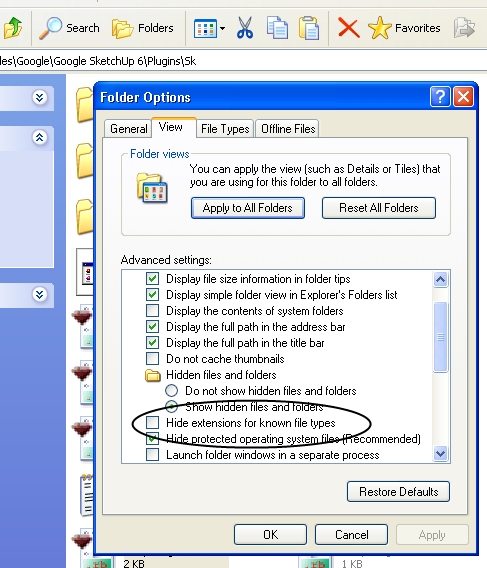

                                  ss.png

                                  Hi

                                  1 Reply Last reply
                                  Reply Quote 0
                                  • R
                                    rogerra
                                    last edited by

                                    Thanks Jim. That did the trick.

                                    1 Reply Last reply
                                    Reply Quote 0
                                    • R
                                      rogerra
                                      last edited by

                                      Well, I got it installed correctly.

                                      Now, how do I get it to work. It says select two curves (what curves?) and then what.

                                      I drew 2 circles with a 1.5' radius, selected them and got a weird cone shape.

                                      1 Reply Last reply
                                      Reply Quote 0
                                      • R
                                        RickW
                                        last edited by

                                        See this thread and this thread for discussions and examples.

                                        Hope that helps,

                                        RickW
                                        www.smustard.com

                                        1 Reply Last reply
                                        Reply Quote 0
                                        • R
                                          rogerra
                                          last edited by

                                          I think I'll stick to making my spiral stairs in "Datacad" and importing them into sketchup.

                                          This works great for me. It includes a handrail, etc.

                                          1 Reply Last reply
                                          Reply Quote 0

                                          Hello! It looks like you're interested in this conversation, but you don't have an account yet.

                                          Getting fed up of having to scroll through the same posts each visit? When you register for an account, you'll always come back to exactly where you were before, and choose to be notified of new replies (either via email, or push notification). You'll also be able to save bookmarks and upvote posts to show your appreciation to other community members.

                                          With your input, this post could be even better 💗

                                          Register Login
                                          • 1 / 1
                                          • First post
                                            Last post
                                          Buy SketchPlus
                                          Buy SUbD
                                          Buy WrapR
                                          Buy eBook
                                          Buy Modelur
                                          Buy Vertex Tools
                                          Buy SketchCuisine
                                          Buy FormFonts

                                          Advertisement