Texture removal
-
How do you remove texture from surface?
-
right click->entity info then mess about with the little materials window in there, i cant remeber the exact combination of buttons you need to press to ge it to set back to default.
-
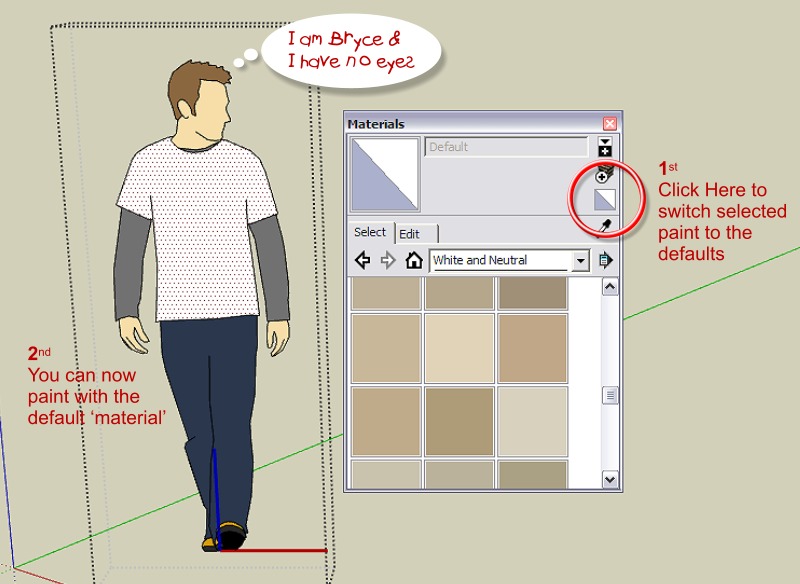
I typically do it by repainting the surface using the default material.
The screenshot below should give some clue as to how you make the 'default' the active paint selection.
Regards, Ross
-
ridix, I do exactly as Ross said above for single faces.
However if you want to remove the materials from a whole mess of materials at once you can use the "Remove Materials" script by Todd Burch found Here.
Install the plugin, then select all the faces you want to remove materials from and then run the script. -
Man, I was deleting the surface to get the materials off! Thanks, both method works fine.

Hello! It looks like you're interested in this conversation, but you don't have an account yet.
Getting fed up of having to scroll through the same posts each visit? When you register for an account, you'll always come back to exactly where you were before, and choose to be notified of new replies (either via email, or push notification). You'll also be able to save bookmarks and upvote posts to show your appreciation to other community members.
With your input, this post could be even better 💗
Register Login


Advertisement