Hi all;
I'm new to sketchUp, using V8 and also new to the OOP-structure business...
I've found in this thread the most relevant info and therefor posting here.
I've composed 2 routines which I want to perform the following:
Draw a thin transparent red cylinder and over that one a larger yellow transparent one.
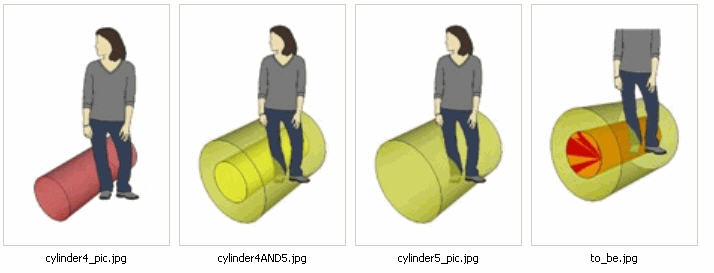
The cylinder4 routine alone = OK; red cylinder = check
The cylinder5 routine alone = OK; yellow cylinder = check
The 2 together makes the inner cylinder also Yellow...
Most likely i'm sinning to the OOP-structure, but i'm just starting...
Thanks
John
ps: i've made a combined picture and the "to_be" picture in the series is a version of which i used the paintin bucket to make the inner one red again...
the code:
def draw_cylinder4
# variables.
	center_point = Geom;;Point3d.new(0, 0, 0)
	vector = Geom;;Vector3d.new(0,-1,0)
	radius = 10
	segments = 24
	height = 50

# Get handles to our model and the Entities collection it contains.
	group=Sketchup.active_model.active_entities.add_group()
	Sketchup.active_model.rendering_options['MaterialTransparency']=true
	Sketchup.active_model.rendering_options['TransparencySort']=2

	cyl_grp_ents=group.entities
	edges=cyl_grp_ents.add_circle(center_point, vector, radius, segments)
	edges[0].find_faces
	face=edges[0].faces[0]

	mats=Sketchup.active_model.materials
	mats.add('White') if not mats['White']
	mat=mats['White']
	mat.color='red'
	mat.alpha=0.5

	face.material = "red"
	face.reverse!
	face.pushpull(height)
end
def draw_cylinder5
# variables.
	center_point = Geom;;Point3d.new(0, 0, 0)
	vector = Geom;;Vector3d.new(0,-1,0)
	radius = 20
	segments = 24
	height = 50

# Get handles to our model and the Entities collection it contains.
	group2=Sketchup.active_model.active_entities.add_group()
	Sketchup.active_model.rendering_options['MaterialTransparency']=true
	Sketchup.active_model.rendering_options['TransparencySort']=2

	cyl_grp_ents2=group2.entities
	edges2=cyl_grp_ents2.add_circle(center_point, vector, radius, segments)
	edges2[0].find_faces
	face2=edges2[0].faces[0]

	mats2=Sketchup.active_model.materials
	mats2.add('White') if not mats2['White']
	mat2=mats2['White']
	mat2.color='yellow'
	mat2.alpha=0.5

	face2.material = "yellow"
	face2.reverse!
	face2.pushpull(height)
end
remark:
I can't combine it into 1 routine because i also need them separately...
 i was fumbling around and i didn't quite understand what is going on in the lines above.