My ruby's
-
Here are three ruby scripts that I've written. Thanks to those who have helped me learn.
JS MoveTool
Description: Moves a selection with the arrow keys.
Usage:- Select a object or group of objects.
- Select the JS MoveTool and enter a distance in the VCB. Press Return/Enter.
- Now move with arrow keys.
- Use Alt + Up/Down to move in Z axis.
- You can enter a new distance at any time.
Hopefully it will work on both Windows and OSX.
Assign it to a shortcut hot key. For example Alt+M.JS Extrude (based on the Push Pull Z script by Didier Bur)
Description : Extrudes a face/faces along either X, Y or Z axis or the normal direction.
Usage : Select a face, select JS Extrude from the Plugins menu, choose direction, enter distance and here you go.JS Align
Description: Use for aligning/flattening edges.
Issues:- If used on faces they will be triagulated.
Since the script moves each vertice at a time,
SketchUp's autofold feature will trangulate all non planar faces.
I've tried to find a way of auto erasing all edges created by autofold but havens succeded.
If you know how to fix it please let me know. - The script doesnt work well with faces inside groups/components.
Get them at my site: http://www.pixero.com
Enjoy!

-
Thanks Jan, much appreciated.
Mike
-
Thank you Pixero!
they work well all of them..
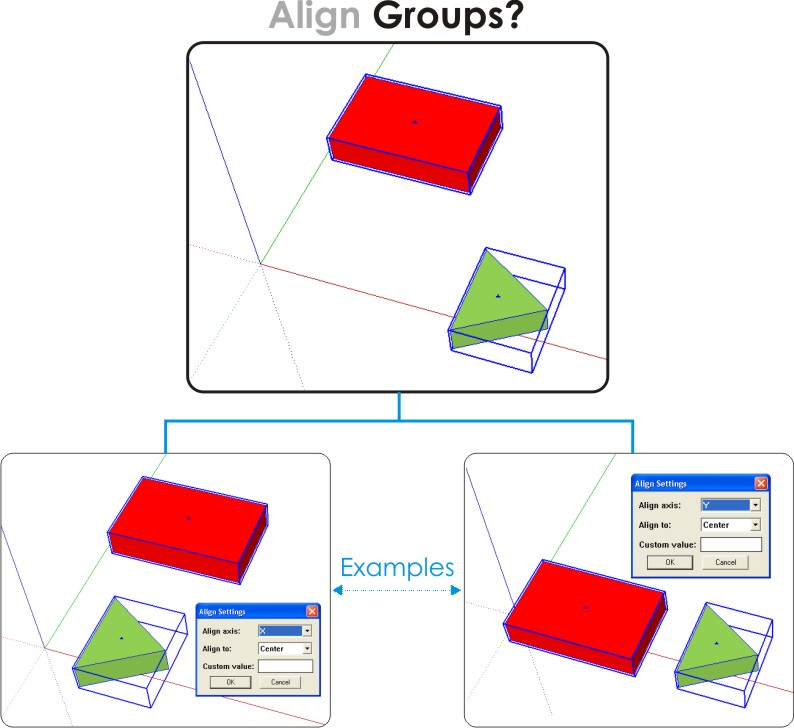
I really like the align tool... Could be possible to make it work for aligning groups?
I attach a image example.Daniel S
-
I've updated JS Align so it works with groups/components as well.
If using custom value with groups, also use the Align groups: Max, Min or Center.Enjoy!
-
fantastic... thanks...
-
I was wishing this feature for a long time.
Thank you very much!!!Daniel S
-
The extrude tool is not working for me neither in SU5 nor SU6. I can get the dialogue box (select a face>Plugins>JS Extrude) and enter my data but nothing happens. Any thoughts? I'll check back in the AM.
-
Just a thought... are you extruding in a direction that is possible?
(I mean not in 90 degrees from the surface normal.)
And of cause you'll have to click ok.
Other than that I dont know. Are you on Mac or Windows?And Coen, I want people to come to my site to download.
-
Two more scripts added.
JS Shadow Threshold
Set the threshold for when a transparent object will cast shadows.
Works on either entire model or a selection.JS Shadow Control
Set if a selection should cast or receive shadows.Get them at my site: http://www.pixero.com
Enjoy!
Jan
-
Thanks for the align tool. It'll make my job a lot easier. Those trees will be in line now. (muah ha ha)
-
JS
Not sure if I'm missing somethg, is there a way to get a translucent surface (like the glass in a window) to receive a shadow (using JS ShadowControl)? Or is this for opaque objects? Also, at say 75% translucence (>) should the object be casting a faded shadow? I haven't been able to make that work....
BTW thanks for these tools, especially your Zoom Selected tool, I've always had to ident the object in the Outliner, the use 3 shortcuts, to Edit, Hide the rest of the model, and then zoom extents. When you issued that one it became one step and I thank you ea time I use it.
Thx again.
/D
-
@pixero said:
Just a thought... are you extruding in a direction that is possible?
(I mean not in 90 degrees from the surface normal.)
And of cause you'll have to click ok.
Other than that I dont know. Are you on Mac or Windows?And Coen, I want people to come to my site to download.
Jan,
Sorry it took me so long to acknowledge your reply. As is often the case, it was my fault-operator error.
Thanks. -
Added small update to jsBackgroundColor.rb so you now can control ground color as well.

No website is present on this hostname
The website you are trying to reach could be suspended, deleted or DNS could be incorrect
(www.pixero.com)
-
While working on another script I stumbled on this (camera.focal_length) in the docs.
I haven't seen this before and since I repeatedly have had problems with using field of view I though I'd share it.
Here is a small script called jsFocalLength that lets you set the cameras focal length in mm. You'll find it under Camera menu.
No website is present on this hostname
The website you are trying to reach could be suspended, deleted or DNS could be incorrect
(www.pixero.com)
-
is not the same as entering "35mm" in VCB while on Zoom tool ?
-
Ok, I never knew it was there. Anyway, if anyone wants it...
-
Added js Frame Step. A script for showing a specified frame of an animation.
You need at least two scenes for it to work. Type in the frames per second you use (Typically: NTSC 30, PAL 25, Film 24) and then the frame you want to go to.Added js Camera Tool. A script for offseting camera rotation and translation numericly.
No website is present on this hostname
The website you are trying to reach could be suspended, deleted or DNS could be incorrect
(www.pixero.com)
-
Updated my jsMoveTool at a request. Now press ctrl (Apple key on Mac) to move 1/10 the entered value and Shift to move 10 * the entered value. (And press alt for moving in Z direction as before.)
Thanks to Rick W for fixing a bug.Get it at my site http://www.pixero.com
Enjoy!
-
Thanks so much for you work Jan. I use your scripts quite often and have never officially said thank you.
-

this will be helpful.
thanks!





Hello! It looks like you're interested in this conversation, but you don't have an account yet.
Getting fed up of having to scroll through the same posts each visit? When you register for an account, you'll always come back to exactly where you were before, and choose to be notified of new replies (either via email, or push notification). You'll also be able to save bookmarks and upvote posts to show your appreciation to other community members.
With your input, this post could be even better 💗
Register Login


Advertisement