sketchucation logo sketchucation
    • Login
    Oops, your profile's looking a bit empty! To help us tailor your experience, please fill in key details like your SketchUp version, skill level, operating system, and more. Update and save your info on your profile page today!
    Mac User? | Join the Rayscaper Beta for Mac Learn More

    ModLumi : Un SketchUp like comme on les aime!
    Scheduled Pinned Locked Moved Français
    119 Posts 6 Posters 7.8k Views 5 Watching
    Loading More Posts
    • Oldest to Newest
    • Newest to Oldest
    • Most Votes
    Reply
    • Reply as topic
    Log in to reply
    This topic has been deleted. Only users with topic management privileges can see it.
    • G
      Glenn at home @ntxdave
      last edited by Glenn at home

      @ntxdave Highlight some text, right click and select translate selection and then choose entire page 😉

      SketchUp Pro 2025/2026 Dell XPS 8950 i9-12900K 64GB Ram RTX 3080

      ntxdaveN 1 Reply Last reply
      Reply Quote 0
      • ntxdaveN
        ntxdave @Glenn at home
        last edited by

        @Glenn-at-home said:

        @ntxdave Highlight some text, right click and select translate selection and then choose entire page 😉

        Thank you sir! Wish there was a way to do that on my iPad.

        Press F1...thank me later

        G 1 Reply Last reply
        Reply Quote 0
        • pilouP
          pilou
          last edited by pilou

          @ntxdave
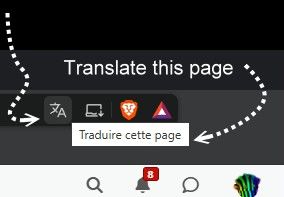
          WIth Brave browser i have something who ask if you want translate the page !
          I suppose that works also in the Ipad! 🙂
          rave.jpg

          Frenchy Pilou
          Is beautiful that please without concept!
          My Little site :)

          ntxdaveN 1 Reply Last reply
          Reply Quote 0
          • ntxdaveN
            ntxdave @pilou
            last edited by

            @pilou said:

            @ntxdave
            WIth Brave browser i have something who ask is you want translate the page !
            I suppose that workss also in the Ipad! 🙂

            rave.jpg

            I was able to translate via the right click. Just wish there was a way I could do it on my iPad since I use it a lot for the forum.

            Press F1...thank me later

            1 Reply Last reply
            Reply Quote 0
            • pilouP
              pilou
              last edited by

              city.jpg

              Les prompts furent:
              Effacer les axes et faire une ville futuriste
              au bord de la mer
              à la montagne dans la neige


              city1.jpg

              city1b.jpg

              city2.jpg

              Frenchy Pilou
              Is beautiful that please without concept!
              My Little site :)

              1 Reply Last reply
              Reply Quote 0
              • PatrickP
                Patrick
                last edited by

                Oui effectivement pas besoin de mettre un roman ! merci pour la réponse.

                La CAO sans se casser la tête ? FreeCAO la CAO toute en vidéo.

                1 Reply Last reply
                Reply Quote 0
                • G
                  Glenn at home @ntxdave
                  last edited by

                  @ntxdave said:

                  @Glenn-at-home said:

                  @ntxdave Highlight some text, right click and select translate selection and then choose entire page 😉

                  Thank you sir! Wish there was a way to do that on my iPad.

                  Ah, didn't think about on a mobile device. My bad 😞

                  SketchUp Pro 2025/2026 Dell XPS 8950 i9-12900K 64GB Ram RTX 3080

                  1 Reply Last reply
                  Reply Quote 0
                  • pilouP
                    pilou
                    last edited by pilou

                    ModLumi est aussi disponible pour MAC! 😉

                    Hi all,

                    Modlumi now runs on the Mac too. You can get it from the download button on modlumi.com , or directly here: modlumi.com/download/latest/macos . It's free.

                    It's the same desktop app as on Windows: save models straight to disk, File → Save to Image…, plugins and scripting with the script console and editor, and all the built-in plugins.

                    Getting started

                    Unzip the download and move Modlumi to your Applications folder.
                    The app is signed and notarized by Apple, so it opens without security warnings.
                    Shortcuts use Cmd where Windows uses Ctrl, so Cmd+N, Cmd+A and so on.
                    What you need

                    A Mac with Apple silicon (M1 or newer) running macOS 15 Sequoia or later. Intel Macs aren't supported yet.

                    This is the first Mac build, so expect a few rough edges. If something looks or feels off, please use Help → Report a Bug or Send Feedback… or post it here as usual.

                    Frenchy Pilou
                    Is beautiful that please without concept!
                    My Little site :)

                    1 Reply Last reply
                    Reply Quote 0
                    • pilouP
                      pilou
                      last edited by

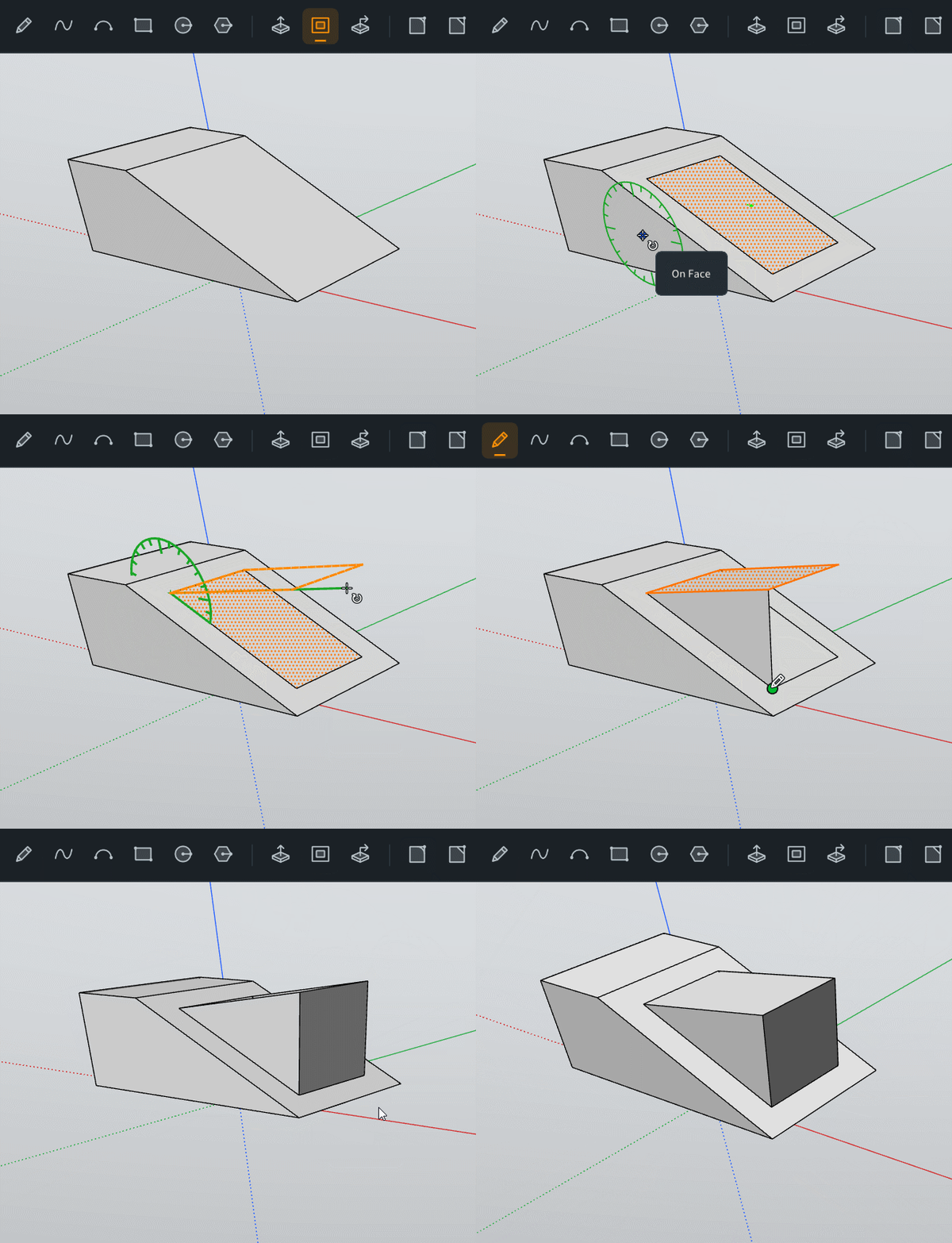
                      Il faut mémoriser la position de la face avec la flèche basse et non Maj comme dans SKetchUp!
                      GIF_rotate_face.gif

                      car.jpg

                      cars1.jpg

                      Frenchy Pilou
                      Is beautiful that please without concept!
                      My Little site :)

                      1 Reply Last reply
                      Reply Quote 0
                      • pilouP
                        pilou
                        last edited by

                        feuilles.jpg

                        vegetation.jpg

                        Frenchy Pilou
                        Is beautiful that please without concept!
                        My Little site :)

                        1 Reply Last reply
                        Reply Quote 0

                        Hello! It looks like you're interested in this conversation, but you don't have an account yet.

                        Getting fed up of having to scroll through the same posts each visit? When you register for an account, you'll always come back to exactly where you were before, and choose to be notified of new replies (either via email, or push notification). You'll also be able to save bookmarks and upvote posts to show your appreciation to other community members.

                        With your input, this post could be even better 💗

                        Register Login
                        • 1
                        • 2
                        • 3
                        • 4
                        • 5
                        • 6
                        • 4 / 6
                        • First post
                          Last post
                        Buy SketchPlus
                        Buy SUbD
                        Buy WrapR
                        Buy eBook
                        Buy Modelur
                        Buy Vertex Tools
                        Buy SketchCuisine
                        Buy FormFonts

                        Advertisement