Potential Project
-
Anyone looking for a seemingly simple project that would be very useful???
Seemingly, because I have no clue.....

I would love to see a plugin/script that would sequentially place numbers at a set height wherever you clicked on a model. You would also need to be able to set the start number (1,2,3... or 25,26,27,28... etc).
I am looking to number lots on site plans. There is a script available for AutoCad called 'lotno' that has the exact functionality I am looking for, with the exception of specifying the Z value.
-
I know TIG knows his way around ruby scripts for SketchUp, I also know he develops scripts for other drawing platforms (AutoCAD & Revit if memory serves) as well. Maybe contact him?
-
@odewallrus said:
Anyone looking for a seemingly simple project that would be very useful???
Seemingly, because I have no clue.....
I would love to see a plugin/script that would sequentially place numbers at a set height wherever you clicked on a model. You would also need to be able to set the start number (1,2,3... or 25,26,27,28... etc).
I am looking to number lots on site plans. There is a script available for AutoCad called 'lotno' that has the exact functionality I am looking for, with the exception of specifying the Z value.
I am assuming you are talking "spot heights" that would be invaluable especially in Landscape Architecture on contours. Brilliant idea mate, would change my life

-
@l i am said:
@odewallrus said:
Anyone looking for a seemingly simple project that would be very useful???
Seemingly, because I have no clue.....
I would love to see a plugin/script that would sequentially place numbers at a set height wherever you clicked on a model. You would also need to be able to set the start number (1,2,3... or 25,26,27,28... etc).
I am looking to number lots on site plans. There is a script available for AutoCad called 'lotno' that has the exact functionality I am looking for, with the exception of specifying the Z value.
I am assuming you are talking "spot heights" that would be invaluable especially in Landscape Architecture on contours. Brilliant idea mate, would change my life
I was not talking about spot or 'TOPO' heights, but that would be a great option as well as sequential numbering. I do agree.
-
Add Height from Datum by TIG is the one for giving heights of objects or terrain. However if you want it to work in a specific format you may need some help modifying it. How it gets from SU text to something like a 2d survey format, I couldn't imagine. The numbering thing's a nice idea. I would probably find it nice in LayOut, if I didn't reserve those kind of things for CAD.
-
What do you mean "at a set height" ? Is it a constant altitude above ground for all text labels, or a height above the objects/points you click ?
With more precise specifications, this script would be quite easy to code
-
I was thinking a constant altitude above the ground.
Typically I would use this for numbering (property) lots and it would be shown in Layout as a parallel projection. numbering 500-1000+ lots becomes quite tedious.
-
Hi,
Here is the first attempt to code what you want (I hope).
Usage:
Unzip the archive and place NumberingText.rbs in your Plugins folder
Restart SketchUpSelect 'Numbering Text' in the 'Extensions' menu
Fill the dialog
Prefix will precede the number (you can include spaces and \n sequence)
Suffix will follow the number (you can include spaces and \n sequence)
N.B.: a \n sequence in a text will reject the rest of the text on a new line.
Altitude will be the height of all the texts above groundClick to insert label(s) , Right-clic to change settings, Escape to cancel, Return to end the tool.
Examples:
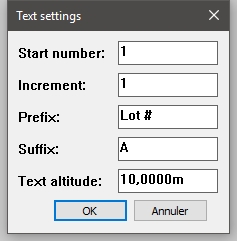
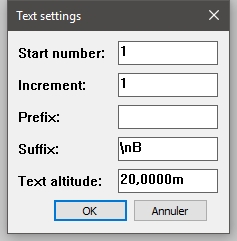
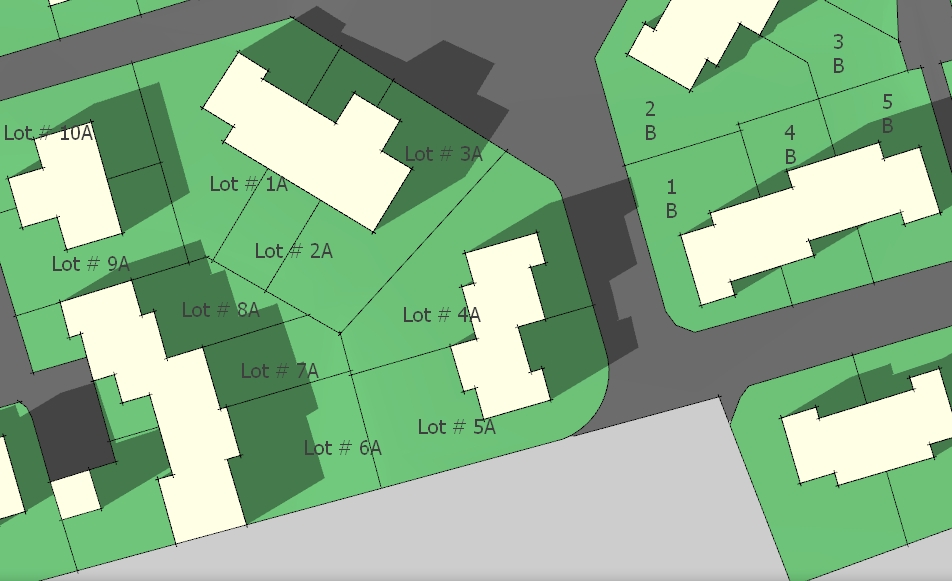
-
That looks excellent!
-
Didier Bur,
Thank you. That is awesome! Just what I was looking for. I would like to see only a single enhancement, if it is possible and you would be so kind...
Are you able to make the text string centered with the mouse click versus left justified at the insert point?
-
I'm afraid I can't
 . Unfortunately text entities in SketchUp are very basic (as opposed to text in Layout), and they do not have justification properties (because they are automatically left or right justified, depending on the arrow and pin features).
I've tried to move the text a little to the left, but this translation depends on the text font and text height, it never gives a good result. A workaround would be to click slighty to the left of the location you want, knowing how long the text is, how big the font is, etc.
Best regards,EDIT: I found that using 3DText will do the trick. I'll investigate this
-
Didier Bur,
If it is possible with the 3d text or not, Thank you very much. This will be an incredible help that I can use immediately. I am currently finishing up an 1200du project which prompted my initial 'Potential Project' suggestion. I was not expecting anything as polished and flexible as your script, and surely nothing so quickly.
I sooooo owe you a beer or 3. -
Here is the second attempt, with it you can insert either 2D texts (like before) and 3D texts (these will be centered on your clicks.
Install:
Unzip the archive and place Numbering2D3DText.rbs in your Plugins folder (remove any old version)
Restart SketchUp, select your option (2D or 3D) in the Draw menu2D Text Usage:
Fill the dialog:
- Prefix will precede the number (you can include spaces,\n or \t sequences)
- Suffix will follow the number (you can include spaces,\n or \t sequences)
- Text altitude will be the height (in your current units) of all the texts, above ground (you can use negative values)
- Click to insert label(s) , Right-clic to change settings, Escape to cancel, Return to end the tool.
3D Text Usage:
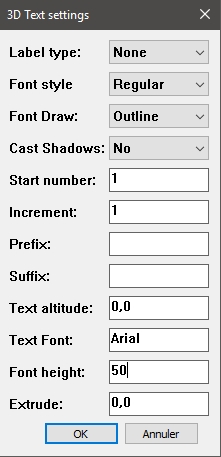
Fill the dialog:
- Prefix will precede the number (you CANNOT include spaces,\n or \t sequences)
- Suffix will follow the number (you CANNOT include spaces,\n or \t sequences)
- Text altitude will be the height (in your current units) of all the texts, above ground (you can use negative values)
- Text font: enter a font name like Arial, Verdana, Tahoma, Times New Roman, etc.
- Font Height: the height of the characters, in your current units
- Extrude: the width (or depth) of the characters
- Click to insert label(s) , Right-clic to change settings, Escape to cancel, Return to end the tool.
N.B.: 3D texts will be centered around the points you click, in top view.
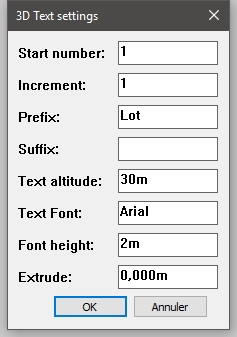
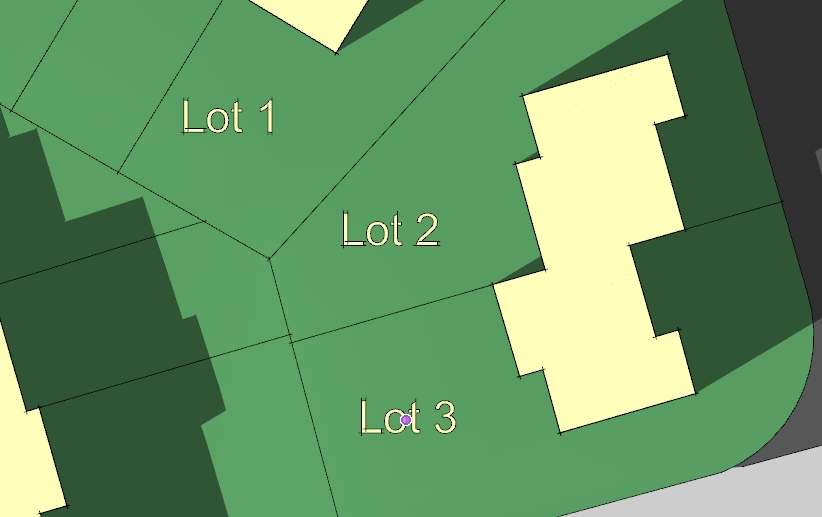
Enjoy !

-
Version 2 works great. Thank you, again.
-
Hi,
Here is the very last final version (I swear)
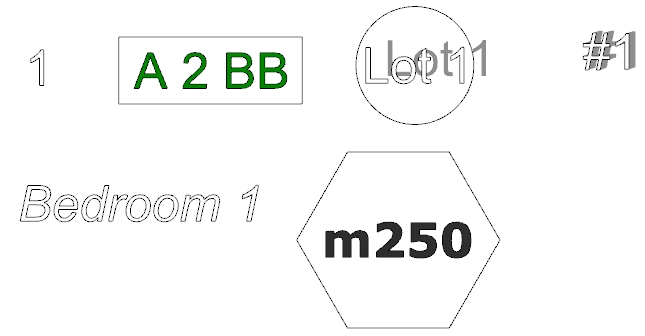
More options for the 3d texts settings:
Some examples:
-
Those are very nice enhancements. I will try it today on a project. TY.
-
Very nice enhancements!
-
Neat! Now copy and paste this to Layout API please.

(Yes, I am very well aware it doesn't work that way, just commenting on the lack of LO enhancements and wishing we had something like this there.)
-
yup... that would be cool.
-
I see at least 1 missing feature. The text label layer.
(Imagine having to select all those text objects to change their layer?)Workaround is to create and change to a "Text" layer (named whatever you please) before creating the text.




Hello! It looks like you're interested in this conversation, but you don't have an account yet.
Getting fed up of having to scroll through the same posts each visit? When you register for an account, you'll always come back to exactly where you were before, and choose to be notified of new replies (either via email, or push notification). You'll also be able to save bookmarks and upvote posts to show your appreciation to other community members.
With your input, this post could be even better 💗
Register Login


Advertisement