[REQ] Inflate Components...
-
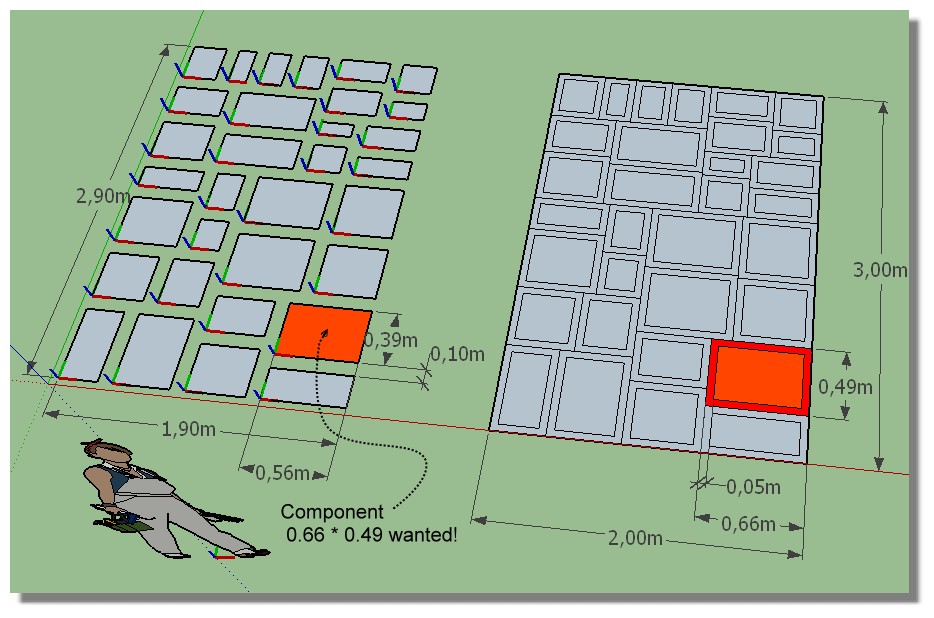
I have these components on the left
How make a "Strip" around each for have the red ones? (here in 2D but will fine also in 3D)
(When i say a strip : just rectangle becomes larger inflate by 0.05 m)
A sort of Scale ?...Seems "Scale Rotate Multiple" by Chris Fullmer can make the trick but curioussly not!

So have you a little trick or a little plugin for that?

-
Try this
@mod = Sketchup.active_model @sel = @mod.selection cmps = @sel.grep(Sketchup;;ComponentInstance) cmps.each{|ci| ctr = Geom;;Point3d.linear_combination(0.5,ci.bounds.corner(0),0.5,ci.bounds.corner(3)) xscl = (ci.bounds.width+0.1.m)/ci.bounds.width yscl = (ci.bounds.height+0.1.m)/ci.bounds.height tr = Geom;;Transformation.scaling(ctr,xscl,yscl,1.0) ci.transform! tr } -
Excellent!

Can you put this in a little plugin with one input variable measure?
And something for any forms? Separated Components on the left: Gap = 0.2m
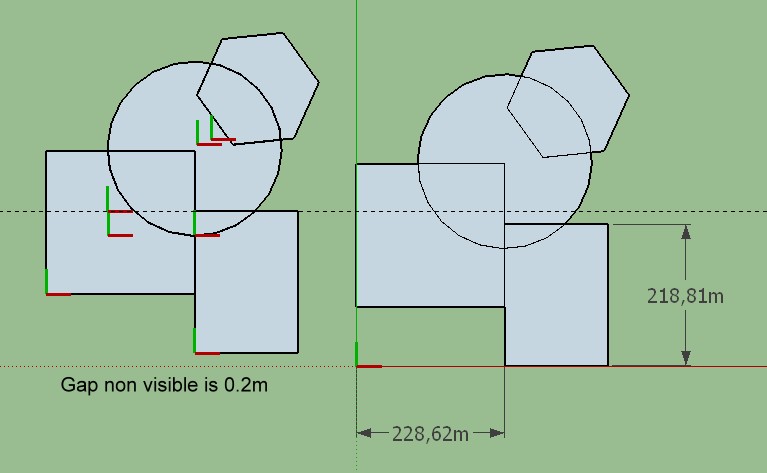
Here big size of scale for avoid overcrossed arc-lines!
My workflow for create separate Components from a general drawing (above previous post from Protrude by Jim)
- Multiple Offset by Remus
- Select Only Simple Face by TIG ?
- Copy move
- Loose to Group by Chris Fulmer
- Groups to Components by ThomThom
- new code Inflate By Sdmitch (works fine for quads forms) Not yet for these forms above!

But maybe some one has a more tricky tip?


Hello! It looks like you're interested in this conversation, but you don't have an account yet.
Getting fed up of having to scroll through the same posts each visit? When you register for an account, you'll always come back to exactly where you were before, and choose to be notified of new replies (either via email, or push notification). You'll also be able to save bookmarks and upvote posts to show your appreciation to other community members.
With your input, this post could be even better 💗
Register Login


Advertisement