sketchucation logo sketchucation
    • 登入
    Oops, your profile's looking a bit empty! To help us tailor your experience, please fill in key details like your SketchUp version, skill level, operating system, and more. Update and save your info on your profile page today!
    🔌 Smart Spline | Fluid way to handle splines for furniture design and complex structures. Download

    [Plugin][$] Profile Builder 2

    已排程 已置頂 已鎖定 已移動 Plugins
    219 貼文 40 Posters 58.6k 瀏覽 40 Watching
    正在載入更多貼文
    • 從舊到新
    • 從新到舊
    • 最多點贊
    回覆
    • 在新貼文中回覆
    登入後回覆
    此主題已被刪除。只有擁有主題管理權限的使用者可以查看。
    • FrederikF 離線
      Frederik
      最後由 編輯

      @pixero said:

      @Frederik: Have you tried deleting the session.dat file here?
      C:\Users\user\AppData\Roaming\SketchUp\SketchUp 2017\SketchUp
      Also log out from your browser if you are logged in there as well.

      I had not tried that until now...
      There wasn't any "session.dat" file...
      (Before you ask... Yes, I know it's a hidden folder, but I have enabled viewing hidden files and folders and I know where to look, what to do etc. but the file wasn't there...)

      I know you wanted to help me, Jan, which I appreciate, but still no luck... 😞

      @pixero said:

      I think it is embarrasing for the SketchUp Team that they can't get this to work.
      The SketchUcation extension manager works soo much better IMHO.

      I fully agree...!
      But why is this the only extension I have this issue with...? 😕

      I have Profile Bulder 2 (2.1.5)
      Can someone confirm that there's a newer version available...?!?

      Cheers
      Kim Frederik

      1 條回覆 最後回覆 回覆 引用 0
      • jujuJ 離線
        juju
        最後由 編輯

        I had the same as you Frederik, but the logging out and back in worked for me (phew!).

        I don't know what changes were made to PB2 and Artisan with the updates, versions report as follows:

        • Artisan: 1.3.0
        • PB2: 2.1.7

        Save the Earth, it's the only planet with chocolate.

        1 條回覆 最後回覆 回覆 引用 0
        • FrederikF 離線
          Frederik
          最後由 編輯

          Cheers, Juju! 👍

          I also have Artisan and it updated without the message, so I've got Artisan 1.3.0
          But the update of PB2 certainly won't work for me... 😕

          Cheers
          Kim Frederik

          1 條回覆 最後回覆 回覆 引用 0
          • W 離線
            Whaat
            最後由 編輯

            @frederik said:

            Cheers, Juju! 👍

            I also have Artisan and it updated without the message, so I've got Artisan 1.3.0
            But the update of PB2 certainly won't work for me... 😕

            Hello everyone,

            The Extension Manager can only be used to updated PB2 if you have purchased PB2 from the Extension Warehouse. Otherwise, you can always download the latest version of PB2 from here:

            Link Preview Image
            Download Profile Builder

            favicon

            Profile Builder 4 (profilebuilder4sketchup.com)

            Note: Version 2.1.7 (just released) just contains a few minor bug-fixes.

            More information can be found here:
            http://profilebuilder4sketchup.com/faq/

            SketchUp Plugins for Professionals

            1 條回覆 最後回覆 回覆 引用 0
            • FrederikF 離線
              Frederik
              最後由 編輯

              Thanks, Whaat...! 👍
              Everything works fine now and I don't get the nagging window informing me that I have an outdated extension that needs to get updated... 😄

              Cheers
              Kim Frederik

              1 條回覆 最後回覆 回覆 引用 0
              • R 離線
                rv1974
                最後由 編輯

                Whaat will we see a new major version in 2017?

                1 條回覆 最後回覆 回覆 引用 0
                • R 離線
                  rv1974
                  最後由 編輯

                  Whaat please add reverse toggling (with keyboard) while creating.

                  1 條回覆 最後回覆 回覆 引用 0
                  • pep75P 離線
                    pep75
                    最後由 編輯

                    I'm having an issue with Profile Builder which is very annoying. When browsing in profile folders I can't see their names in the upper row. Can I change this? Is there a solution?
                    Thanks!
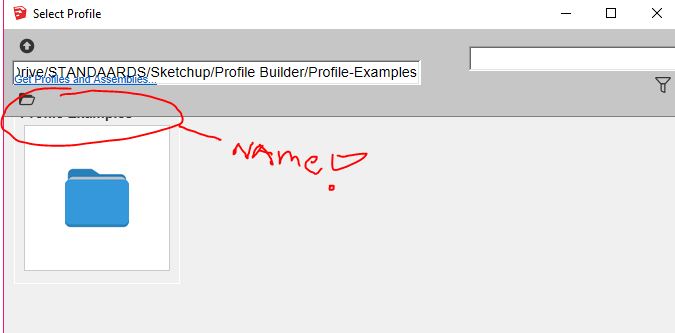

                    Capture.JPG

                    1 條回覆 最後回覆 回覆 引用 0
                    • jujuJ 離線
                      juju
                      最後由 編輯

                      your monitor setup, do you use some sort of scaling factor / %?

                      Save the Earth, it's the only planet with chocolate.

                      1 條回覆 最後回覆 回覆 引用 0
                      • W 離線
                        Whaat
                        最後由 編輯

                        @pep75 said:

                        I'm having an issue with Profile Builder which is very annoying. When browsing in profile folders I can't see their names in the upper row. Can I change this? Is there a solution?
                        Thanks!

                        You just need to stretch out the size of the window. The size of the window should be saved for next time you open it. Is this not happening for you?

                        SketchUp Plugins for Professionals

                        1 條回覆 最後回覆 回覆 引用 0
                        • pep75P 離線
                          pep75
                          最後由 編輯

                          Thanks for you replies! Scaling is set to 100% (I've a 2560x1440 screen). When I drag the window and try to scale it the upper folder names stay hidden...that's doesn't do anything. I'v tried a lot to solve this however...😞

                          1 條回覆 最後回覆 回覆 引用 0
                          • W 離線
                            Whaat
                            最後由 編輯

                            @pep75 said:

                            Thanks for you replies! Scaling is set to 100% (I've a 2560x1440 screen). When I drag the window and try to scale it the upper folder names stay hidden...that's doesn't do anything. I'v tried a lot to solve this however...😞

                            Can you post a screenshot or a video of your window with the window width increased?

                            SketchUp Plugins for Professionals

                            1 條回覆 最後回覆 回覆 引用 0
                            • pep75P 離線
                              pep75
                              最後由 編輯

                              Hey Whaat...when click on the full-screen button in the window(square button) it's fully visible...and when I reopen the dialaog it's okay again (??!). Well fixed. Sorry to have you bothered!!! Feel like a noob now! 😕 Thanks!!!

                              1 條回覆 最後回覆 回覆 引用 0
                              • W 離線
                                Whaat
                                最後由 編輯

                                @pep75 said:

                                Hey Whaat...when click on the full-screen button in the window(square button) it's fully visible...and when I reopen the dialaog it's okay again (??!). Well fixed. Sorry to have you bothered!!! Feel like a noob now! 😕 Thanks!!!

                                OK then! Thanks for letting me know it is working!

                                SketchUp Plugins for Professionals

                                1 條回覆 最後回覆 回覆 引用 0
                                • pep75P 離線
                                  pep75
                                  最後由 編輯

                                  😄) Thanks again!

                                  1 條回覆 最後回覆 回覆 引用 0
                                  • 1
                                  • 2
                                  • 7
                                  • 8
                                  • 9
                                  • 10
                                  • 11
                                  • 11 / 11
                                  • 第一個貼文
                                    最後的貼文
                                  Buy SketchPlus
                                  Buy SUbD
                                  Buy WrapR
                                  Buy eBook
                                  Buy Modelur
                                  Buy Vertex Tools
                                  Buy SketchCuisine
                                  Buy FormFonts

                                  Advertisement

