sketchucation logo sketchucation
    • 登入
    Oops, your profile's looking a bit empty! To help us tailor your experience, please fill in key details like your SketchUp version, skill level, operating system, and more. Update and save your info on your profile page today!
    ⚠️ Important | Libfredo 15.6b introduces important bugfixes for Fredo's Extensions Update

    Sweet New Plugin from Garry Kernan is in the pipe.

    已排程 已置頂 已鎖定 已移動 Plugins
    38 貼文 9 Posters 3.2k 瀏覽 9 Watching
    正在載入更多貼文
    • 從舊到新
    • 從新到舊
    • 最多點贊
    回覆
    • 在新貼文中回覆
    登入後回覆
    此主題已被刪除。只有擁有主題管理權限的使用者可以查看。
    • jujuJ 離線
      juju
      最後由 編輯

      I cant' wait to see the finished product!

      Save the Earth, it's the only planet with chocolate.

      1 條回覆 最後回覆 回覆 引用 0
      • G 離線
        Garry K
        最後由 編輯

        Testers found a few bugs that I am working through. I've also learned a bit and I believe that I will be able to handle opening and closing of bifolds.

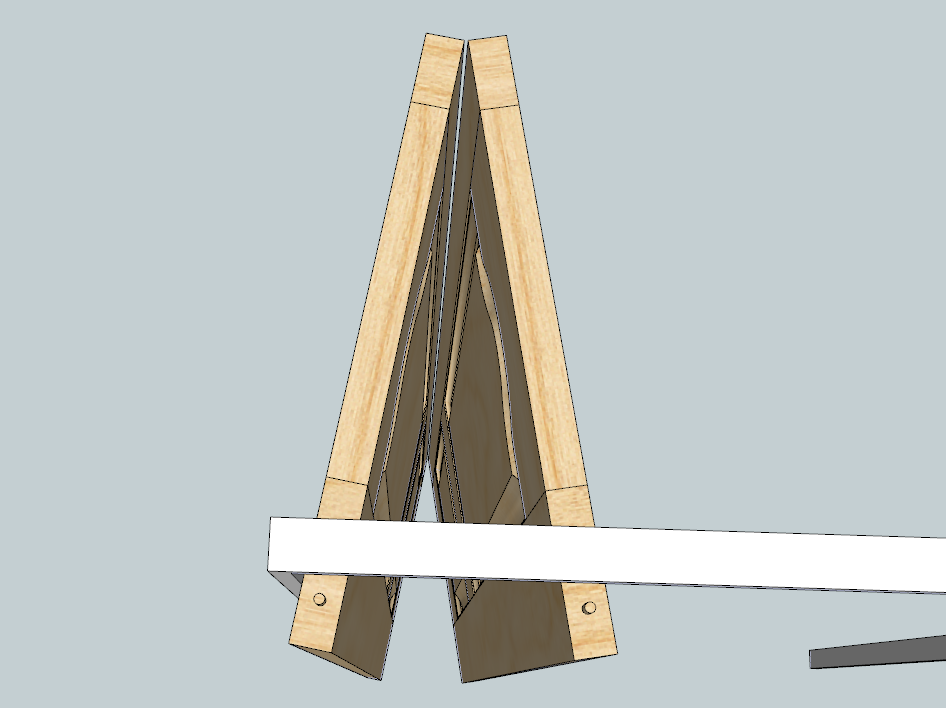
        The dowel is just to show you where the pivot point is.
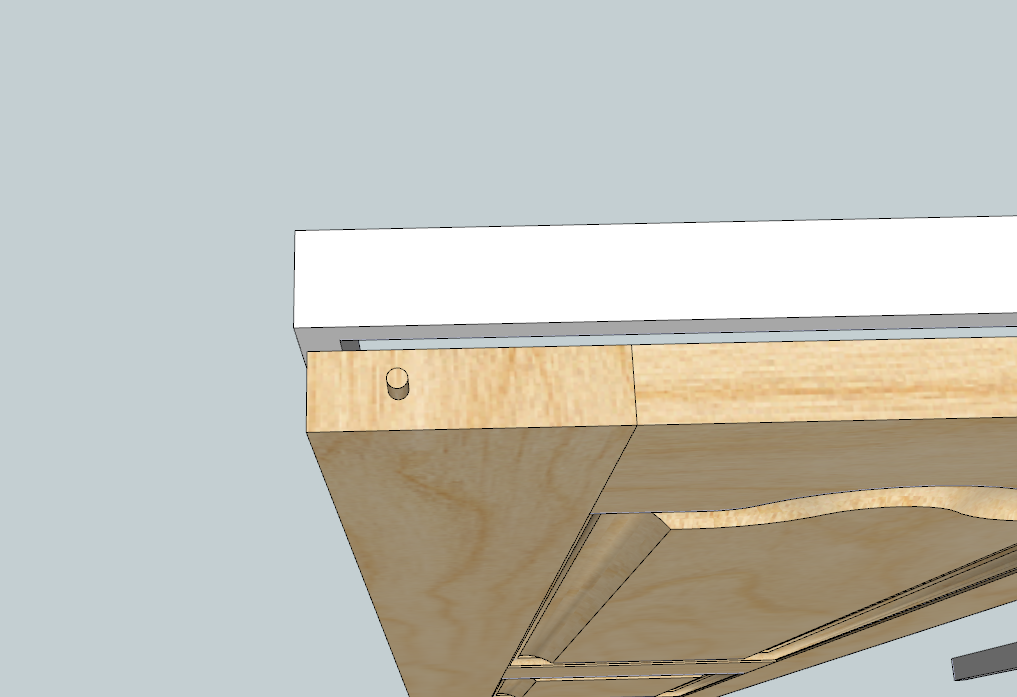

        Bifold with half jamb closed - using pivot point of 35 mm


        Bifold with half jamb opened - same pivot point

        1 條回覆 最後回覆 回覆 引用 0
        • G 離線
          Garry K
          最後由 編輯

          Here is a working version of a pair of bifold doors.


          Pair of Bifolds

          1 條回覆 最後回覆 回覆 引用 0
          • KrisidiousK 離線
            Krisidious
            最後由 編輯

            It has a construction guide in it... But very nice.

            By: Kristoff Rand
            Home DesignerUnique House Plans

            1 條回覆 最後回覆 回覆 引用 0
            • G 離線
              Garry K
              最後由 編輯

              Yes - the construction guide was temporarily added along with the circles. Shows that the pivot point works as expected.

              1 條回覆 最後回覆 回覆 引用 0
              • KrisidiousK 離線
                Krisidious
                最後由 編輯

                yes, works well...

                By: Kristoff Rand
                Home DesignerUnique House Plans

                1 條回覆 最後回覆 回覆 引用 0
                • G 離線
                  Garry K
                  最後由 編輯

                  New DoorMaker Gold is now in testing.
                  Should be available for general download within a few days.

                  Version 1.0.36 – Dec 17, 2014

                  1. Added door jambs and half jambs for passage doors and bifolds.
                  2. Added Swing Layer for 2D house plans.
                  3. Added pivot point for passage doors and astragals for double doors.
                  4. Re organized door maker input form.
                  5. Added Top Rail Height.
                  6. Added a number of new fields to support door jambs.
                  7. Dropped "Schlage Modern Handle Left" and changed the name of "Schlage Modern Handle Right" to "Schlage Modern". Door maker now flips RH handles for LH doors.
                  8. Finished dynamic movement for bifold doors.
                  9. You can now have 0 to 3 mullions for square panel sections.
                  1 條回覆 最後回覆 回覆 引用 0
                  • jujuJ 離線
                    juju
                    最後由 編輯

                    Excellent! Just as I am about to go on holiday. Will have to check it out at a later stage then.

                    Save the Earth, it's the only planet with chocolate.

                    1 條回覆 最後回覆 回覆 引用 0
                    • G 離線
                      Garry K
                      最後由 編輯

                      The new version is now available from my website
                      cabmaker32.com

                      You need to register and then you can download a trial.

                      1 條回覆 最後回覆 回覆 引用 0
                      • A 離線
                        AcesHigh
                        最後由 編輯

                        @olishea said:

                        @garry k said:

                        I can put a direction symbol like an arc and an arrow for 2D plans.
                        You are suggesting to put the direction information on a user defined named layer.
                        Please provide an example of what you would like to see for a direction symbol

                        That pivot hinge looks interesting. Looks like the door will complete clear the casings and can open 180 degrees.

                        This pivot hinge allows a door to open both directions.
                        [attachment=0:3d200ecp]<!-- ia0 -->both way pivot hinge.PNG<!-- ia0 -->[/attachment:3d200ecp]

                        Just thought it would be a nice addition to your plugin. People tend to use pivot hinges on very large external doors (>1000mm wide) although you do see them internally from time to time. I believe there is also another pivot hinge that just acts as an axle directly though the door, might be wrong but the type you have posted looks a bit more intricate than the ones I have seen, unless I have misunderstood the mechanism.

                        http://1.design-milk.com/images/2013/05/pivot-door-Graux-Baeyens-Architecten-600x900.jpg

                        this photo makes me dizzy. Depth, wideness, size of door, corridor. Nothing matches.

                        1 條回覆 最後回覆 回覆 引用 0
                        • G 離線
                          Garry K
                          最後由 編輯

                          I have added a simple pivot hinge to any door - you choose.
                          You provide a value for the pivot point.
                          I use that value to move the rotation point precisely the value you picked from the end of the door.
                          Then I center it by simply dividing the door thickness by 2

                          I know some pivot hinges use offsets - this one currently does not.

                          1 條回覆 最後回覆 回覆 引用 0
                          • 1
                          • 2
                          • 2 / 2
                          • 第一個貼文
                            最後的貼文
                          Buy SketchPlus
                          Buy SUbD
                          Buy WrapR
                          Buy eBook
                          Buy Modelur
                          Buy Vertex Tools
                          Buy SketchCuisine
                          Buy FormFonts

                          Advertisement