[Plugin] Tube cutting optimisation
-
Hello,
This is my new plugin 'Tube cutting optimisation'.
This plugin allows you to list usage of a components (tube or whatever scaled in your model) and optimize the cutting of it.
For example, if you use tube to build an object, just by copy/paste it and scale it through one direction, this plugin will list the number of tube you used and size of each tube.
PS : tube can be based on square, circle, or whatever shape you want, the key thing is to always stretch it in the same axis in your model (you can turn it also in your model, no problem).Also this plugin allows you to optimize the cutting of these tubes with a defined un-cut tube size and a allowable loss.
NB: "tubes" are actually a component scaled always in the same axis.See video and help file for more explainations.
Note that anonymous data (for statistics usage) are collected. All can be seen on http://bgsketchup.esy.es/index_tube_cutting_optimization.php
[highlight=#ffff00:2ptamou2]DOWNLOAD[/highlight:2ptamou2] :Click here to download it from PluginStore
Thank you.
Best regards.
Inteloide (BGSketchup)History :
1.6.1 (03/09/2014)
CORRECTED : Prevent error when calculation is on selected entities
CORRECTED : Design issue on update splash screen
CORRECTED : Little issue in stats system1.6.0 (31/08/2014)
ADDED : Translation in French. Other translations can be proposed by used in translating file BGSketchup/Tube_cutting_optimisation/Rb/Localization.rb
ADDED : Link to help file in status bar
ADDED : Help file directly into the plugin rbz file
CORRECTED : "Check for update option" didn't work, now solve
OPTIMIZED : Optimized scripts for statistics1.5.0 (28/08/2014)
ADDED : Allows to list components only in entities selected in model
ADDED : Unscaled length of component information added as per JClement request.
ADDED : Ask to stop calculation if too long (30sec)
ADDED : Check for updates on startup (with option to disable this function)
ADDED : Statistics following : IP as user indentifier, date, language, SU version, plugin version, sketchup licence, computer platform. Database can be seen on http://bgsketchup.esy.es/index_tube_cutting_optimization.php
OPTIMIZED : Export of part list and optimisation list are now proposed to be saved in model's folder.
CORRECTED : Part list and optimization list now fit window width
CORRECTED : Some webdialog design optimizations
CORRECTED : Prevent from error when not selecting a component in the model1.4.0 (18/08/2014) ADDED : Allow possibility to have mutli-size of tube for cut optimization ADDED : For multi tube cutting : plugin ask if priority is to cut the smallest non-cut tubes ADDED : Options management (For multi tube cutting) ADDED : Very little help adding in status bar when entering tube length CORRECTED : Fix a bug when uncut tube are longer than all tubes to be cut CORRECTED : Unit error in part list CSV export OPTIMIZED : Change interface icons & colors 1.3.0 (16/08/2014)ADDED : Cut width taken into account
CORRECTED : Errors with inches unit in optimisation. Now user can enter " or ' in tubes' length or loss or cut
CORRECTED : Scan also groups and other components entities
CORRECTED : Javascript errors make a bugsplat screen appear
CORRECTED : Avoid bug with components names
v1.2.1 (15/08/2014)
CORRECTED : Avoid issue with model with inches unitv1.2.0 (12/08/2014)
ADDED : Try to find automatically the vector for the component
CORRECTED : Avoid to auto-open the window at SU launch
CORRECTED : Prevent having same tube length in list by rounding length before building summary.
CORRECTED : Prevent bug when introduce length with point separator instead of commav1.1.1 (11/08/2014) :
CORRECTED : Bug with tube sizes.
OPTIMIZED : Now use model unit to show sizev1.1.0 (10/08/2014):
Add compatbility with SU8.
Add export possibility.v1.0.0 (09/08/2014) :
Intitial release -

-
i tried
made this file
get the following error message"optimisation
14
Error: #<ArgumentError: wrong number of arguments (1 for 0)>
C:/Program Files (x86)/Google/Google SketchUp 8/Plugins/BGSketchup/Tube_cutting_optimisation/Rb/Main.rb:118:inround' C:/Program Files (x86)/Google/Google SketchUp 8/Plugins/BGSketchup/Tube_cutting_optimisation/Rb/Main.rb:118:inadd_optimisation_in_html'
C:/Program Files (x86)/Google/Google SketchUp 8/Plugins/BGSketchup/Tube_cutting_optimisation/Rb/Main.rb:117:ineach' C:/Program Files (x86)/Google/Google SketchUp 8/Plugins/BGSketchup/Tube_cutting_optimisation/Rb/Main.rb:117:inadd_optimisation_in_html'
C:/Program Files (x86)/Google/Google SketchUp 8/Plugins/BGSketchup/Tube_cutting_optimisation/Rb/Main.rb:109:ineach' C:/Program Files (x86)/Google/Google SketchUp 8/Plugins/BGSketchup/Tube_cutting_optimisation/Rb/Main.rb:109:inadd_optimisation_in_html'
C:/Program Files (x86)/Google/Google SketchUp 8/Plugins/BGSketchup/Tube_cutting_optimisation/Rb/Main.rb:53:inoptimisation' C:/Program Files (x86)/Google/Google SketchUp 8/Plugins/BGSketchup/Tube_cutting_optimisation/Rb/Main.rb:35:inshow_hide_window'
C:/Program Files (x86)/Google/Google SketchUp 8/Plugins/BGSketchup/Tube_cutting_optimisation/Rb/Main.rb:118:in `call'
C:/Program Files (x86)/Google/Google SketchUp 8/Plugins/BGSketchup/Tube_cutting_optimisation/Rb/Main.rb:118"tube cut opt -
Hello Glro,
Happy to see you again watching at my plugin ! ;o)
The error come with SU 8. In SU 2014 the error doesn't appear because SU include a new version of ruby.I'll correct this by using other function compatible with SU8.
I'll post it at same time than a new version which will allow exports in CSV format.If you have other idea to improve plugin, as usual you can tell me.
Inteloide
-
Just posted the new version !
-
@inteloide said:
Just post the new version !
Thank you for your plugins; it sounds magical for the user, but i know there is a lot of work behind
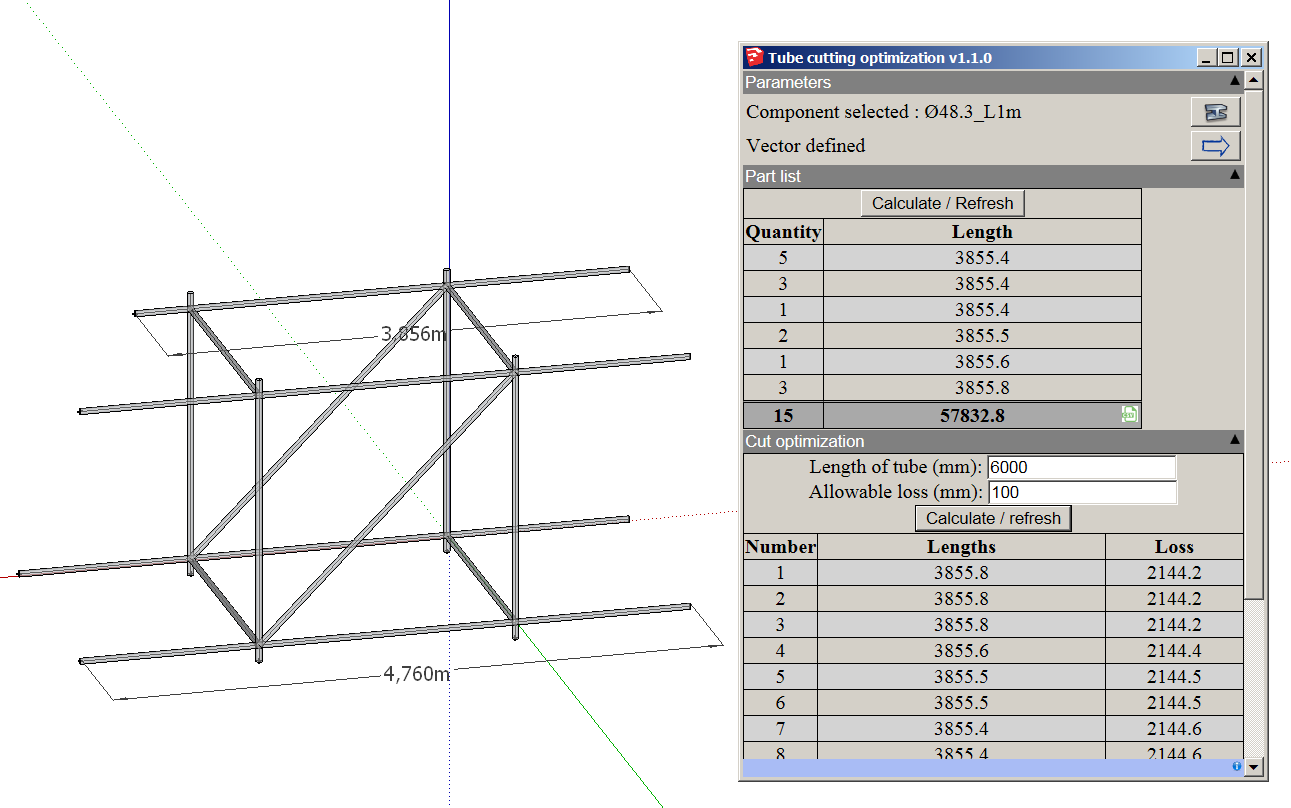
I tried the new version; now it works in SU8; i got the expected result from the model i uploaded previously
Then i selected one tube and i made it longer; clicked on "calculate/refresh" but the list didn't change
I realized maybe i had to select the component again by clicking on the button in the up right corner
i did ... and yes; this time it changed the list, but the result doesn't seem correct
Besides, by definition, a tube is a structural element that have one dimension much longer than the 2 others; so, would it be possible for the plugin to recognize automatically which dimension is much bigger, without having to define the vector by mouse?
This program might be useful for scaffolders who use tubes and fittings
-
Please check your personal messages.
-
Hello !
Just post new version !@unknownuser said:
Then i selected one tube and i made it longer; clicked on "calculate/refresh" but the list didn't change
I realized maybe i had to select the component again by clicking on the button in the up right corner
i did ... and yes; this time it changed the list, but the result doesn't seem correct
=> should work now !
@unknownuser said:
Besides, by definition, a tube is a structural element that have one dimension much longer than the 2 others; so, would it be possible for the plugin to recognize automatically which dimension is much bigger, without having to define the vector by mouse?
=> Clever ! I'll try to integrate it in future. The problem is with components with the biggest size not align with an axis of the model (tube created with angle of 45° between "vector" axis and model axis...
For JQL :
@unknownuser said:
- Should there be a difference between the sum total units of your script and the outliner?
=> I have seen the difference but I cannot explain, there are only 15 instance of the component in your model. Can you find other ?
@unknownuser said:
- Can the script be made to read the default unit of measure for the model (the attached model uses inches).
=> Done
@unknownuser said:
- Would there be a way to input the available lengths of the SOURCE material and calculate the optimize cuts for each? For example, 1x4's in the lumber yard come in lengths of 2 foot increments, starting at 6' up 12'. So I was thinking the user might be able to input something like 6,8,10,12 into a "source material" field of the script and the script would calculate the optimal lumber lengths required and the cut-lengths for each lumber size.
=> That's much more complicated (another algorithm to develop...) let see in future what I can do.
Inteloide
-
Thank you
I tried:
the plugin windows opens automatically when sketchup is launched: possible to avoid that? because you don't always need to use the plugin
calculate/refresh now works
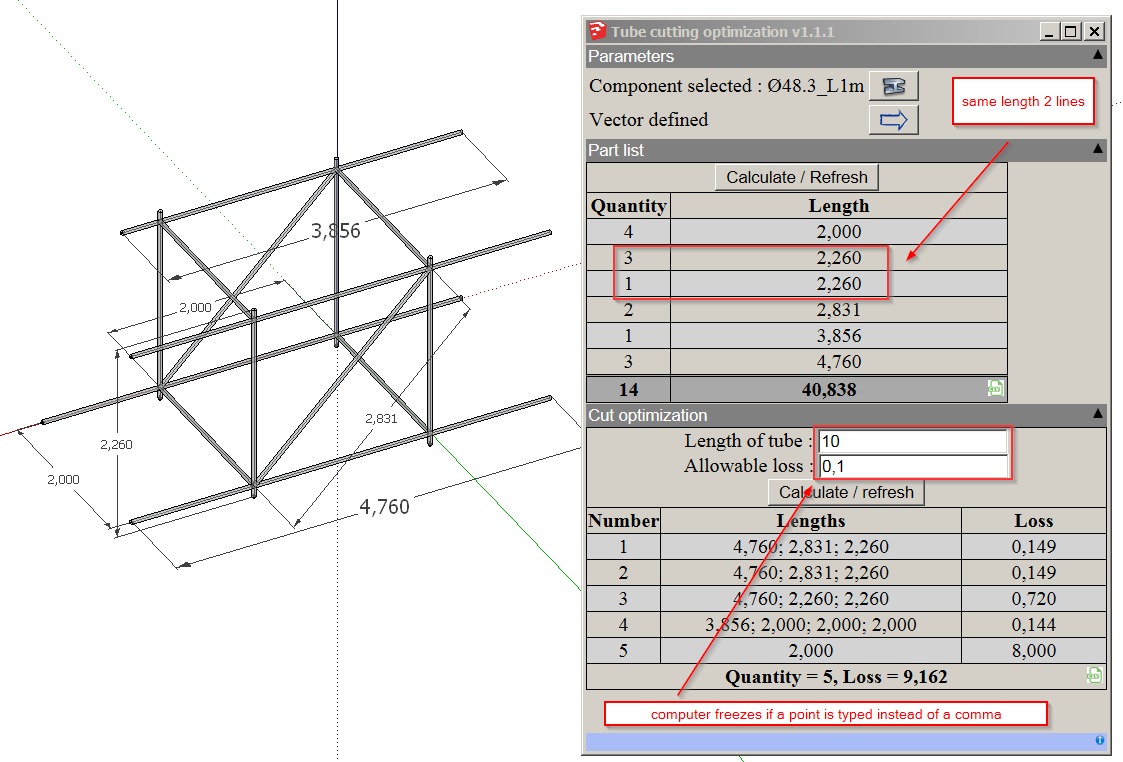
2 lines for tubes same length; possible one line only?
in cut optimization, if french is the system language, you have to enter the number with a comma, not a decimal point; otherwise your computer freezes; possible to avoid freezing?i understand the difficulty to retrieve the length when the component doesn't follow main axis; would it be possible to store the tube component axis directly in the sketchup model, so that when you open it again, you don't have to clic again (same component, same axis)
also, if the point is to cut the tubes, would it be possible/useful to parameter the cut width?
-
Hello !
Just post new version that solve some of your issue. Main improvement is in vector auto-detection.
It try to find which dimension was change between component original definition and the component instance you selected. If within change (you didn't scaled selected component), the plugin try to find the biggest dimension axis in the component. If it's a cube (grrr...) then the plugin doesn't not define a vector, so user must define it. In any case user can change the vector afterward.I take into consideration, for next update, your requests :
- add cutting width parameter (should not be so complicated)
- Try to develop model structure to look component included in sub-components.
- I'll try to implement a option to list only components in selected entities of the model (to avoid listing all "tubes" of the model).
See you after some hours of coding ;o)
Inteloide
-
@inteloide said:
Hello !
Just post new version that solve some of your issue. Main improvement is in vector auto-detection.
It try to find which dimension was change between component original definition and the component instance you selected. If within change (you didn't scaled selected component), the plugin try to find the biggest dimension axis in the component. If it's a cube (grrr...) then the plugin doesn't not define a vector, so user must define it. In any case user can change the vector afterward.I take into consideration, for next update, your requests :
- add cutting width parameter (should not be so complicated)
- Try to develop model structure to look component included in sub-components.
- I'll try to implement a option to list only components in selected entities of the model (to avoid listing all "tubes" of the model).
See you after some hours of coding ;o)
Inteloide
thank you, you repaired everything
-
I could not get the latest version to accurately work at all.
Try the attached file. -
@jclements said:
I could not get the latest version to accurately work at all.
Try the attached file.[attachment=0:q94of7rb]<!-- ia0 -->test 2 for counting component.skp<!-- ia0 -->[/attachment:q94of7rb]
downloaded the file
plugin didn't work
switched units to millimeters
the plugin worked...concersion issues...?
-
Just post version 1.2.1 which correct your bug (html bug actually).
Inteloide
-
Big correction just post.
Also cut width function addedNow I'll work on multi-tube lengthes cutting optimization as per JClements request.
Version 1.3.0 Improvements : ADDED : Cut width taken into account CORRECTED : Errors with inches unit in optimisation. Now user can enter " or ' in tubes' length or loss or cut CORRECTED : Scan also groups and other components entities CORRECTED : Javascript errors make a bugsplat screen appear CORRECTED : Avoid bug with components names -
Hello,
Last version (1.4.0) includes some corrections and optimization.
Mainly (for JClement) it allows to calculate cutting from different uncut tube sizes. Just enter tube sizes with a '/' between each.
In next revision, I'll include a crash preventer function, because, if you enter wrong parameters in tube cutting optimization (for example without a loss allowable and a big number of tubes), you may have some cases where calculation will take hours... For example a model with 30 tubes may have 10^32 solutions to be computed...
Inteloide
-
I couldn't get the "slashes" ( / ) to work for multiple source lengths.
-
Hello everybody !
Can somebody try the new version to check if everything goes ok ?
Then I'll post it in pluginstore.
Thank you.NB : I added an help file to explain how to use it.
Inteloide -
@inteloide said:
Hello everybody !
Can somebody try the new version to check if everything goes ok ?
Then I'll post it in pluginstore.
Thank you.NB : I added an help file to explain how to use it.
Inteloideit seems to be working fine
i don't understand the concept of "waste allowed", though
since the goal is to minimize the waste (loss...)it should be put at 0 everytime, no?
what is the use of a limit?
i tried to change it and the result is the same -
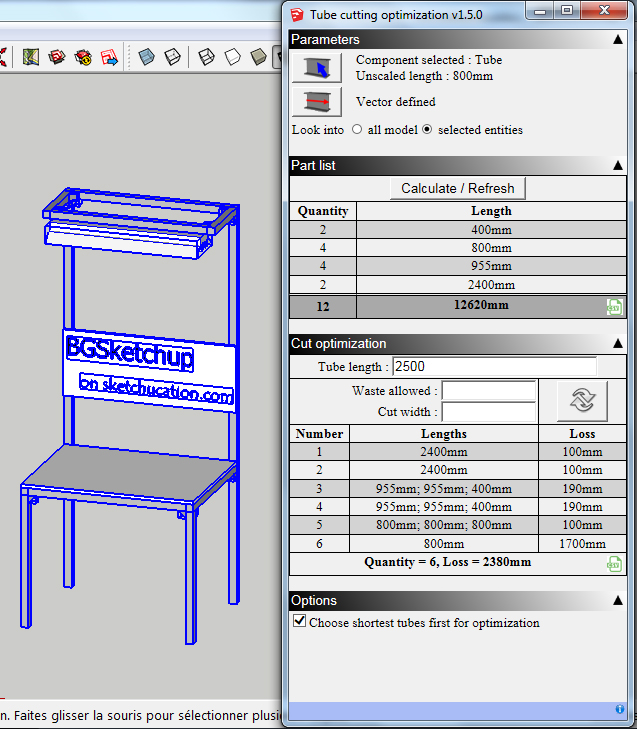
Waste allowed is for the plugin algorithm : if, during calculation, it found a solution with a loss shorter than "allowable waste" then plugin will not to find better solution : it's faster...in some case





Advertisement