sketchucation logo sketchucation
    • 登入
    Oops, your profile's looking a bit empty! To help us tailor your experience, please fill in key details like your SketchUp version, skill level, operating system, and more. Update and save your info on your profile page today!
    ⚠️ Important | Libfredo 15.6b introduces important bugfixes for Fredo's Extensions Update

    [Talk] Ruby Debugger for SketchUp 14+

    已排程 已置頂 已鎖定 已移動 Developers' Forum
    45 貼文 8 Posters 6.6k 瀏覽 8 Watching
    正在載入更多貼文
    • 從舊到新
    • 從新到舊
    • 最多點贊
    回覆
    • 在新貼文中回覆
    登入後回覆
    此主題已被刪除。只有擁有主題管理權限的使用者可以查看。
    • Dan RathbunD 離線
      Dan Rathbun
      最後由 編輯

      Topic thread for the new Ruby Debugger for SketchUp 14+.

      Link Preview Image
      GitHub - SketchUp/sketchup-ruby-debugger: Ruby API debugger for SketchUp 2014 and later.

      Ruby API debugger for SketchUp 2014 and later. Contribute to SketchUp/sketchup-ruby-debugger development by creating an account on GitHub.

      favicon

      GitHub (github.com)

      I'm not here much anymore.

      1 條回覆 最後回覆 回覆 引用 0
      • Dan RathbunD 離線
        Dan Rathbun
        最後由 編輯

        It would be nice if the library file (DLL, etc.) could be installed and maintained as a SketchupExtension from it's own subdir of the "Plugins" directory.

        Is it possible ? Perhaps the extension could have a modify date file checker (using File.mtime,) that copies the dll from the extension subdir, to a required location (if it cannot be loaded by the executable from a subdir of the binary directory.)

        I'm not here much anymore.

        1 條回覆 最後回覆 回覆 引用 0
        • J 離線
          Jim
          最後由 編輯

          The debugger has a console interface. From the command line:

          $ Sketchup.exe -rdebug console

          type 'h' for help.

          Hi

          1 條回覆 最後回覆 回覆 引用 0
          • Dan RathbunD 離線
            Dan Rathbun
            最後由 編輯

            @jim said:

            The debugger has a console interface.

            Tried that. (Actually made a new desktop shortcut that has the above command.)

            Need to type 'c' in the console to allow SketchUp to finish loading.

            Tried to list global vars but nothing happens.

            I'm not here much anymore.

            1 條回覆 最後回覆 回覆 引用 0
            • Dan RathbunD 離線
              Dan Rathbun
              最後由 編輯

              Also tried Aptana Studio 3. It connects with SketchUp ok if the port is the deafult 1234.

              But I thot it might be better if each version used it's own port numbered after itself... ie, port 2014.
              But I could not get the two (Su & IDE to connect on port 2014.

              Also when I "run" a file, it runs using the System Ruby 2.0, instead of loading into SketchUp's Ruby.

              I'm not here much anymore.

              1 條回覆 最後回覆 回覆 引用 0
              • J 離線
                Jim
                最後由 編輯

                After you cont, set a breakpoint:

                b foo.rb:line_no

                uses regex on file_name, so even a partial filename should work.

                Then go to SketchUp and run the method with the breakpoint.

                foo()

                Then you should see the result in the console. You can list, and step, and view variables.

                Hi

                1 條回覆 最後回覆 回覆 引用 0
                • J 離線
                  Jim
                  最後由 編輯

                  Played with this today - sort of an IDE simulator. This is not a plugin - meant to be run from installed Ruby.

                  I can get a response when setting and deleting breakpoints, but the breakpoints don't seem to work when I run in SketchUp.

                  
                  require 'socket'
                  
                  def main
                    s = TCPSocket.open('localhost', 1234) 
                    print "Connected.\n> "
                    while line = gets
                      break if line[/^q/]
                      send(s, line)
                      rec(s)
                      print "> "
                    end
                  rescue
                    s.close
                  end
                  
                  
                  def send(s, msg)
                    s.write(msg)
                  end
                  
                  def rec(s)
                  
                    ready = IO.select([s], nil, nil, 0.2)
                  
                    if ready
                      puts ready[0][0].recvfrom(4096)
                    else
                      puts "timeout."
                    end
                  
                  end
                  
                  main()


                  Hi

                  1 條回覆 最後回覆 回覆 引用 0
                  • jiminy-billy-bobJ 離線
                    jiminy-billy-bob
                    最後由 編輯

                    I've never used an IDE. What's the point of all of this?
                    What does it provide over notepad++?

                    25% off Skatter for SketchUcation Premium Members

                    1 條回覆 最後回覆 回覆 引用 0
                    • J 離線
                      Jim
                      最後由 編輯

                      @jiminy-billy-bob said:

                      I've never used an IDE. What's the point of all of this?
                      What does it provide over notepad++?

                      The debugger let's you set a breakpoints at lines in a ruby file. When execution reaches a breakpoint, you are dropped into the debugger where you can inspect variables and step through the program a line at a time. Some IDE's can interface with the debugger and let you set breakpoints, step, and follow variables from within the IDE.

                      The code I posted might be used as a starting point to interface a simple editor with the debugger.

                      Hi

                      1 條回覆 最後回覆 回覆 引用 0
                      • jiminy-billy-bobJ 離線
                        jiminy-billy-bob
                        最後由 編輯

                        Ok so it's a faster way to get the same thing than reading the error's number line in the ruby console and check it in notepad++?

                        25% off Skatter for SketchUcation Premium Members

                        1 條回覆 最後回覆 回覆 引用 0
                        • Dan RathbunD 離線
                          Dan Rathbun
                          最後由 編輯

                          @jim said:

                          The code I posted might be used as a starting point to interface a simple editor with the debugger.

                          I have d/l'd a couple of gems to do this:

                          ruby-debug-ide-0.4.22.gem (written by the RubyMine folks)
                          debase-0.0.9.gem (a dependancy of the above.)

                          Haven't gotten them installed yet.

                          I'm not here much anymore.

                          1 條回覆 最後回覆 回覆 引用 0
                          • Dan RathbunD 離線
                            Dan Rathbun
                            最後由 編輯

                            @jiminy-billy-bob said:

                            Ok so it's a faster way to get the same thing than reading the error's number line in the ruby console and check it in notepad++?

                            The "I" in IDE means integrated.

                            An IDE has panes, some of which are variable lists, editor, console, object tree, project tree, etc.

                            I think some IDEs have used the Scintilla editor engine which NotePad++ also uses.

                            In an IDE you usually set breakpoints by clicking in the margin if the editor pane, and a breakpoint icon appears. (In Notepad++, it is a blue sphere.)

                            I'm not here much anymore.

                            1 條回覆 最後回覆 回覆 引用 0
                            • Dan RathbunD 離線
                              Dan Rathbun
                              最後由 編輯

                              @dan rathbun said:

                              @jim said:

                              The code I posted might be used as a starting point to interface a simple editor with the debugger.

                              I have d/l'd a couple of gems to do this:

                              ruby-debug-ide-0.4.22.gem (written by the RubyMine folks)
                              debase-0.0.9.gem (a dependancy of the above.)

                              Haven't gotten them installed yet.

                              The above gems require building with the DevKit, for the system Ruby install.

                              I'm installing the DevKit today for my main system Ruby, but not for SketchUp's Ruby. (I really do not know if I should attempt hooking the DevKit into SketchUp's Ruby install as the folder structure does not follow the norm.)

                              @unknownuser said:

                              The ruby-debug-ide protocol has been mostly implemented so any Ruby IDE that supports this protocol should work. We have tested with Aptana RadRails, NetBeans (with Ruby community plugin) and RubyMine.

                              So... it seems we do not need to install the above gems into SketchUp's Ruby ? (confirmation requested.)

                              I'm not here much anymore.

                              1 條回覆 最後回覆 回覆 引用 0
                              • J 離線
                                Jim
                                最後由 編輯

                                @jiminy-billy-bob said:

                                Ok so it's a faster way to get the same thing than reading the error's number line in the ruby console and check it in notepad++?

                                Not exactly.

                                The debugger will let you:

                                1. Stop execution of a Sketchup/Ruby script at some given line. (breakpoint.) Multiple breakpoints can be set across files.
                                2. Inspect local and global variable at that line.
                                3. Inspect the call stack at that breakpoint.
                                4. Step through the following script lines one at a time. Goto 2

                                If Notepad++ can do that, then I've been missing out. And if it were only a faster way to do the same thing, wouldn't that be worth investigating?

                                Here's the help listing for the console debugger:
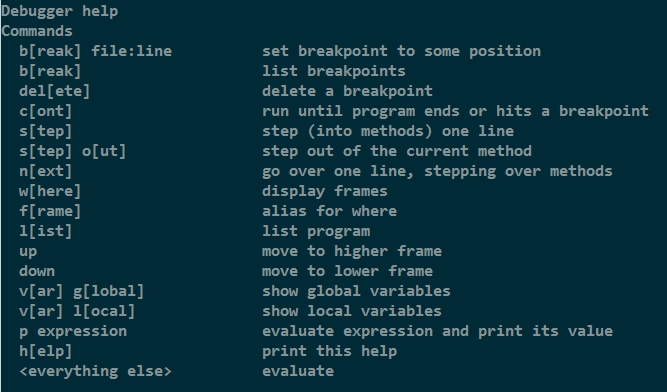
                                2014-04_01.png

                                Hi

                                1 條回覆 最後回覆 回覆 引用 0
                                • J 離線
                                  Jim
                                  最後由 編輯

                                  I'm not interested in installing a 100+ MB IDE in order to write plugins and to use the debugger efficiently, which is the reason I am playing with getting my editor (vim) to talk to the debugger.

                                  Since the su debugger communicates over a tcp socket, there is a chance of creating an intermediate service between the editor and the debugger. Unfortunately, Notepad++ might require a c/c++ plugin to interface with the SU Debugger.

                                  Hi

                                  1 條回覆 最後回覆 回覆 引用 0
                                  • Dan RathbunD 離線
                                    Dan Rathbun
                                    最後由 編輯

                                    @jim said:

                                    If Notepad++ can do that, then I've been missing out.

                                    I may be confused with the "bookmark" feature. (But normally a bookmark feature allows giving them names. NPP does not allow giving them names, making them "act" like breakpoints.)

                                    I'm not here much anymore.

                                    1 條回覆 最後回覆 回覆 引用 0
                                    • Dan RathbunD 離線
                                      Dan Rathbun
                                      最後由 編輯

                                      @jim said:

                                      I'm not interested in installing a 100+ MB IDE in order to write plugins and to use the debugger efficiently, ...

                                      Hmmm... I came across Arcadia. It's written in Ruby, and is less than 1MB (~600KB).
                                      It uses Tcl/Tk for GUI elements, so make sure that is installed in your system Ruby.
                                      http://arcadia.rubyforge.org/

                                      I'm not here much anymore.

                                      1 條回覆 最後回覆 回覆 引用 0
                                      • jiminy-billy-bobJ 離線
                                        jiminy-billy-bob
                                        最後由 編輯

                                        @jim said:

                                        The debugger will let you:

                                        1. Stop execution of a Sketchup/Ruby script at some given line. (breakpoint.) Multiple breakpoints can be set across files.
                                        2. Inspect local and global variable at that line.
                                        3. Inspect the call stack at that breakpoint.
                                        4. Step through the following script lines one at a time. Goto 2

                                        Oh now that sounds might interresting!

                                        @jim said:

                                        And if it were only a faster way to do the same thing, wouldn't that be worth investigating?

                                        Sure! I was just trying to understand the whole thing. I never heard of breakpoints before. (My coding knowledge is limited to html/css, js, and a little ruby)

                                        25% off Skatter for SketchUcation Premium Members

                                        1 條回覆 最後回覆 回覆 引用 0
                                        • J 離線
                                          Jim
                                          最後由 編輯

                                          It appears you (the ide) must maintain the tcp connection to the debugger for the duration of the debugging session. The debugger does not respond if you try to reconnect and send messages after closing the connection.

                                          It seems like you should be able to close and connect to the debugger as long as it is running.

                                          This means any type of Editor -> SketchUp Debugger bridge can only connect once and needs to stay running the duration of the user's debugging activities. I was hoping to use a small script executed from the editor that would connect -> send message -> disconnect to the debugger.

                                          Hi

                                          1 條回覆 最後回覆 回覆 引用 0
                                          • J 離線
                                            Jim
                                            最後由 編輯

                                            The SketchUp debugger is logging messages, so having a windows debugger such as DbgView open can be useful.
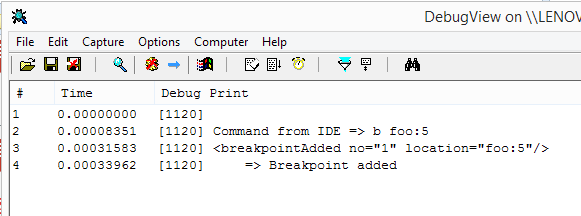

                                            2014-04_02.png

                                            Hi

                                            1 條回覆 最後回覆 回覆 引用 0
                                            • 1
                                            • 2
                                            • 3
                                            • 1 / 3
                                            • 第一個貼文
                                              最後的貼文
                                            Buy SketchPlus
                                            Buy SUbD
                                            Buy WrapR
                                            Buy eBook
                                            Buy Modelur
                                            Buy Vertex Tools
                                            Buy SketchCuisine
                                            Buy FormFonts

                                            Advertisement
